


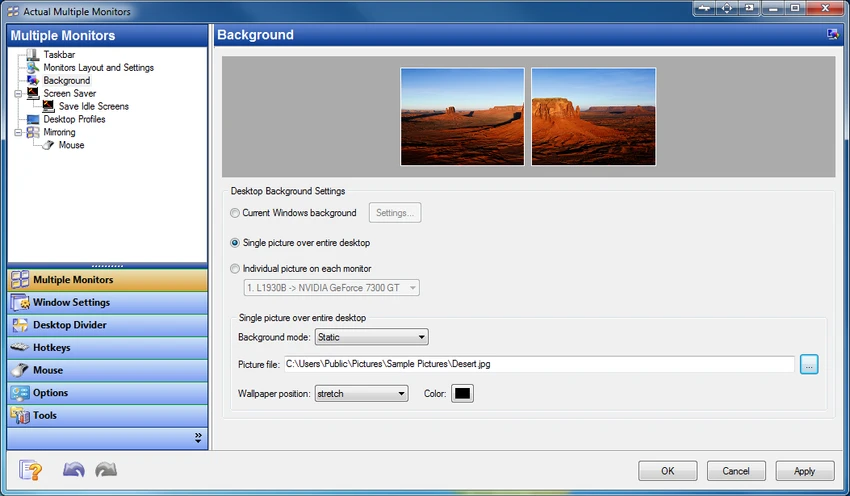

Actual Multiple Monitors is a Windows utility designed to improve productivity and usability when working with multiple displays. Instead of relying on the default Windows multi-monitor behavior, it adds a wide range of enhancements such as independent taskbars, advanced window management tools, desktop customization features, and multi-display controls.
The software is especially useful for users with dual or multi-monitor setups, allowing each screen to function more independently and efficiently. It also introduces features aimed at gamers, professionals, and multitaskers who want better control over how windows and applications behave across screens. By extending the Windows interface, Actual Multiple Monitors helps users create a more organized and flexible multi-display workspace.
Features of Actual Multiple Monitors
- Adds taskbar, Start menu, system tray, and task switcher to each monitor
- Move windows between monitors using title bar buttons
- Maximize windows across the entire multi-monitor desktop
- Custom hotkey support for advanced window actions
- Fully customizable keyboard shortcuts for window management
- Gaming mode features:
- Prevent game minimization (Ignore Deactivation)
- Lock mouse within a screen or window
- Desktop Divider for splitting screens into customizable zones
- Window snapping with improved multi-monitor support
- Snap windows to:
- Monitor edges
- Other windows
- Custom grid layouts
- Multi-monitor wallpaper options:
- Single image stretched across screens
- Different wallpapers per monitor
- Independent slideshow per display
- Web-based image slideshows (Google Images, Flickr)
- Multi-monitor screen saver support:
- Stretch across all displays
- Separate screen savers per monitor
- Desktop mirroring for duplicating or projecting screen content
- Support for presentations and remote display monitoring
- Quick switching between laptop and external monitor profiles
Interface and Usability
Actual Multiple Monitors integrates directly into the Windows environment, enhancing the existing interface rather than replacing it. Once installed, additional taskbars and window controls appear across connected displays, making multi-screen navigation more intuitive. Most features are accessible through context menus, hotkeys, or window title bar buttons. Users can also configure profiles for different setups, such as switching between laptop-only mode and full multi-monitor mode.
While the software offers deep customization, its structure remains logical. However, users new to multi-monitor management may need time to explore and configure advanced features such as desktop division or mirroring.
Who Should Use Actual Multiple Monitors?
- Professionals using dual or multi-monitor setups
- Software developers and IT specialists
- Designers, video editors, and creative professionals
- Gamers who use secondary screens for streaming or browsing
- Business users delivering presentations or managing workflows
- Laptop users frequently switching between display configurations
Conclusion
Actual Multiple Monitors is a powerful and feature-rich solution for users who rely on multi-display setups. By extending Windows with per-monitor taskbars, advanced window management, and customizable desktop features, it significantly improves productivity and usability.


