HFS: HTTP File Server logo

HFS: HTTP File Server 3.2.1

  • User Rating:
    ★★★★★
    ★★★★★
    0.0 ★ 0Votes
  • Requirements:
    Windows
  • Version: 3.2.1
  • Latest updated: 2 weeks ago
  • License: Freeware  
  • Publisher: rejetto
  • Size: 41 MB
× app stores

HFS (HTTP File Server) is a lightweight Windows application that makes sharing files over the internet quick and straightforward. Instead of relying on complex server software, it transforms your computer into an HTTP file server that users can access through a standard web browser. I found it especially useful for quickly sharing individual files or entire folders without requiring clients to install additional software. Despite its simple setup process, HFS offers an impressive range of advanced configuration options, allowing experienced users to customize permissions, bandwidth, user accounts, virtual folders, and many other aspects of file distribution.

Features of HFS

  • HTTP-based file sharing through a web browser
  • Fast file download and upload support
  • Virtual file system management
  • Drag-and-drop file sharing
  • Share individual files or entire folders
  • Highly customizable application settings
  • Customizable HTML website template
  • Bandwidth and download speed control
  • Download limits for connected users
  • Block download manager usage
  • User accounts and folder permissions
  • Kick or ban connected clients
  • Pause active downloads
  • Easy Mode and Expert Mode interfaces
  • Server traffic graph and connection statistics
  • Built-in logging
  • Dynamic DNS updater
  • Compatible with Windows 11, Windows 10, Windows 8, and Windows 7

Interface and Usability

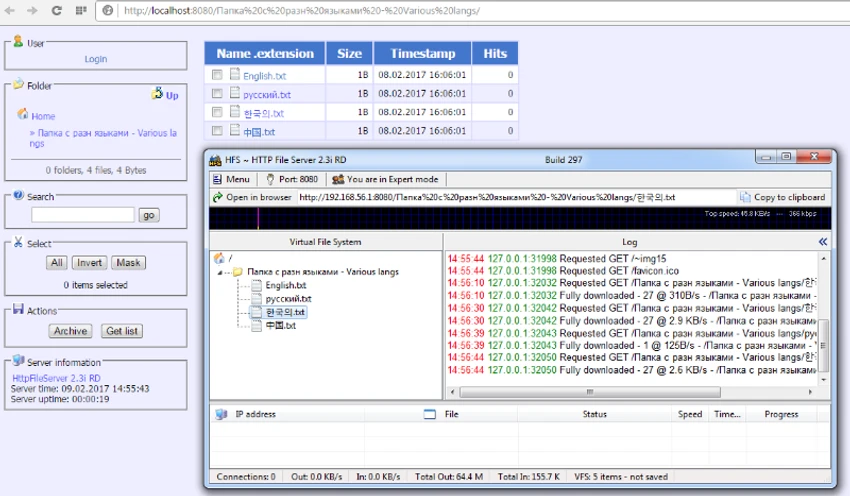
One of the first things I noticed about HFS is how approachable it is for basic file sharing. Adding files is as simple as dragging them into the main window, while sharing entire folders only requires a right-click within the file panel. For beginners, the Easy Mode keeps the interface clean and focuses on essential functions. Users who need greater control can switch to Expert Mode, which provides detailed traffic graphs, upload and download statistics, and additional server management tools.

Although the application includes a large number of settings, they are logically organized. More advanced features such as virtual file systems, user permissions, bandwidth controls, and connection management may take some time to explore, but they offer considerable flexibility for users who need more than simple file sharing.

Who Should Use HFS?

  • Individuals who need to share files quickly over the internet
  • Small businesses requiring a lightweight file-sharing solution
  • IT administrators managing temporary file distribution
  • Developers and testers who need to host downloadable files
  • Power users looking for detailed control over file access and bandwidth

HFS delivers an excellent balance between simplicity and advanced functionality. Its lightweight design, browser-based access, comprehensive connection management, and extensive customization make it one of the stronger Windows-based HTTP file-sharing solutions. While the abundance of configuration options introduces a learning curve, the software remains approachable for beginners thanks to its Easy Mode.

Conclusion

HFS is an excellent choice for anyone looking to share files over the internet without deploying a full-scale web server. Its drag-and-drop workflow makes basic sharing effortless, while advanced capabilities such as user accounts, virtual file systems, bandwidth management, and connection controls provide the flexibility needed for more demanding environments.

Pros & Cons

✓

Pros

  • Easy to set up and start sharing files
  • No client software required for downloads
  • Supports both file uploads and downloads
  • Extensive customization options
  • Virtual file system support
  • User account and permission management
  • Bandwidth limiting and connection control
  • Lightweight and runs well on older Windows systems
  • Includes Easy and Expert interface modes
✕

Cons

  • Large number of settings may overwhelm new users
  • Advanced features require time to fully understand

Frequently Asked Questions

What is HFS HTTP File Server used for?

HFS is a Windows application that turns your computer into an HTTP file server, allowing you to share files and folders over the internet through a web browser without requiring users to install additional software.

Does HFS support file uploads as well as downloads?

Yes. HFS supports both downloading and uploading files, and administrators can configure how uploads are handled through the application's settings.

Can I control who accesses my shared files?

Yes. HFS allows you to create user accounts, assign permissions to specific folders, and manage connected users by pausing downloads, disconnecting clients, or banning unwanted connections.

Is HFS suitable for beginners?

Yes. The Easy Mode provides a simplified interface for basic file sharing, making it accessible to new users. Those who need more advanced controls can switch to Expert Mode.

Can I limit download speeds in HFS?

Yes. HFS includes bandwidth management tools that allow administrators to limit download speeds, set download restrictions, and even block users from using download managers.

Which versions of Windows are supported?

According to the provided information, HFS supports Windows 11, Windows 10, Windows 8, and Windows 7.

Recommended apps [Freeware]:
  • Stellarium 26.2 Stellarium logo 3D planetarium software showing stars, constellations, planets, and deep-sky objects in real time.
  • DISMTools 0.8 DISMTools logo open-source GUI for Windows DISM that simplifies image management, system repair, and maintenance
  • QR-Code Creator 7.6.8 QR-Code Creator logo a free Windows tool for making customizable QR codes with offline generation and exports
  • OpenVPN 2.7.5-I001 OpenVPN logo Create secure VPN connections with OpenVPN using SSL/TLS encryption, flexible authentication, and remote access support
  • NoScript 13.6.30 NoScript logo Protect your browser by blocking scripts, preventing XSS attacks, and controlling trusted websites with customizable security settings.
  • LibreWolf 152.0.6-1 LibreWolf logo Browse privately with a Firefox-based browser focused on blocking tracking, removing telemetry, and improving online security.
Recommended apps [Shareware]:
  • KeyShot 2026.2 KeyShot logo real-time 3D rendering and animation software for photorealistic visuals, materials, and product design
  • SysTools MBOX Converter 9.0 SysTools MBOX Converter logo batch email migration tool that converts MBOX, MBS, and MBX files into multiple formats with attachment support
  • Atlantis Word Processor 5.0.5.3 Atlantis Word Processor logo Create documents with Atlantis Word Processor, a fast and lightweight word processor featuring spell check, formatting, and eBook export
  • Actual File Folders 1.15.5 Actual File Folders logo Speed up folder navigation and access frequently used locations faster with a Windows tool designed for file dialogs.
  • Batch It Ultra 6.77 Batch It Ultra logo Process thousands of images with batch resizing, conversion, effects, watermarking, captions, and advanced automation tools.
  • SmartGit 26.1.045 SmartGit logo Manage Git repositories easily with visual history, merging tools, platform integrations, and customizable workflows.