


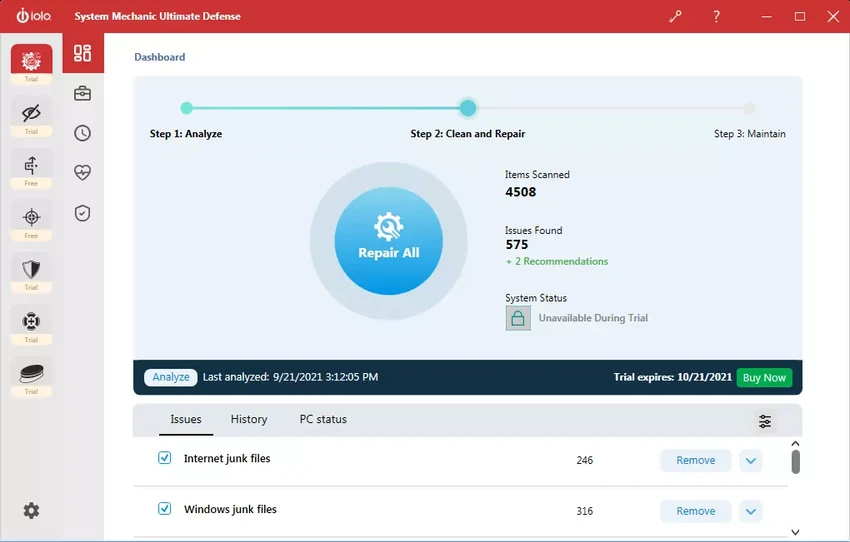

System Mechanic Ultimate Defense is an all-in-one Windows optimization and security suite developed to keep PCs running smoothly while protecting them from common security threats. During my experience exploring its feature set, it felt like a comprehensive maintenance solution rather than just another PC cleaner.
The software combines multiple iolo technologies into a single package, bringing together system optimization, automated maintenance, antivirus protection, startup management, privacy tools, and disk cleanup. Instead of relying on several separate utilities, users can perform routine maintenance, improve performance, and strengthen system security from one application. Its focus extends beyond simple cleanup by automatically repairing system issues, removing unnecessary files, blocking resource-hungry startup applications, and optimizing Windows settings for improved responsiveness and internet performance.
Features of System Mechanic Ultimate Defense
- Automatically optimizes CPU, RAM, and hard drive resources for demanding applications.
- Improves gaming, streaming, editing, and multitasking performance.
- Detects and repairs more than 30,000 different Windows issues through intelligent live updates.
- Automatically performs PC maintenance while the computer is idle.
- Removes over 50 types of hidden junk files to recover disk space.
- Identifies and blocks unnecessary startup applications that slow system boot.
- Improves Windows startup speed and overall responsiveness.
- Includes antivirus protection.
- Detects and helps remove potentially unwanted programs (PUPs).
- Securely wipes sensitive browsing history.
- Patches Windows security vulnerabilities.
- Optimizes hidden Windows internet settings for:
- Faster downloads
- Faster web page loading
- Reduced buffering
- Improved video streaming
- Smoother online gaming
Interface and Usability
System Mechanic Ultimate Defense is designed to automate much of the maintenance process. From my perspective, its strongest advantage is that many optimization tasks can run automatically while the PC is idle, reducing the need for manual intervention. The software groups cleaning, optimization, repair, and protection features into logical sections, making routine maintenance straightforward even for users who are not particularly experienced with Windows optimization tools. Automatic scanning and one-click maintenance also simplify ongoing system care.
Who Should Use System Mechanic Ultimate Defense?
- Windows users wanting an all-in-one maintenance solution.
- Gamers looking to maximize system resources during gameplay.
- Users with aging PCs that have become slower over time.
- Anyone wanting automatic PC maintenance with minimal manual effort.
- Users who want antivirus protection alongside performance optimization.
- Home users who want to improve startup speed and reclaim storage space.
System Requirements
- Operating System:
- Windows 7
- Windows 8
- Windows 8.1
- Windows 10
- Windows 11
Conclusion
System Mechanic Ultimate Defense offers considerably more than a traditional PC cleaner by combining automated maintenance, performance optimization, antivirus protection, privacy tools, and startup management in one package. Throughout my review, I found its emphasis on automation especially appealing, as it allows routine maintenance to occur with minimal user involvement.


