FileLegit Windows Utilities System Tools NTFS Permissions Reporter
NTFS Permissions Reporter logo

NTFS Permissions Reporter 5.5.701

  • User Rating:
    ★★★★★
    ★★★★★
    0.0 ★ 0Votes
  • Requirements:
    Windows
  • Version: 5.5.701
  • Latest updated: 2 weeks ago
  • License: Free Trial  
  • Publisher: Key Metric Software
  • Size: 70 MB
× app stores

NTFS Permissions Reporter is a professional Windows utility designed to help system administrators audit and analyze file system permissions across local and network environments. The software addresses the challenge of managing complex NTFS permissions, where years of user access changes and layered security settings can make it difficult to understand who has access to specific files and folders.

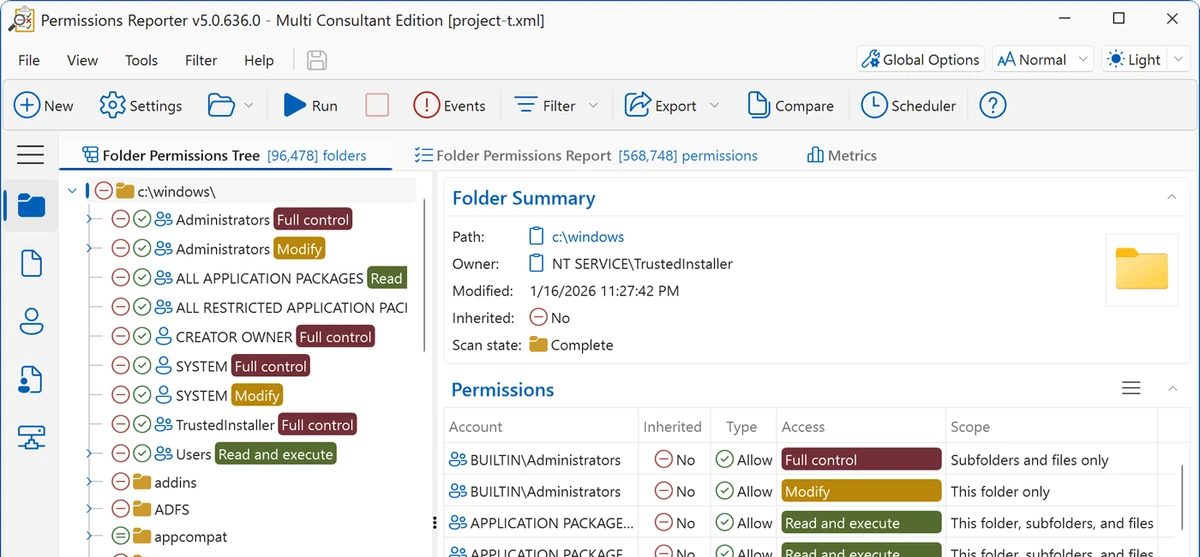
The application provides visual and interactive reporting tools that allow administrators to review folder permissions, file permissions, ownership details, and network share access. It helps users evaluate the security posture of entire file systems by presenting permission information in structured reports with sorting, filtering, and grouping capabilities.

NTFS Permissions Reporter includes multiple reporting views, including folder permissions, file ownership, share permissions, and file permission differences. Administrators can identify files that do not inherit permissions from parent folders, review user access levels on shared resources, and analyze storage usage by file type and owner.

The software also includes automation features such as built-in scheduling, email integration, command-line support, and multiple export formats. Reports can be exported to HTML, XML, Microsoft Excel, and CSV formats, while XML data can be imported again later for additional analysis. NTFS Permissions Reporter supports Windows 10, Windows 11, and several Windows Server editions.

Features of NTFS Permissions Reporter

  • Audits NTFS file and folder permissions across Windows systems
  • Provides visual reports for analyzing file system security
  • Includes folder permissions reports with sorting, filtering, and grouping
  • Displays file ownership information with hierarchical visualization
  • Reviews local and network share permissions
  • Identifies files with different permissions from parent folders
  • Provides advanced filtering during or after scans
  • Supports scheduled report creation and exports
  • Includes email integration for scheduled reporting
  • Offers command-line support
  • Exports reports to HTML, XML, Microsoft Excel, and CSV formats
  • Allows previously exported XML reports to be imported for further analysis

Interface and Usability

NTFS Permissions Reporter is built around a reporting-focused interface designed for administrators who need to review large amounts of permission data efficiently. Instead of manually checking individual folders and files, users can generate structured reports that organize access information into easier-to-analyze views. The folder permissions report provides a flat table-style overview with customization options for sorting, filtering, and grouping. The file owners report presents ownership and storage information in a hierarchical format, while the share permissions report helps administrators review access rights across shared resources.

The advanced filtering system allows users to narrow down results during scans or after reports have been generated. Export and import options also support workflows where reports can be created automatically and reviewed later. Because the software focuses on Windows permission management, it is best suited for users familiar with NTFS permissions and system administration tasks.

Who Should Use NTFS Permissions Reporter?

  • System administrators managing Windows file systems
  • IT professionals auditing user access permissions
  • Organizations reviewing security settings on shared resources
  • Administrators who need scheduled permission reports
  • Teams managing complex NTFS permission structures

Conclusion

NTFS Permissions Reporter is a specialized auditing tool for administrators who need a clearer view of Windows file system permissions. Its reporting features, filtering options, scheduling capabilities, and export support make it useful for managing complex NTFS environments and reviewing access security.

Pros & Cons

✓

Pros

  • Provides detailed NTFS permission auditing capabilities
  • Supports local and network share analysis
  • Includes multiple report types for different security reviews
  • Offers advanced filtering and sorting tools
  • Supports automated reporting and multiple export formats
  • Works with Windows client and server environments
✕

Cons

  • Designed primarily for IT administrators rather than casual users
  • Requires knowledge of Windows permissions and file security concepts

Frequently Asked Questions

What is NTFS Permissions Reporter used for?

NTFS Permissions Reporter is used to audit and analyze Windows NTFS file and folder permissions. It helps administrators review user access, ownership information, and security settings across file systems.

Who should use NTFS Permissions Reporter?

The software is designed for system administrators, IT professionals, and organizations that need to manage or audit Windows file permissions.

What types of reports can NTFS Permissions Reporter create?

The software provides folder permissions reports, file permissions reports, file owner reports, and share permissions reports for analyzing different aspects of file access and security.

Can NTFS Permissions Reporter export reports?

Yes. The software supports exporting permission report data in HTML, XML, Microsoft Excel, and CSV formats.

Does NTFS Permissions Reporter support scheduled reports?

Yes. It includes a built-in scheduler that can create and export folder, file, owner, and share permission reports. It also supports email integration.

What versions of Windows are supported by NTFS Permissions Reporter?

NTFS Permissions Reporter supports Windows 10, Windows 11, and Windows Server 2025, 2022, 2019, and 2016 according to the provided system requirements.

Recommended apps [Freeware]:
  • FastCopy 5.11.3 FastCopy logo a lightweight Windows tool for ultra-fast file copying, syncing, and error-resilient data transfer
  • HomeBank 5.10.2 HomeBank logo Track expenses, manage budgets, and analyze personal finances with HomeBank's powerful reporting tools
  • Opera GX 133.0.5932.56 Opera GX logo Chromium-based gaming browser featuring CPU, RAM, and network limiters, built-in VPN, ad blocker, and gaming integrations.
  • Endless Sky 0.11.2 Endless Sky logo a free, open-source space simulation game featuring exploration, trading, fleet management, and tactical combat
  • ShareX 21.0.0 ShareX logo a free Windows tool for screenshots, screen recording, annotation, and instant file sharing with cloud support
  • MemoryCleaner 2.0.1 MemoryCleaner logo Free utility that helps clean physical and standby memory with one click or automatic scheduling to improve memory management.
Recommended apps [Shareware]:
  • PowerDirector 2026 v24.6 PowerDirector logo AI-powered video editor offering templates, effects, and tools for fast, professional video creation
  • SQL Backup Master 8.5.1120 SQL Backup Master logo SQL Server backups with cloud storage, encryption, scheduling, and recovery features
  • FastKeys 6.07 FastKeys logo Windows automation tool for shortcuts, text expansion, mouse gestures, macros, and workflow automation
  • Ashampoo Driver Updater 2.6.2 Ashampoo Driver Updater logo Automatically scan, update, and manage outdated drivers to improve Windows system stability, hardware compatibility, and performance.
  • Network LookOut Administrator Pro 5.5.5 Network LookOut Administrator Pro logo Monitor and manage network computers remotely with screen viewing, administration controls, and secure access features for Windows environments.
  • Garden Planner 3.8.86 Garden Planner logo Create professional garden layouts easily with drag-and-drop tools for plants, paths, fences, objects, and printable designs.