


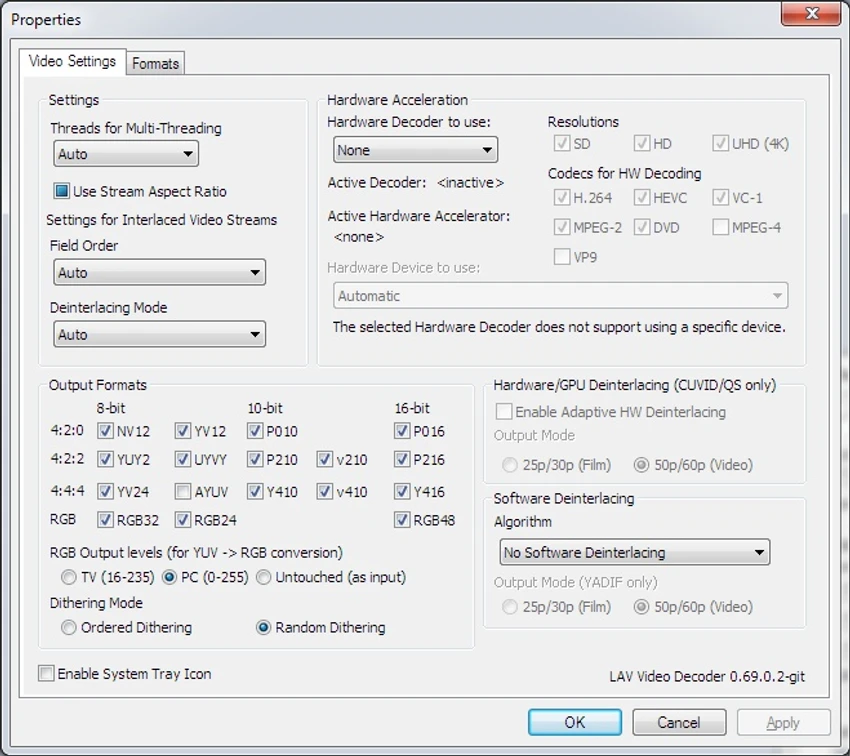

LAV Filters is a comprehensive collection of DirectShow components designed to improve media playback compatibility on Windows. Built on FFmpeg libraries, it combines a media splitter, audio decoder, and video decoder to enable support for a wide range of formats in DirectShow-compatible players. During my experience with it, I found that LAV Filters provides reliable playback capabilities while offering advanced configuration options for users who need more control.
Features of LAV Filters
- Includes LAV Splitter, LAV Audio, and LAV Video components
- Based on FFmpeg libraries for broad format compatibility
- Supports numerous containers including MKV, WebM, MP4, MOV, AVI, MPEG-TS/PS, FLV, and OGG
- Compatible with many video codecs including H.264, VC-1, MPEG-2, MPEG4-ASP, VP8, and MJPEG
- Supports audio codecs such as AAC, AC3, DTS-HD, TrueHD, MP3, Vorbis, and LPCM
- Subtitle support for VOB, DVB Subs, PGS, SRT, SSA/ASS, and text subtitles
- Blu-ray playlist support through .mpls and index.bdmv files
- Full stream switching capabilities
- Advanced subtitle handling options
- Stream selection based on quality, language, and type
- Multi-threaded video decoding
- Hardware and software deinterlacing support
- Hardware acceleration options
- HDMI and S/PDIF bitstreaming support
- Audio delay adjustment and automatic audio-video synchronization
- MKV embedded font support
- Compatible with Windows 11, Windows 10, Windows 8, and Windows 7
User Experience
After installing LAV Filters, setup was straightforward. During installation, I was able to choose which file formats each component should handle, giving me flexibility over media associations. The process was quick and uncomplicated. In daily use, LAV Filters worked quietly in the background, providing seamless playback support through DirectShow-compatible players. One thing I appreciated was the extensive format compatibility, which reduced the need to install separate codec packs.
Advanced users will find plenty of options inside the configuration panels. The subtitle management features are particularly useful, allowing stream selection based on language or accessibility requirements. Hardware acceleration and multi-threaded decoding also help deliver smooth playback performance on supported systems. While most users may never need to adjust the detailed settings, they are available for those who want finer control over video decoding, audio synchronization, and bitstreaming options.
Who Should Use LAV Filters?
- Users of DirectShow-compatible media players
- Home theater PC enthusiasts
- Users who need support for multiple media formats
- People playing Blu-ray content on Windows
- Advanced users who want control over decoding settings
- Anyone looking for a lightweight alternative to larger codec packs
Conclusion
LAV Filters is a dependable codec package that provides extensive media format support without unnecessary complexity. Its combination of broad compatibility, hardware acceleration, and advanced playback options makes it an excellent addition for users who rely on DirectShow media players or want greater control over audio and video decoding. If you need a lightweight yet powerful solution for handling diverse media formats, LAV Filters is definitely worth considering.


