


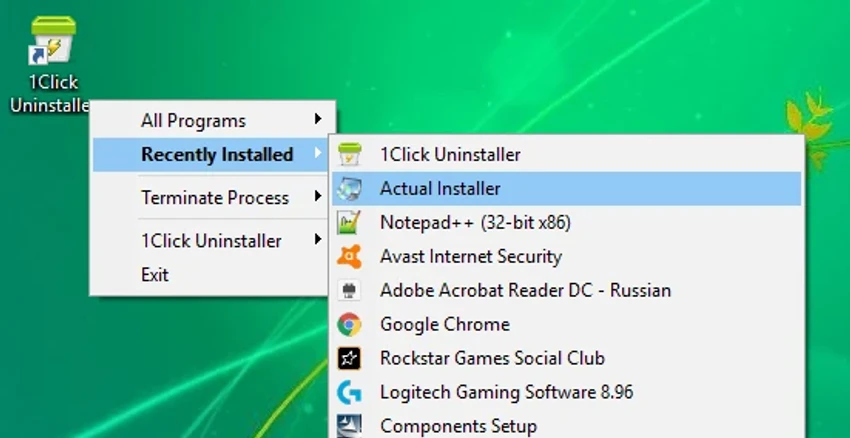

1Click Uninstaller is a lightweight Windows utility designed to simplify the process of removing installed applications. It focuses on speed and convenience, allowing users to uninstall programs directly through a pop-up interface or context menu, with additional cleanup features for leftover files and registry traces.
Overview of 1Click Uninstaller
1Click Uninstaller is built around a straightforward idea: make software removal faster and more accessible. Instead of navigating through multiple system menus, users can uninstall applications directly via a pop-up style interface or right-click context menu. The tool also includes cleanup capabilities that help remove residual files from improperly uninstalled applications, making it more than just a basic uninstaller.
Features of 1Click Uninstaller
- Pop-up menu style uninstaller for quick access
- List of recently installed programs for easy tracking
- Uninstall directly from application shortcut context menu
- Ability to remove improperly uninstalled programs
- Option to uninstall programs without traditional uninstallers
- Cleanup of leftover files and registry traces
- Support for both 32-bit and 64-bit applications
- Process termination feature to stop running programs before uninstalling
What’s New
- Display app on the current monitor in multi-monitor setups
- Enhanced leftover scanning (file system and registry areas such as Run, App Paths, AppCompatFlags)
- Option to show the number of installed programs
- Improved handling when multiple apps share similar names during context menu uninstall
- Bug fixes for duplicate program names display
- Fix for program names containing special characters like “&”
- Improved process termination for executables with spaces in file names
- General stability improvements and minor fixes
User Experience
1Click Uninstaller focuses heavily on simplicity and speed. The context menu integration is one of its strongest points, allowing users to uninstall software without opening a separate control panel or settings window. In real-world usage, the tool feels lightweight and responsive. The ability to terminate running processes before uninstalling helps reduce errors during removal, especially for stubborn applications. While it does not appear to offer advanced system management tools beyond uninstallation and cleanup, it performs its core function efficiently without unnecessary complexity.
Who Should Use 1Click Uninstaller?
- Users who want fast, one-click program removal
- Beginners looking for a simple alternative to Windows uninstall tools
- Users dealing with leftover files from incomplete uninstallations
- People who prefer context menu-based system utilities
- Users managing multiple installed applications regularly
Conclusion
1Click Uninstaller is a practical, lightweight solution for users who prioritize speed and simplicity in software removal. With its context menu integration and leftover cleanup capabilities, it offers a more convenient alternative to traditional Windows uninstallation methods.


