Exportizer logo

Exportizer 10.3.4.822

  • User Rating:
    ★★★★★
    ★★★★★
    0.0 0Votes
  • Requirements:
    Windows
  • Version: 10.3.4.822
  • Latest updated: 1 day ago
  • License: Freeware  
  • Publisher: Vitality Levchenko Software
  • Size: 5 MB
×

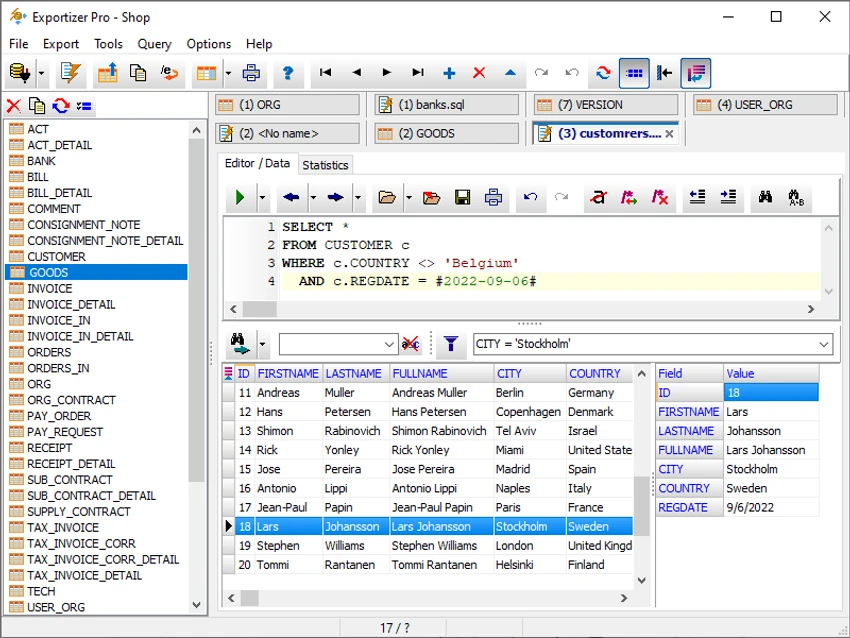
Exportizer is a database export and conversion tool designed for viewing, editing, querying, and transferring data across multiple database formats. It is built for database administrators, analysts, and developers who need a flexible way to move data between file-based databases, server systems, and common export formats like Excel, CSV, and SQL scripts.

Overview

Exportizer provides a unified environment for handling database data extraction and conversion tasks. It supports a wide variety of data sources, including file-based databases, ODBC connections, Excel files, and major relational database systems. The software is available in three editions—Exportizer, Exportizer Pro, and Exportizer Enterprise—each expanding capabilities from basic data browsing and exporting to advanced SQL querying and full database-to-database migration. It is particularly useful for professionals who frequently move data between different systems or need batch export automation.

Features of Exportizer

  • Browse and view database tables in a grid interface
  • Edit database records directly within the tool
  • Export data to multiple formats including CSV, Excel, JSON, HTML, PDF, XML, SQL scripts, and more
  • Supports file-based databases (DBF, CSV, Paradox, etc.)
  • Supports ODBC and server databases (Pro and Enterprise editions)
  • Advanced SQL query execution (Pro and Enterprise editions)
  • Batch export and multi-dataset operations (Enterprise edition)
  • Export between different database systems (e.g., PostgreSQL to Excel, SQLite to DBF)
  • Command-line support for automation
  • Custom export templates and reusable configurations
  • Data logging and error tracking for export validation
  • Formatting options for columns, rows, and output structure
  • Clipboard data export support

User Experience

Using Exportizer feels like working with a lightweight but highly capable data conversion workstation. The grid-based interface makes it easy to browse and edit records without needing complex SQL knowledge for basic operations.

For simple tasks like exporting a table to Excel or CSV, the workflow is straightforward and efficient. More advanced operations—such as cross-database transfers or SQL-based exports—introduce additional complexity but also significantly expand control over data processing.

Conclusion

Exportizer is a practical and efficient tool for database export, conversion, and data management. It stands out for its wide format support and ability to transfer data between different systems with minimal friction.

Pros & Cons

Pros

    • Supports a wide range of database formats and systems
    • Powerful export options (CSV, Excel, SQL, JSON, PDF, etc.)
    • Batch export and automation support (especially in Pro/Enterprise)
    • Easy-to-use grid interface for data browsing
    • Flexible data conversion between different databases
    • Command-line support for advanced workflows

Cons

    • Advanced features require Pro or Enterprise editions
    • Interface is functional but not modern or highly visual
    • Requires technical knowledge for complex database operations
    • No official rating or performance benchmarks provided

Frequently Asked Questions

What is Exportizer used for?

Exportizer is used to view, edit, and export data from databases into formats like Excel, CSV, SQL, and more.

Does Exportizer support multiple database types?

Yes, it supports file-based databases, ODBC sources, and major relational database systems (depending on edition).

Can Exportizer convert databases between formats?

Yes, it can convert data between different database systems and file formats, especially in Pro and Enterprise editions.

Does Exportizer support SQL queries?

Yes, SQL query support is available in Exportizer Pro and Enterprise editions.

Is Exportizer suitable for beginners?

It is usable for simple exports, but advanced features are better suited for technical users with database experience.

Recommended apps [Freeware]:
  • IObit Driver Booster 13.4.0.234 IObit Driver Booster logo updates outdated drivers automatically to boost system stability and gaming performance.
  • EarthTime 6.33.4 EarthTime logo displays world clocks, weather, and local times for 120,000+ cities with customizable alarms and maps.
  • Winhance 26.06.12 Winhance logo Windows optimization tool to debloat apps, tweak settings, and customize Windows 10/11
  • FastCopy 5.11.3 FastCopy logo a lightweight Windows tool for ultra-fast file copying, syncing, and error-resilient data transfer
  • AnyTXT Searcher 1.3.3173 AnyTXT Searcher logo fast desktop search tool that indexes and searches full-text content across documents, PDFs, emails, and more
  • Universal USB Installer 2.0.3.7 Universal USB Installer logo create bootable Linux USB drives easily with ISO support and persistence options on Windows.
Recommended apps [Shareware]:
  • Audio Transcoder 2.12.24 Audio Transcoder logo all-in-one audio converter and CD ripper supporting MP3, FLAC, AAC, WMA, and more
  • Sidify Spotify Music Converter 2026 Sidify Spotify Music Converter logo convert Spotify songs, playlists, and podcasts to MP3, AAC, FLAC, and WAV formats.
  • SketchUp Pro 2026 SketchUp Pro logo powerful 3D modeling software for architects, designers, and engineers with intuitive tools.
  • COAA PlanePlotter 6.7.5.9 COAA PlanePlotter logo a Windows tool that decodes live aircraft data like ADS-B and ACARS and displays real-time radar-style tracking
  • Bandizip 7.44 Bandizip logo Fast and intuitive file compression software supporting ZIP, RAR, 7Z, and more with high-speed archiving features
  • Teorex FolderIco 9.2.2 Teorex FolderIco logo Change folder colors or icons in one click and organize your files visually, so you can find everything instantly