FileLegit Windows Security & Privacy Antivirus BitDefender Antivirus Free Edition
BitDefender Antivirus Free Edition logo

BitDefender Antivirus Free Edition 27.0.60.339

  • User Rating:
    ★★★★★
    ★★★★★
    0.0 0Votes
  • Requirements:
    Windows
  • Version: 27.0.60.339
  • Latest updated: 3 days ago
  • License: Freeware  
  • Publisher: Bitdefender
  • Size: 22 MB
× app stores

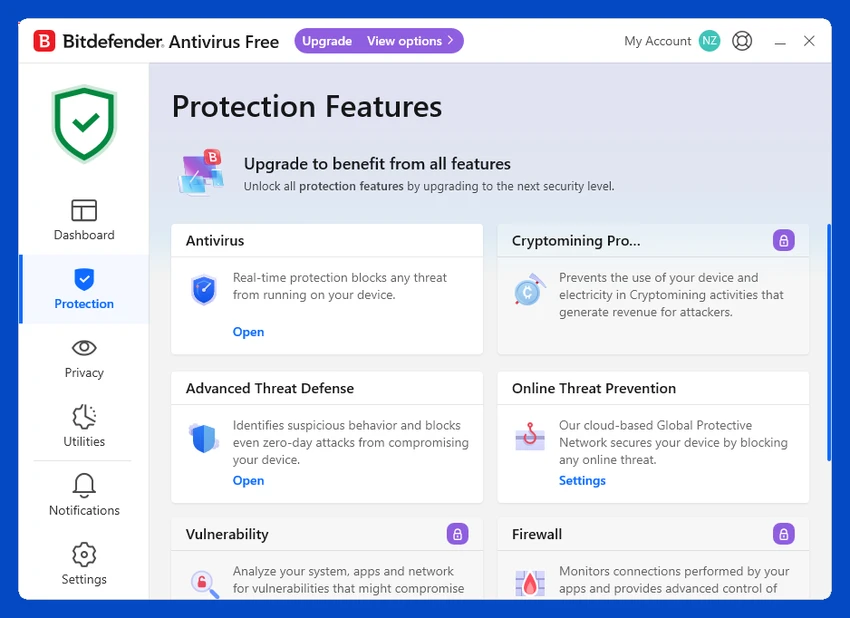
Bitdefender Free Antivirus is a lightweight security solution designed to provide essential protection against viruses, malware, and phishing threats without slowing down your system. It is built for users who want simple, automatic protection that runs quietly in the background without requiring constant configuration. The software focuses on core security features such as real-time scanning and web protection, making it suitable for everyday users who need reliable, no-nonsense antivirus coverage.

Features of Bitdefender Free Antivirus

  • Real-time antivirus protection against viruses and malware.
  • Automatic updates for the latest threat definitions.
  • Phishing protection to block fraudulent and unsafe websites.
  • Lightweight background operation with minimal system impact.
  • Simple “set-it-and-forget-it” security approach.
  • Web browsing protection for safer online activity.
  • Designed for silent, continuous system monitoring.

Paid upgrade (Bitdefender Antivirus Plus) includes:

  • Ransomware protection.
  • Vulnerability scanning.
  • Web tracking protection.
  • Built-in VPN for secure browsing.

User Experience

Bitdefender Free Antivirus is designed for simplicity. Installation is straightforward, and once installed, it requires minimal user interaction. The software automatically handles scanning and threat detection without frequent notifications or interruptions. In daily use, it runs quietly in the background and has a low impact on system performance, making it suitable for older or less powerful computers. Web protection also works seamlessly, helping prevent access to phishing sites during browsing, shopping, or online banking. While advanced users may find the free version limited, it provides a stable and dependable baseline of protection for general use.

Who Should Use Bitdefender Antivirus?

  • Casual computer users needing basic protection.
  • Users who want a lightweight antivirus solution.
  • People who prefer automatic, hands-off security.
  • Users with older or low-spec PCs.
  • Anyone needing protection against phishing and malware.

Conclusion

Bitdefender Free Antivirus provides solid, reliable protection without overwhelming users with unnecessary features or system load. It focuses on essential security needs like real-time malware detection and phishing protection, making it a practical choice for everyday use.

Pros & Cons

Pros

  • Free and lightweight antivirus solution.
  • Strong real-time malware protection.
  • Effective phishing and web protection.
  • Minimal system performance impact.
  • Easy setup with no complex configuration.
  • Runs silently in the background.

Cons

  • Lacks advanced security tools in the free version.
  • No custom or scheduled scan options.
  • Advanced features require paid upgrade.

Frequently Asked Questions

What is Bitdefender Free Antivirus used for?

It is used to protect Windows computers from viruses, malware, and phishing attacks.

Is Bitdefender Free Antivirus really free?

Yes, it offers a free version with core protection features.

Does it slow down my computer?

No, it is designed to be lightweight and run quietly in the background.

Does it include ransomware protection?

No, ransomware protection is available only in the paid version.

Is it good for beginners?

Yes, it is designed for simple, automatic protection with minimal setup.

Recommended apps [Freeware]:
  • Visual Studio Code 1.126.0 Visual Studio Code logo Free and powerful code editor from Microsoft with extensions, debugging, Git support, and multi-language development
  • Far Manager 3.0 Build 6699 Far Manager logo Manage files efficiently with Far Manager's fast text-based interface, plugins, and archive support
  • TeamViewer 15.79.4 TeamViewer logo a secure remote desktop tool for PC control, file transfer, and remote support worldwide
  • Claude Desktop 1.15962.1 Claude Desktop logo Anthropic's AI assistant to Windows and macOS for writing, coding, research, and file analysis
  • Kali Linux 2026.2 Kali Linux logo a powerful penetration testing OS with tools for cybersecurity, digital forensics, and ethical hacking
  • PDF Shaper 15.6 PDF Shaper logo Windows PDF utility for splitting, merging, converting, encrypting, and editing PDF documents with powerful tools
Recommended apps [Shareware]:
  • HyperSnap 10.1.2 HyperSnap logo captures screenshots, scrolling windows, OCR text and video with advanced editing tools on Windows.
  • FontExpert 2026 21.0 Release 1 FontExpert logo a Windows font manager for installing, organizing, previewing, and fixing fonts with advanced tools.
  • Duplicate Finder 2026 v418 Duplicate Finder logo remove duplicate photos and videos by scanning files using MD5 hashing for accurate results.
  • ON1 Effects 2026.4 ON1 Effects logo AI-powered photo effects, creative filters, presets, LUTs, and masking tools for stunning image enhancements
  • CoolUtils PDF Combine 8.1.0.76/13 CoolUtils PDF Combine logo Windows tool for merging multiple PDF files into one, with bookmarks, encryption, and batch processing
  • Bandicam 8.3.1.2537 Bandicam logo Record your screen, gameplay, and streaming videos with Bandicam, a fast screen recorder for Windows with high-quality compression