Actual Multiple Monitors logo

Actual Multiple Monitors 8.15.4

  • Benutzerbewertung:
    ★★★★★
    ★★★★★
    0.0 0Votes
  • Anforderungen:
    Windows
  • Version: 8.15.4
  • Zuletzt aktualisiert: vor 3 Wochen
  • Lizenz: Testversion  
  • Herausgeber: Actual Tools
  • Größe: 11 MB
× app stores

Actual Multiple Monitors is a Windows utility designed to improve productivity and usability when working with multiple displays. Instead of relying on the default Windows multi-monitor behavior, it adds a wide range of enhancements such as independent taskbars, advanced window management tools, desktop customization features, and multi-display controls.

The software is especially useful for users with dual or multi-monitor setups, allowing each screen to function more independently and efficiently. It also introduces features aimed at gamers, professionals, and multitaskers who want better control over how windows and applications behave across screens. By extending the Windows interface, Actual Multiple Monitors helps users create a more organized and flexible multi-display workspace.

Features of Actual Multiple Monitors

  • Adds taskbar, Start menu, system tray, and task switcher to each monitor
  • Move windows between monitors using title bar buttons
  • Maximize windows across the entire multi-monitor desktop
  • Custom hotkey support for advanced window actions
  • Fully customizable keyboard shortcuts for window management
  • Gaming mode features:
    • Prevent game minimization (Ignore Deactivation)
    • Lock mouse within a screen or window
  • Desktop Divider for splitting screens into customizable zones
  • Window snapping with improved multi-monitor support
  • Snap windows to:
    • Monitor edges
    • Other windows
    • Custom grid layouts
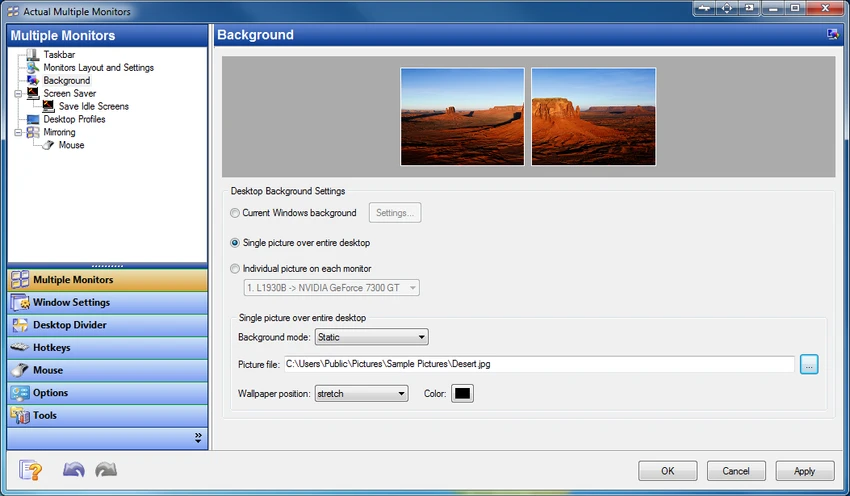
  • Multi-monitor wallpaper options:
    • Single image stretched across screens
    • Different wallpapers per monitor
    • Independent slideshow per display
    • Web-based image slideshows (Google Images, Flickr)
  • Multi-monitor screen saver support:
    • Stretch across all displays
    • Separate screen savers per monitor
  • Desktop mirroring for duplicating or projecting screen content
  • Support for presentations and remote display monitoring
  • Quick switching between laptop and external monitor profiles

Interface and Usability

Actual Multiple Monitors integrates directly into the Windows environment, enhancing the existing interface rather than replacing it. Once installed, additional taskbars and window controls appear across connected displays, making multi-screen navigation more intuitive. Most features are accessible through context menus, hotkeys, or window title bar buttons. Users can also configure profiles for different setups, such as switching between laptop-only mode and full multi-monitor mode.

While the software offers deep customization, its structure remains logical. However, users new to multi-monitor management may need time to explore and configure advanced features such as desktop division or mirroring.

Who Should Use Actual Multiple Monitors?

  • Professionals using dual or multi-monitor setups
  • Software developers and IT specialists
  • Designers, video editors, and creative professionals
  • Gamers who use secondary screens for streaming or browsing
  • Business users delivering presentations or managing workflows
  • Laptop users frequently switching between display configurations

Conclusion

Actual Multiple Monitors is a powerful and feature-rich solution for users who rely on multi-display setups. By extending Windows with per-monitor taskbars, advanced window management, and customizable desktop features, it significantly improves productivity and usability.

Vorteile & Nachteile

Vorteile

  • Adds full taskbars and system tools to every monitor
  • Strong multi-window and workspace management tools
  • Excellent support for gaming and productivity workflows
  • Highly customizable hotkeys and window behavior
  • Advanced wallpaper and screen saver options
  • Supports desktop mirroring and presentation use cases
  • Improves usability of multi-monitor setups significantly

Nachteile

  • Requires setup to fully configure advanced features
  • Can feel feature-heavy for casual users
  • Some tools may overlap with built-in Windows features
  • Learning curve for desktop divider and automation tools

Häufig gestellte Fragen

What is Actual Multiple Monitors used for?

Actual Multiple Monitors is used to enhance multi-monitor setups by adding taskbars, window controls, wallpapers, and productivity tools to improve workflow across multiple displays.

Does Actual Multiple Monitors add a taskbar to every monitor?

Yes. It provides a full taskbar, Start menu, system tray, and task switcher on each connected display.

Can I move windows between monitors easily?

Yes. You can move windows using dedicated title bar buttons or hotkeys for quick transfer between screens.

Does Actual Multiple Monitors support gaming?

Yes. It includes gaming-focused features like preventing game minimization and locking the mouse within a screen or window.

Can I use different wallpapers on each monitor?

Yes. The software supports individual wallpapers, stretched images, and even separate slideshows for each display.

Is it suitable for laptop users?

Yes. It includes desktop profiles that allow quick switching between internal and external display setups.

Empfohlene Apps [Freeware]:
  • TreeSize 9.8.2.2303 TreeSize logo Windows-Festplattenanalyseprogramm zum effizienten Scannen, Visualisieren und Bereinigen von Speichermedien mit Berichtsfunktion.
  • AB Download Manager 1.9.2 AB Download Manager logo Dateien mit Funktionen wie Warteschlangenverwaltung, Zeitplanung, Geschwindigkeitskontrolle und Browserintegration herunterladen.
  • YouTube Music (Desktop App) 3.12.0 YouTube Music (Desktop App) logo Erleben Sie YouTube Music mit benutzerdefinierten Plugins, Werbeblocker, Tastenkombinationen und Desktop-Wiedergabe.
  • Argente System Repair 1.0.8.2 Argente System Repair logo Scannt und behebt Windows-Fehler, um die Leistung in einfachen, empfohlenen und benutzerdefinierten Modi zu verbessern.
  • Volumouse 2.21 Volumouse logo Passen Sie die Windows-Lautstärke schnell über Mausrad-Shortcuts mit anpassbaren Regeln und einfacher Hintergrundsteuerung an.
  • Telegram 7.0.2 Telegram logo Sicher chatten, Dateien austauschen, großen Communities beitreten und geräteübergreifend in Verbindung bleiben – mit einer funktionsreichen Cloud-Messaging-Plattform.
Empfohlene Apps [Shareware]:
  • EF CheckSum Manager 26.07 EF CheckSum Manager logo Erstellt und überprüft MD5-, SHA- und SFV-Prüfsummen, um die Integrität von Dateien zu gewährleisten und Beschädigungen aufzudecken.
  • EF Duplicate Files Manager 26.05 EF Duplicate Files Manager logo Findet und entfernt doppelte Dateien anhand von Name, Größe oder Inhalt, um Speicherplatz freizugeben.
  • Google Antigravity 2.3.0 Google Antigravity logo KI-gestützte IDE, die autonome Agenten zur Automatisierung von Codierungs-, Test- und Softwareentwicklungs-Workflows einsetzt.
  • CMDebug 36.50.70 CMDebug logo Batch-Skripting-IDE und Debugger für Windows, unterstützt CMD- und TCC-RT-Skriptentwicklung
  • SmarterMail Build 9686 SmarterMail logo Hosten und verwalten Sie geschäftliche E-Mails mit Kollaborationstools, Spamschutz, ActiveSync-Unterstützung und webbasierter Administration.
  • TextPad 9.9.7 TextPad logo Bearbeiten Sie große Textdateien effizient mit einem leistungsstarken Windows-Editor, der Makros, reguläre Ausdrücke, Rechtschreibprüfung, Dateivergleich und vieles mehr bietet.