FileLegit Windows Utilities Disk Tools SoftPerfect RAM Disk
SoftPerfect RAM Disk logo

SoftPerfect RAM Disk 26.6

  • User Rating:
    ★★★★★
    ★★★★★
    0.0 0Votes
  • Requirements:
    Windows
  • Version: 26.6
  • Latest updated: 1 week ago
  • License: Freeware  
  • Publisher: SoftPerfect
  • Size: 6 MB
× app stores

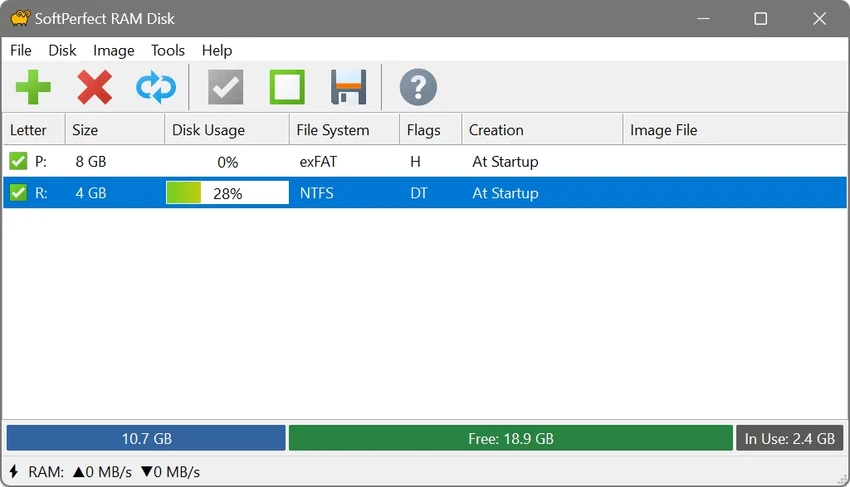
SoftPerfect RAM Disk is a high-performance utility that creates virtual disks using your computer's RAM instead of physical storage. Because system memory is significantly faster than traditional hard drives and SSDs, the software can accelerate temporary file operations and reduce wear on physical drives. During my experience with it, I found it to be an effective solution for users who want to make better use of unused memory while improving overall responsiveness.

Features of SoftPerfect RAM Disk

  • Creates virtual disks stored entirely in RAM
  • Accessible through Windows Explorer and standard applications
  • Can be used for temporary files and caches
  • Helps reduce excessive read and write operations on physical drives
  • Supports multiple RAM disks simultaneously
  • Up to 26 virtual disks (limited by available drive letters)
  • Supports virtually any RAM disk size on 64-bit systems
  • Supports up to approximately 3.5 GB on 32-bit systems
  • Persistent RAM disks with associated disk image files
  • Volatile RAM disks whose contents disappear after shutdown
  • Built-in disk image management tools
  • Preserves data between sessions using disk images
  • Compatible with Windows 7, Windows 8, Windows 10, and Windows 11 (64-bit)

User Experience

After setting up SoftPerfect RAM Disk, I found the process of creating virtual drives straightforward. The newly created disks appear just like regular drives inside Windows Explorer, making them easy to use with existing applications. One of the biggest advantages is performance. Temporary files and caches stored on the RAM disk are accessed much faster than on conventional storage devices. This can improve responsiveness in certain workloads and reduce unnecessary write activity on physical drives.

The ability to create either volatile or persistent RAM disks provides useful flexibility. Volatile disks are ideal for temporary data, while persistent disks can automatically save their contents to an image file, preserving information across restarts. The software also includes disk image tools, which simplify the process of managing stored data. Although understanding how much RAM to allocate may require some experimentation, the interface itself remains practical and user-friendly.

Who Should Use SoftPerfect RAM Disk?

  • Power users seeking faster temporary storage
  • Users with unused system memory
  • Professionals looking to reduce SSD and HDD wear
  • Enthusiasts optimizing system performance
  • Users working with temporary files and caches
  • Advanced users requiring persistent RAM disks

Conclusion

SoftPerfect RAM Disk is a powerful utility for users who want to turn unused memory into ultra-fast storage. Whether you're looking to accelerate temporary file access, minimize wear on physical drives, or create persistent virtual drives, it offers a reliable and flexible solution. If your system has spare RAM and you want to improve performance in specific scenarios, SoftPerfect RAM Disk is well worth considering.

Pros & Cons

Pros

  • Extremely fast virtual storage
  • Reduces read and write operations on physical drives
  • Supports multiple RAM disks
  • Persistent and volatile disk options
  • Built-in disk image tools
  • Seamless integration with Windows Explorer
  • Flexible disk size allocation

Cons

  • Consumes system memory
  • Requires sufficient available RAM
  • Benefits vary depending on workload
  • 32-bit systems have size limitations

Frequently Asked Questions

What is SoftPerfect RAM Disk used for?

SoftPerfect RAM Disk creates virtual drives stored in RAM to provide extremely fast storage for temporary files and other data.

Does a RAM disk improve performance?

Yes. Since RAM is much faster than physical storage, accessing files on a RAM disk can improve responsiveness in certain tasks.

Can data be preserved after restarting the computer?

Yes. Persistent RAM disks can be associated with disk image files to save and restore data between sessions.

How many RAM disks can I create?

The software supports multiple RAM disks, with a practical limit of 26 based on available drive letters.

Does SoftPerfect RAM Disk help extend SSD life?

Yes. By reducing frequent reads and writes to physical drives, it can help minimize storage wear.

Which Windows versions are supported?

SoftPerfect RAM Disk supports Windows 7, Windows 8, Windows 10, and Windows 11 on 64-bit systems.

Is the content of a volatile RAM disk saved after shutdown?

No. Volatile RAM disks lose their contents when the computer shuts down.

Recommended apps [Freeware]:
  • K-Lite Codec Pack Mega 19.8.2 K-Lite Codec Pack Mega logo Play all audio and video formats on Windows with K-Lite Codec Pack Mega, a full multimedia codec and filter package
  • XnConvert 1.112.0.0 XnConvert logo batch image converter supporting 500 formats with 80+ editing actions and cross-platform compatibility
  • QuickImageComment 5.02 QuickImageComment logo Edit IPTC, EXIF, and XMP metadata quickly, a lightweight tool for image comments and photo tagging on Windows
  • KMPlayer 2026.6.26.11 KMPlayer logo high-performance 4K/8K media player with ad-free UI, codec support, and YouTube playback tools
  • Hasleo Backup Suite 5.8.2.2 Hasleo Backup Suite logo Windows backup software for system restore, disk imaging, and cloning with emergency recovery support
  • Ultimaker Cura 5.13.0 Ultimaker Cura logo Prepare, slice, and manage 3D prints with Ultimaker Cura, an open-source software for beginners and professionals
Recommended apps [Shareware]:
  • All Video Downloader Pro 10.4.7 All Video Downloader Pro logo Download videos, playlists, subtitles, and audio from popular sites with built-in conversion and playback tools
  • EF Duplicate Files Manager 26.05 EF Duplicate Files Manager logo finds and removes duplicate files by name, size, or content to reclaim storage space.
  • IntraWEB 16.2.2 IntraWEB logo web development framework for creating interactive web applications using a Windows application-style approach
  • Sketchbook Pro 9.4.7.0 Sketchbook Pro logo a professional drawing app with customizable brushes, layers, symmetry tools, and natural pen support.
  • SQL Backup Master 8.5.1102.0 SQL Backup Master logo SQL Server backups with cloud storage, encryption, scheduling, and recovery features
  • Lansweeper 12.8.1.3 Lansweeper logo network discovery and IT asset management tool for software inventory, compliance reporting, and device tracking