Actual File Folders logo

Actual File Folders 1.15.5

  • User Rating:
    ★★★★★
    ★★★★★
    0.0 ★ 0Votes
  • Requirements:
    Windows
  • Version: 1.15.5
  • Latest updated: 2 weeks ago
  • License: Free Trial  
  • Publisher: Actual Tools
  • Size: 9 MB
× app stores

Actual File Folders is a Windows utility designed to make working with files and folders faster by improving the way users navigate through common file dialog windows. The software focuses on reducing repetitive folder browsing when opening, saving, or selecting files in different applications.

Instead of manually moving through multiple levels of folders every time, Actual File Folders provides quick access to frequently used locations through Favorite Folders and automatically tracks recently visited folders through Recent Folders. These functions work across supported applications because many Windows programs use standard system dialogs for file-related tasks.

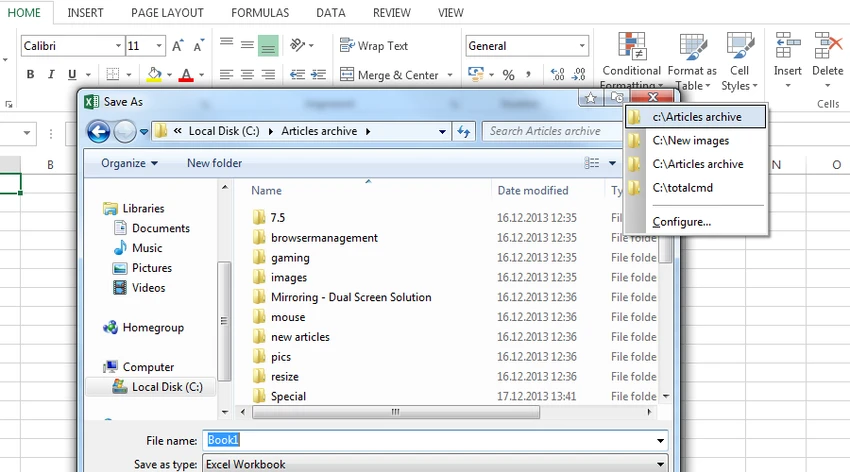
The software adds additional title bar buttons to supported windows, allowing users to open their favorite or recent folder lists directly. Favorite Folders works similarly to browser bookmarks, giving users a shortcut list for locations they access regularly. Recent Folders works like browsing history, keeping track of folders used across different programs rather than limiting the history to a single file manager.

Actual File Folders is compatible with multiple Windows versions, including both 32-bit and 64-bit editions, making it suitable for users who frequently manage files across different applications and want a more efficient folder navigation workflow.

Features of Actual File Folders

  • Favorite Folders shortcuts: Create a personalized list of frequently used folders and access them instantly from supported file-related windows.
  • Recent Folders history: Automatically records recently visited folders and allows quick returns with a single click.
  • Works across applications: Uses Windows system dialogs, allowing folder shortcuts to be available in many programs that support standard file operations.
  • Faster file navigation: Reduces the need for repeated folder browsing and long mouse navigation through folder structures.
  • Additional title bar buttons
    Adds dedicated buttons to supported window title bars for accessing Favorite Folders and Recent Folders.
  • Windows compatibility: Supports Windows 11, Windows 10, Windows 8.1, Windows 8, Windows 7, Vista, XP, and older supported Windows versions, including server editions.

Interface and Usability

Actual File Folders takes a practical approach by integrating directly into existing Windows file-related windows rather than requiring users to learn a completely new interface. The main workflow revolves around accessing Favorite Folders and Recent Folders through additional title bar buttons.

The Favorite Folders panel provides a way to organize commonly used folder shortcuts, while the Recent Folders panel keeps track of previously accessed locations automatically. This approach makes navigation more convenient for users who repeatedly work with the same folders across multiple applications.

The software is designed around speed and convenience. Once configured, accessing frequently used folders requires fewer steps compared with manually navigating through Windows folder structures. The title button compact mode has also been updated to work correctly with right-to-left language systems such as Arabic and Hebrew.

Who Should Use Actual File Folders?

  • Office users who frequently work with documents stored in different locations
  • Professionals managing projects with many folder structures
  • Users who want a faster alternative to repeatedly browsing through Windows folders
  • Anyone looking for a lightweight folder navigation improvement tool

Conclusion

Actual File Folders provides a focused solution for improving everyday folder navigation on Windows. By combining Favorite Folders shortcuts with a global Recent Folders history, the software helps reduce repetitive browsing and makes commonly used locations easier to reach.

Pros & Cons

✓

Pros

  • Provides quick access to frequently used folders
  • Tracks recent folders across supported applications
  • Works with standard Windows file dialogs
  • Reduces repetitive folder navigation
  • Supports a wide range of Windows versions
✕

Cons

  • Focused mainly on folder navigation rather than broader file management features

Frequently Asked Questions

What is Actual File Folders used for?

Actual File Folders is a Windows utility that helps users access folders faster when opening, saving, or browsing files in applications. It provides shortcuts to favorite folders and keeps a history of recently visited folders to reduce repeated manual navigation.

How does the Favorite Folders feature work?

The Favorite Folders feature allows users to create a list of shortcuts for folders they use frequently. Once configured, users can open this list from supported file-related windows and access their preferred folders with a single click.

What does Recent Folders do?

Recent Folders automatically records folders that users have recently accessed. It works similarly to browser history by allowing users to quickly return to previously visited folders without searching through the folder structure again.

Does Actual File Folders work with different Windows applications?

Yes. Actual File Folders is designed to work with applications that use standard Windows file dialogs for tasks such as opening files, saving files, and selecting folders. This allows folder shortcuts to be used across many supported programs.

Which operating systems are compatible with Actual File Folders?

Actual File Folders supports Windows 11, Windows 10, Windows 8.1, Windows 8, Windows 7, Windows Vista, and Windows XP, as well as older Windows versions listed by the developer. It also supports several Windows Server editions, with both 32-bit and 64-bit compatibility.

Can Actual File Folders make file management faster?

Actual File Folders can make folder access more efficient by reducing the time spent manually browsing through multiple directories. Users who frequently work with the same folders across different applications may find the Favorite Folders and Recent Folders features helpful for speeding up their workflow.

Recommended apps [Freeware]:
  • UltraSearch 4.9.2.1208 UltraSearch logo locates files and folders on local NTFS drives in seconds without building an index. Fast, precise, and lightweight.
  • Zortam Mp3 Media Studio 33.97 Zortam Mp3 Media Studio logo Manage, tag, rip, organize, convert, and play MP3 files with the all-in-one Zortam Mp3 Media Studio
  • SoundSwitch 7.1.0 / 7.1.1 Beta 1 SoundSwitch logo a lightweight Windows tool that lets you switch audio devices instantly using customizable hotkeys
  • Microsoft PowerToys 0.100.2 Microsoft PowerToys logo adds powerful productivity tools and customization features to Windows 10 and 11
  • TeraCopy 4.0.0.37 TeraCopy logo Windows file transfer tool that speeds up copying, resumes transfers, and improves reliability with error recovery
  • F-Secure Uninstallation Tool 19.3.15 F-Secure Uninstallation Tool logo completely removes F-Secure security products, including files, services, and registry entries from Windows
Recommended apps [Shareware]:
  • VueScan 9.8.56 VueScan logo Enhance scanner functionality with advanced tools for scanning documents, photos, videos, and slides.
  • VovSoft AI Requester 5.2 VovSoft AI Requester logo a program that can connect to OpenAI API and OpenAI-compatible APIs with ease
  • EventSentry Light 6.0.1.68 EventSentry Light logo Monitor servers, logs, and network devices, get real-time alerts and centralized system monitoring for IT environments.
  • Xlight FTP Server 3.9.5 Xlight FTP Server logo Windows FTP server supporting SFTP, SSL, Active Directory, and enterprise-grade file transfer management
  • Auslogics ChillMate 1.1.0.6 Auslogics ChillMate logo Monitor CPU and GPU temperature, optimize battery life, and reduce overheating with Auslogics ChillMate for Windows laptops
  • GiliSoft AI Toolkit 10.9 GiliSoft AI Toolkit logo combines chatbot, OCR, TTS, ASR, and image tools to streamline AI-powered workflow automation.