Actual Multiple Monitors logo

Actual Multiple Monitors 8.15.4

  • ユーザー評価:
    ★★★★★
    ★★★★★
    0.0 0Votes
  • 動作環境:
    Windows
  • バージョン: 8.15.4
  • 最終更新: 3週間前
  • ライセンス: 無料体験版  
  • 提供元: Actual Tools
  • サイズ: 11 MB
× app stores

Actual Multiple Monitors is a Windows utility designed to improve productivity and usability when working with multiple displays. Instead of relying on the default Windows multi-monitor behavior, it adds a wide range of enhancements such as independent taskbars, advanced window management tools, desktop customization features, and multi-display controls.

The software is especially useful for users with dual or multi-monitor setups, allowing each screen to function more independently and efficiently. It also introduces features aimed at gamers, professionals, and multitaskers who want better control over how windows and applications behave across screens. By extending the Windows interface, Actual Multiple Monitors helps users create a more organized and flexible multi-display workspace.

Features of Actual Multiple Monitors

  • Adds taskbar, Start menu, system tray, and task switcher to each monitor
  • Move windows between monitors using title bar buttons
  • Maximize windows across the entire multi-monitor desktop
  • Custom hotkey support for advanced window actions
  • Fully customizable keyboard shortcuts for window management
  • Gaming mode features:
    • Prevent game minimization (Ignore Deactivation)
    • Lock mouse within a screen or window
  • Desktop Divider for splitting screens into customizable zones
  • Window snapping with improved multi-monitor support
  • Snap windows to:
    • Monitor edges
    • Other windows
    • Custom grid layouts
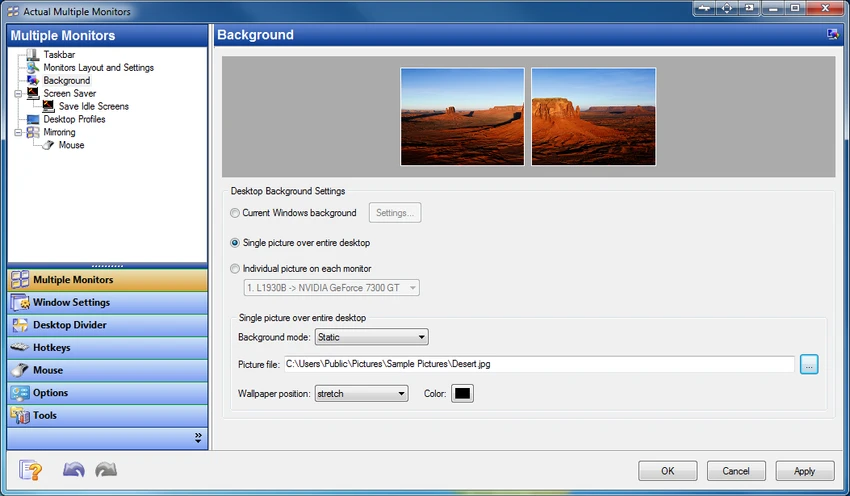
  • Multi-monitor wallpaper options:
    • Single image stretched across screens
    • Different wallpapers per monitor
    • Independent slideshow per display
    • Web-based image slideshows (Google Images, Flickr)
  • Multi-monitor screen saver support:
    • Stretch across all displays
    • Separate screen savers per monitor
  • Desktop mirroring for duplicating or projecting screen content
  • Support for presentations and remote display monitoring
  • Quick switching between laptop and external monitor profiles

Interface and Usability

Actual Multiple Monitors integrates directly into the Windows environment, enhancing the existing interface rather than replacing it. Once installed, additional taskbars and window controls appear across connected displays, making multi-screen navigation more intuitive. Most features are accessible through context menus, hotkeys, or window title bar buttons. Users can also configure profiles for different setups, such as switching between laptop-only mode and full multi-monitor mode.

While the software offers deep customization, its structure remains logical. However, users new to multi-monitor management may need time to explore and configure advanced features such as desktop division or mirroring.

Who Should Use Actual Multiple Monitors?

  • Professionals using dual or multi-monitor setups
  • Software developers and IT specialists
  • Designers, video editors, and creative professionals
  • Gamers who use secondary screens for streaming or browsing
  • Business users delivering presentations or managing workflows
  • Laptop users frequently switching between display configurations

Conclusion

Actual Multiple Monitors is a powerful and feature-rich solution for users who rely on multi-display setups. By extending Windows with per-monitor taskbars, advanced window management, and customizable desktop features, it significantly improves productivity and usability.

メリット・デメリット

メリット

  • Adds full taskbars and system tools to every monitor
  • Strong multi-window and workspace management tools
  • Excellent support for gaming and productivity workflows
  • Highly customizable hotkeys and window behavior
  • Advanced wallpaper and screen saver options
  • Supports desktop mirroring and presentation use cases
  • Improves usability of multi-monitor setups significantly

デメリット

  • Requires setup to fully configure advanced features
  • Can feel feature-heavy for casual users
  • Some tools may overlap with built-in Windows features
  • Learning curve for desktop divider and automation tools

よくある質問

What is Actual Multiple Monitors used for?

Actual Multiple Monitors is used to enhance multi-monitor setups by adding taskbars, window controls, wallpapers, and productivity tools to improve workflow across multiple displays.

Does Actual Multiple Monitors add a taskbar to every monitor?

Yes. It provides a full taskbar, Start menu, system tray, and task switcher on each connected display.

Can I move windows between monitors easily?

Yes. You can move windows using dedicated title bar buttons or hotkeys for quick transfer between screens.

Does Actual Multiple Monitors support gaming?

Yes. It includes gaming-focused features like preventing game minimization and locking the mouse within a screen or window.

Can I use different wallpapers on each monitor?

Yes. The software supports individual wallpapers, stretched images, and even separate slideshows for each display.

Is it suitable for laptop users?

Yes. It includes desktop profiles that allow quick switching between internal and external display setups.

おすすめアプリ [無料]:
  • TreeSize 9.8.2.2303 TreeSize logo Windows用ディスク容量アナライザーは、ストレージを効率的にスキャン、可視化、クリーンアップし、レポートを作成します。
  • AB Download Manager 1.9.2 AB Download Manager logo キュー管理、スケジュール設定、速度制御、ブラウザ統合などの機能を備えたファイルダウンロード機能。
  • YouTube Music (Desktop App) 3.12.0 YouTube Music (Desktop App) logo カスタムプラグイン、広告ブロック、キーボードショートカット、デスクトップ再生機能を備えたYouTube Musicを体験しよう
  • Argente System Repair 1.0.8.2 Argente System Repair logo Windowsのエラーをスキャンして修正し、シンプル、推奨、カスタムの各モードでパフォーマンスを向上させます。
  • Volumouse 2.21 Volumouse logo カスタマイズ可能なルールとシンプルなバックグラウンドコントロールを備えたマウスホイールショートカットを使用して、Windowsの音量を素早く調整できます。
  • Telegram 7.0.2 Telegram logo 機能豊富なクラウドメッセージングプラットフォームで、安全なチャット、ファイル共有、大規模コミュニティへの参加、そしてデバイスを跨いだ接続維持を実現しましょう。
おすすめアプリ [シェアウェア]:
  • EF CheckSum Manager 26.07 EF CheckSum Manager logo ファイルの整合性を確保し、破損を検出するために、MD5、SHA、およびSFVのチェックサムを作成および検証します。
  • EF Duplicate Files Manager 26.05 EF Duplicate Files Manager logo 名前、サイズ、または内容に基づいて重複ファイルを検索して削除し、ストレージ容量を解放します。
  • Google Antigravity 2.3.0 Google Antigravity logo 自律エージェントを使用してコーディング、テスト、ソフトウェア開発のワークフローを自動化する、AI搭載のIDE
  • CMDebug 36.50.70 CMDebug logo Windows 用バッチスクリプト IDE およびデバッガー。CMD および TCC-RT スクリプト開発をサポート。
  • SmarterMail Build 9686 SmarterMail logo コラボレーションツール、スパム対策、ActiveSyncサポート、Webベースの管理機能を備えたビジネスメールのホスティングと管理。
  • TextPad 9.9.7 TextPad logo マクロ、正規表現、スペルチェック、ファイル比較など、豊富な機能を備えた強力なWindowsエディタで、大容量のテキストファイルを効率的に編集できます。