Lansweeper logo

Lansweeper 12.8.1.3

  • User Rating:
    ★★★★★
    ★★★★★
    0.0 0Votes
  • Requirements:
    Windows
  • Version: 12.8.1.3
  • Latest updated: 6 days ago
  • License: Free Trial  
  • Publisher: Geert Moernaut
  • Size: 371 MB
× app stores

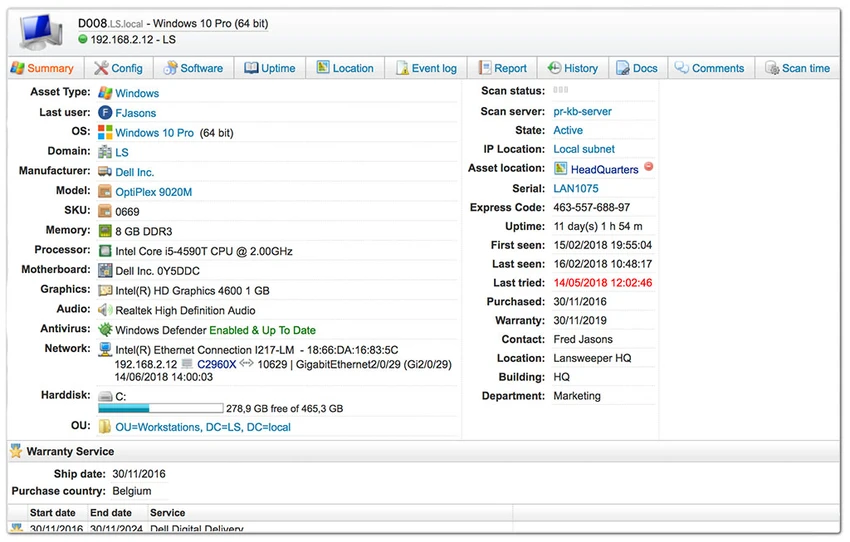
Lansweeper is an automated network discovery and asset management solution designed to scan and catalog all devices connected to a network. It provides a centralized web-based interface where IT teams can view hardware, software, and system information without requiring agents installed on endpoints.

Overview

Lansweeper focuses on IT asset visibility and network-wide discovery. It automatically scans computers and IP-enabled devices such as printers, routers, and servers, collecting detailed hardware and software information. The platform is primarily used in enterprise IT environments where maintaining an accurate inventory of devices, installed software, and compliance status is essential. It also integrates with Active Directory and Windows event logs to provide deeper administrative insights. Because it operates without agents, Lansweeper reduces deployment overhead and simplifies large-scale network monitoring.

Features of Lansweeper

  • Automated network discovery without installing agents
  • Centralized web-based dashboard for asset management
  • Software inventory tracking across all connected devices
  • Hardware inventory monitoring with change detection
  • Discovery of IP-enabled devices (Windows, Linux, printers, routers, etc.)
  • Software license tracking and compliance reporting
  • Compliance dashboards for security and policy monitoring
  • Active Directory integration for users, groups, and organizational units
  • Event log integration with alerting for system errors
  • Custom reporting for IT audits and asset management
  • Change tracking for hardware and system modifications

User Experience

Lansweeper is designed for IT administrators managing medium to large networks. Once configured, it automatically populates a centralized inventory of all detected devices, reducing the need for manual tracking. The web interface is structured around dashboards and reports, making it easy to filter assets by type, software version, or compliance status. Reporting tools are one of its strongest aspects, allowing administrators to quickly identify outdated software, missing patches, or unauthorized applications. Active Directory integration adds another layer of usability by aligning device data with organizational structure, which is particularly useful in corporate environments.

Who Should Use Lansweeper?

  • IT administrators managing corporate networks
  • System engineers responsible for asset tracking
  • Security teams monitoring compliance and vulnerabilities
  • Organizations needing centralized software and hardware inventory
  • Enterprises managing Active Directory environments

Conclusion & Recommendation

Lansweeper is a powerful IT asset management and network discovery platform built for enterprise environments. Its agentless scanning approach, combined with detailed software and hardware inventory reporting, makes it a strong solution for organizations that need full visibility over their infrastructure.

Pros & Cons

Pros

  • Agentless network discovery simplifies deployment
  • Comprehensive hardware and software inventory tracking
  • Strong reporting and compliance tools
  • Active Directory and event log integration
  • Supports a wide range of device types beyond PCs
  • Useful for large-scale IT environments

Cons

  • Primarily designed for enterprise use (may be complex for small setups)
  • Requires proper configuration for full effectiveness
  • No official performance rating or benchmark data provided
  • Web-based interface may require learning for new users

Frequently Asked Questions

What is Lansweeper used for?

Lansweeper is used for discovering, tracking, and managing IT assets across a network.

Does Lansweeper require agents?

No, it performs agentless scanning using built-in network protocols.

Can Lansweeper track software licenses?

Yes, it includes license compliance and software inventory reporting features.

Does Lansweeper support Active Directory?

Yes, it integrates with Active Directory to map users, computers, and organizational units.

Who should use Lansweeper?

It is best suited for IT teams, system administrators, and enterprise organizations managing complex networks.

Recommended apps [Freeware]:
  • EarthView 7.16.6 EarthView logo dynamic wallpapers and screensavers with day, night, and weather effects
  • FBackup 9.9.1044 FBackup logo a free Windows backup tool offering automatic backups, cloud support, encryption, and easy file recovery options
  • Sandboxie-Plus 1.17.9 Sandboxie-Plus logo a Windows sandboxing tool that isolates programs to prevent system changes and improve security.
  • Adobe DNG Converter 18.4 Adobe DNG Converter logo Convert camera-specific RAW files to Adobe DNG format for improved compatibility and flexible photo workflows
  • WinScript 2.20.1 WinScript logo customize Windows with debloat, privacy, performance tweaks, and one-click app installation scripts
  • Revo Registry Cleaner 2.2.1 Revo Registry Cleaner logo Clean, monitor, tune, and back up the Windows Registry with Revo Registry Cleaner for improved system maintenance
Recommended apps [Shareware]:
  • Wondershare AllMyTube 7.4.9.2 Wondershare AllMyTube logo download and convert videos from YouTube and 100+ sites into multiple formats for offline viewing.
  • Syncovery 12.2.1 Syncovery logo fast backup and file synchronization tool with real-time sync, versioning, and advanced automation features
  • Gilisoft SnapID 8.8.0 Gilisoft SnapID logo Edit, enhance, retouch, and transform images with powerful tools in Gilisoft SnapID for Windows
  • Duplicate Photos Fixer Pro 1.3.1086.1158 Duplicate Photos Fixer Pro logo finds and removes duplicate and similar photos to organize your library and save space
  • Disk Savvy 18.2.36 Disk Savvy logo analyze disk space usage, network shares, NAS storage, and generate detailed reports on Windows
  • Sketchbook Pro 9.4.7.0 Sketchbook Pro logo a professional drawing app with customizable brushes, layers, symmetry tools, and natural pen support.