SpectraLayers logo

SpectraLayers 13.0

  • User Rating:
    ★★★★★
    ★★★★★
    0.0 0Votes
  • Requirements:
    Windows
  • Version: 13.0
  • Latest updated: 3 weeks ago
  • License: Commercial  
  • Publisher: Steinberg
  • Size: 4.3 GB
× app stores

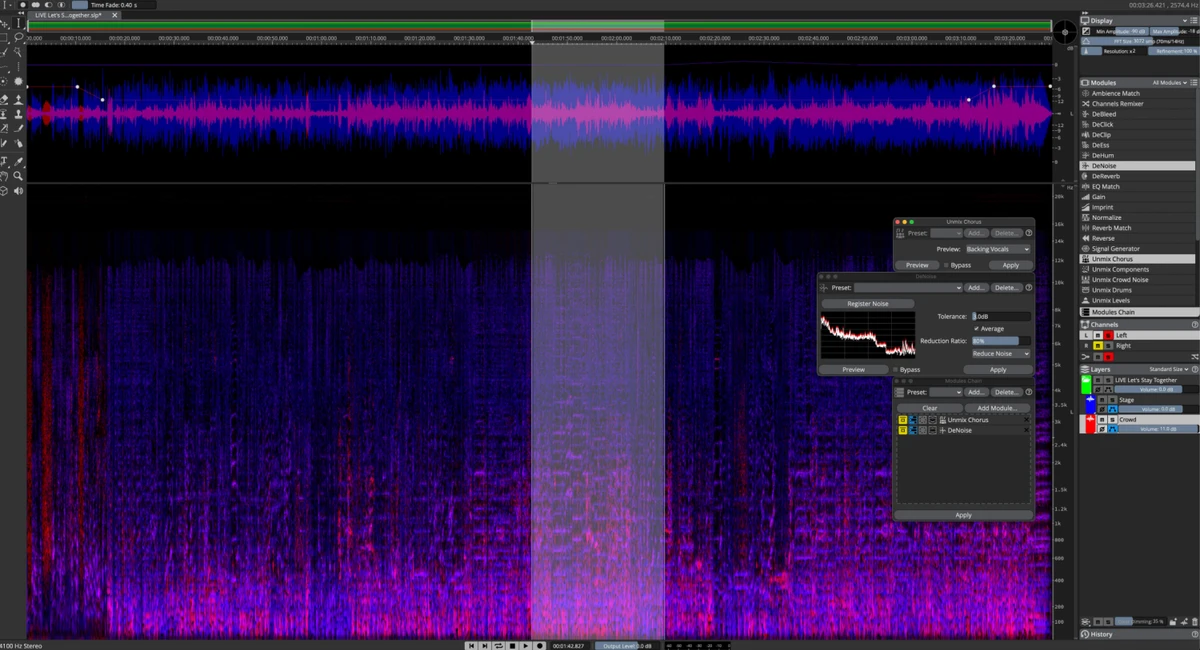
SpectraLayers is an advanced audio editing application that transforms sound into a visual spectrum, allowing users to directly interact with audio as if it were an image. This unique approach enables precise editing, restoration, and creative sound design by letting users select, isolate, and manipulate individual elements of audio data.

The software combines traditional spectral editing tools with modern AI-driven processing to automate complex tasks such as noise reduction, audio repair, and stem separation. It can be used both as a standalone application and as an integrated tool within digital audio workstations (DAWs) such as Cubase and Nuendo through ARA 2 support.

Designed for audio engineers, sound designers, and music producers, SpectraLayers bridges technical precision and creative flexibility, making it suitable for both restoration work and experimental sound manipulation.

Features of SpectraLayers

  • Visual spectral audio editing with layer-based workflow.
  • AI-assisted audio processing for improved speed and accuracy.
  • Separate audio into layers for detailed editing and mixing.
  • Stem extraction and audio unmixing capabilities.
  • Isolate and manipulate:
    • Tones
    • Transients
    • Noise components
  • Advanced audio repair tools:
    • Noise reduction
    • Click removal
    • Audio restoration
    • Clip repair
  • Manual and AI-assisted selection tools for precise editing.
  • Freeform sound design and experimental audio manipulation.
  • Seamless integration with DAWs via ARA 2 technology.
  • Compatible with Cubase and Nuendo workflows.
  • Non-destructive editing on DAW timelines.
  • Export extracted audio layers for further processing.
  • Available in different editions including Elements and Pro (feature depth varies).

Interface and Usability

SpectraLayers uses a visually driven interface where audio is represented as a spectral display rather than a traditional waveform. This allows users to “see” sound and interact with it directly, selecting specific frequencies or time segments for editing.

While the workflow is highly powerful, it is also more complex than standard audio editors. Users familiar with digital audio workstations will find the layer-based system intuitive over time, but beginners may need an adjustment period to understand spectral editing concepts. AI-assisted tools help reduce complexity by automating tasks like separation and noise removal, making advanced editing more accessible even for less experienced users.

Who Should Use SpectraLayers?

  • Audio engineers working on restoration and cleanup.
  • Music producers needing stem separation or remix preparation.
  • Sound designers creating experimental or layered audio textures.
  • Post-production professionals in film, TV, and media.
  • Users working with Cubase or Nuendo DAWs.
  • Anyone needing precise spectral-level audio editing.

Conclusion & Recommendation

SpectraLayers stands out as a highly specialized audio editing tool that combines visual spectral editing with advanced AI-powered processing. Its ability to isolate, repair, and reshape sound makes it a strong choice for professional audio restoration, music production, and experimental sound design.

Pros & Cons

Pros

  • Unique spectral, visual-based audio editing workflow.
  • Powerful AI-assisted audio processing tools.
  • Excellent for audio restoration and cleanup tasks.
  • Advanced stem separation and sound isolation.
  • Deep integration with Cubase and Nuendo via ARA 2.
  • Supports both manual and automated editing workflows.
  • Suitable for professional audio production environments.

Cons

  • Steep learning curve for beginners.
  • Requires strong system resources for AI processing.
  • Best performance depends on compatible DAW integration.

Frequently Asked Questions

What is SpectraLayers used for?

SpectraLayers is used for spectral audio editing, allowing users to visualize and manipulate sound frequencies for tasks such as audio restoration, noise reduction, and sound design.

Does SpectraLayers use AI?

Yes. SpectraLayers includes AI-driven tools that assist with audio separation, noise reduction, and other complex processing tasks, improving both speed and accuracy.

Can SpectraLayers separate audio into stems?

Yes. The software can unmix audio into stems and individual components, allowing detailed editing of vocals, instruments, and other sound elements.

Does SpectraLayers work with DAWs?

Yes. SpectraLayers integrates with DAWs like Cubase and Nuendo using ARA 2 technology, enabling real-time, non-destructive editing within the DAW timeline.

Is SpectraLayers suitable for beginners?

It can be challenging for beginners due to its spectral editing workflow, but AI-assisted features help simplify many advanced tasks.

What are the system requirements?

SpectraLayers requires Windows 10 (21H2 or higher) or Windows 11, a modern CPU (Intel 5th Gen or AMD Ryzen or newer), at least 8 GB RAM (16 GB recommended), 8 GB free disk space, and a DirectX 11 compatible GPU (DirectX 12 with 8 GB VRAM recommended for AI processing).

Recommended apps [Freeware]:
  • Adobe Camera Raw 18.4 Adobe Camera Raw logo Edit, process, and convert RAW photos in Photoshop with Adobe Camera Raw's powerful image workflow tools
  • TeamViewer 15.79.4 TeamViewer logo a secure remote desktop tool for PC control, file transfer, and remote support worldwide
  • DoesNotBelong 11.8.3 DoesNotBelong logo free malware removal and Windows repair tool that complements antivirus software with on-demand scanning and system cleanup
  • Avast Clear 26.6.11052 Avast Clear logo Remove Avast antivirus completely with Avast Clear, the official uninstall utility that cleans leftover files and registry entries
  • Advanced Trigonometry Calculator 2.1.7 Advanced Trigonometry Calculator logo Solve advanced trigonometry, scientific notation, complex numbers, and equations with Advanced Trigonometry Calculator
  • ESET Online Scanner 3.7.11.0 ESET Online Scanner logo Scan and remove malware, viruses, spyware, and other online threats with a lightweight browser-based security scanner.
Recommended apps [Shareware]:
  • GiliSoft Exe Lock 12.0.0 GiliSoft Exe Lock logo Protect Windows applications with passwords and prevent unauthorized access using GiliSoft Exe Lock
  • SysTools MBOX Converter 9.0 SysTools MBOX Converter logo batch email migration tool that converts MBOX, MBS, and MBX files into multiple formats with attachment support
  • Google Satellite Maps Downloader 8.419 Google Satellite Maps Downloader logo downloads satellite map tiles from Google Maps for offline viewing, GIS projects, and map export
  • Spectaculator 9.1 Spectaculator logo Experience classic ZX Spectrum games and software with Spectaculator, a high-accuracy emulator for modern Windows PCs
  • Lossless Extract 3.0.1 Lossless Extract logo Extract high-resolution audio from Blu-ray, SACD, MKV, and DVD-Audio while preserving lossless quality and immersive audio formats.
  • QueueMonitor Professional 1.6.38 QueueMonitor Professional logo Monitor MSMQ queues, automate message processing, detect issues, and integrate external systems with a professional queue management tool.