Subtitle Edit logo

Subtitle Edit 5.0.0

  • User Rating:
    ★★★★★
    ★★★★★
    0.0 0Votes
  • Requirements:
    Windows
  • Version: 5.0.0
  • Latest updated: 1 week ago
  • License: Freeware  
  • Publisher: SubtitleEdit
  • Size: 52 MB
× app stores

Subtitle Edit is a feature-rich subtitle editing tool designed for creating, adjusting, syncing, and translating subtitles for video content. It supports a wide range of subtitle formats and includes advanced tools for timing correction, translation, and error fixing, making it a reliable solution for both casual users and professionals working with video captions.

Overview

Subtitle Edit is built to solve one of the most common problems in video editing: subtitle accuracy and synchronization. Whether subtitles are out of sync, incorrectly timed, or need translation, the software provides a structured set of tools to correct them efficiently. It supports many subtitle formats and integrates with external video players such as DirectShow and VLC. In addition to manual editing, Subtitle Edit includes automation features like translation services, OCR support for extracting subtitles from video sources, and spell-checking tools to improve accuracy. Its combination of precision tools and accessibility makes it widely used for subtitle creation, localization, and video accessibility work.

Features of Subtitle Edit

  • Create, edit, sync, and translate subtitle files
  • Adjust subtitle timing and synchronization with video
  • Convert between subtitle formats (SubRip, MicroDVD, SSA, SAMI, YouTube SBV, and more)
  • Support for DirectShow and VLC video playback
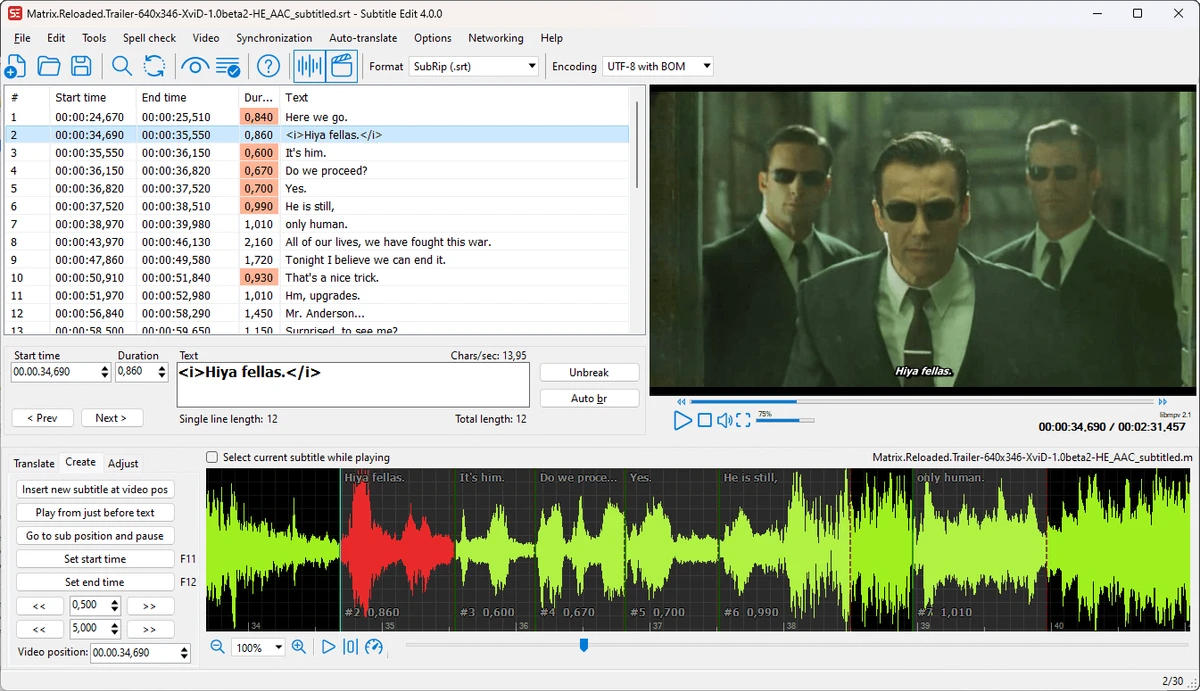
  • Visual subtitle timing adjustments
  • Automatic translation using Google Translate or Microsoft Bing Translate
  • Subtitle extraction from DVDs (decrypted)
  • Import and OCR for VobSub subtitle files using Tesseract
  • Support for subtitles embedded in Matroska (MKV) files
  • UTF-8 and Unicode file support
  • Subtitle splitting and merging tools
  • Fix common subtitle errors via built-in wizard
  • Spell checking using OpenOffice dictionaries and NHunspell
  • Remove hearing-impaired text formatting
  • Subtitle renumbering tools
  • Search and replace functionality
  • Case correction using name dictionaries
  • Subtitle comparison tools
  • History and undo manager
  • Subtitle effects such as typewriter and karaoke styles

User Experience

Subtitle Edit offers a practical and highly structured interface focused on precision. Users can load a subtitle file alongside a video and make real-time adjustments to ensure perfect synchronization. The visual syncing tools are particularly useful, allowing users to adjust subtitle timing while watching the video playback. This reduces guesswork and makes timing corrections more intuitive.

Translation features streamline multilingual subtitle creation, especially for users working with international content. OCR support adds additional flexibility when dealing with embedded or image-based subtitles. Despite its technical capabilities, the workflow remains accessible once users become familiar with the layout. Most tools are logically grouped, allowing efficient navigation between editing, timing, and conversion functions.

Who Should Use Subtitle Edit?

  • Video editors working with subtitles
  • Content creators publishing multilingual videos
  • YouTubers and filmmakers adding captions
  • Translators working on video localization
  • Accessibility professionals creating subtitles for hearing-impaired audiences
  • Users fixing or syncing existing subtitle files

Conclusion

Subtitle Edit is a highly capable subtitle editing solution that combines precision tools, automation, and format flexibility. It is particularly valuable for anyone working with video content that requires accurate captions or multilingual subtitles.

Pros & Cons

Pros

  • Extensive subtitle format support
  • Precise timing and synchronization tools
  • Built-in translation support
  • OCR for subtitle extraction
  • Video playback integration (VLC/DirectShow)
  • Spell-check and error correction tools
  • Subtitle comparison and editing history
  • Free and feature-rich

Cons

  • Interface may feel technical for beginners
  • Requires learning time for advanced features
  • Focused specifically on subtitles rather than full video editing

Frequently Asked Questions

What is Subtitle Edit used for?

Subtitle Edit is used to create, edit, sync, translate, and fix subtitle files for videos.

Can Subtitle Edit fix out-of-sync subtitles?

Yes. It includes tools for adjusting subtitle timing and synchronizing text with video playback.

Does Subtitle Edit support translation?

Yes. It supports automatic translation using Google Translate and Microsoft Bing Translate.

Can it extract subtitles from videos?

Yes. It supports OCR-based extraction and can import subtitles from DVDs and embedded formats.

What subtitle formats does it support?

It supports formats like SubRip, MicroDVD, SubStation Alpha, SAMI, and YouTube SBV, among others.

Does it work with VLC?

Yes. Subtitle Edit can use VLC media player for video playback.

Which operating systems are supported?

Subtitle Edit supports Windows 10 and Windows 11.

Recommended apps [Freeware]:
  • Automatic Email Processor 4.1.0 Automatic Email Processor logo Automatically save, archive, print, and process Outlook emails and attachments with customizable rules.
  • Futuremark SystemInfo 5.92.1497 Futuremark SystemInfo logo scans your PC hardware and system components, generating detailed diagnostic reports.
  • QuickImageComment 5.02 QuickImageComment logo Edit IPTC, EXIF, and XMP metadata quickly, a lightweight tool for image comments and photo tagging on Windows
  • WAU Manager 3.8.7.0 WAU Manager logo Provides complete control over Windows Updates, including scheduling, installing, hiding, and uninstalling updates on Windows 10/11
  • PrivaZer 4.0.124.1 PrivaZer logo a privacy cleaning tool that removes PC traces, frees disk space, and helps protect personal data
  • Image Sort 2.14.7 Image Sort logo a free, open-source photo organizer that helps you quickly sort, move, rename, and delete images
Recommended apps [Shareware]:
  • DBConvert Studio 4.3.1 DBConvert Studio logo simplifies database migration and synchronization across multiple database platforms.
  • DP Animation Maker 3.5.51 DP Animation Maker logo a simple Windows tool for creating animated images, GIFs, and videos with effects, objects, and music.
  • Adobe Audition 2026 v26.3 Adobe Audition logo professional audio editor for recording, mixing, restoration, podcasting, and sound design
  • R-Wipe & Clean 20.0 Build 2567 R-Wipe & Clean logo a privacy and disk cleanup tool with secure file wiping, scheduling, and SSD support
  • Wondershare MobileTrans 5.1.13 Wondershare MobileTrans logo Transfer contacts, photos, apps, and more between Android and iPhone safely
  • priPrinter Server 7.0.1.2625 priPrinter Server logo virtual printer driver that lets users preview, edit, and optimize print jobs before printing or exporting to PDF and image formats