4K YouTube to MP3 logo

4K YouTube to MP3 26.2.0

  • User Rating:
    ★★★★★
    ★★★★★
    0.0 0Votes
  • Requirements:
    Windows
  • Version: 26.2.0
  • Latest updated: 3 weeks ago
  • License: Free Trial  
  • Publisher: OpenMedia
  • Size: 160 MB
× app stores

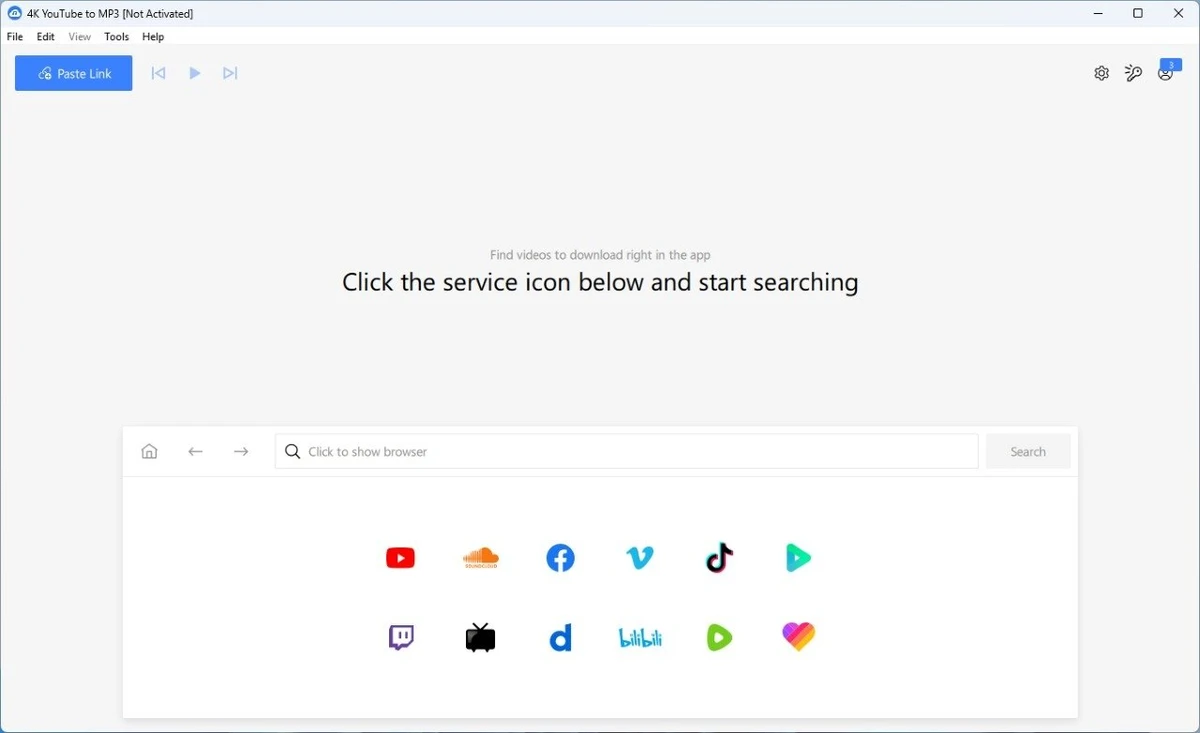
4K YouTube to MP3 is designed as a straightforward audio extraction tool that allows users to convert online videos into downloadable audio files. It supports platforms such as YouTube, Vimeo, Facebook, SoundCloud, Flickr, and DailyMotion, making it a versatile option for users who want to save audio content for offline listening. The software focuses on simplicity: users only need to copy a video URL and click “Paste Url” to start the download process. There are no complicated configurations or advanced setup steps, making it accessible even for beginners.

Features of 4K YouTube to MP3

  • Extract audio from YouTube videos and save in MP3, M4A, or OGG formats
  • Download full YouTube playlists or channels and generate M3U files
  • Automatically transfer downloaded tracks to iTunes for iPhone or iPod syncing
  • Built-in music player for listening to downloaded audio
  • Download audio from SoundCloud, Vimeo, Flickr, and DailyMotion
  • Support for downloading audiobooks from YouTube
  • Extract audio from embedded HTML video content
  • Available on Windows, macOS, and Linux

Interface and Usability

The interface of 4K YouTube to MP3 is described as clean and user-friendly. The workflow is intentionally minimal: users copy a link, paste it into the application, and begin downloading. This simplicity is one of its strongest points, especially for users who do not want to deal with technical settings or complex menus. The built-in structure helps streamline audio extraction without requiring additional tools or plugins.

Who Should Use 4K YouTube to MP3?

  • Users who want to download music or audio from YouTube and similar platforms
  • People looking for an easy offline listening solution
  • Users who prefer minimal setup and a clean interface
  • Those who need playlist or channel-based audio downloading
  • Anyone wanting cross-platform support (Windows, macOS, Linux)

Conclusion

4K YouTube to MP3 is a practical solution for users who want a quick and uncomplicated way to extract audio from online video platforms. Its focus on simplicity, combined with support for multiple sources and formats, makes it a useful everyday tool for offline listening.

Pros & Cons

Pros

  • Very simple and beginner-friendly interface
  • Supports multiple platforms beyond YouTube
  • Multiple audio formats available (MP3, M4A, OGG)
  • Playlist and channel downloading supported
  • Includes built-in player and iTunes integration

Cons

  • No advanced editing or customization options mentioned
  • No official update changelog available
  • Lacks detailed performance or quality benchmarks in provided data

Frequently Asked Questions

Is 4K YouTube to MP3 free to use?

Yes, based on the provided information, 4K YouTube to MP3 is free to use and does not include adware or malware.

Which platforms are supported?

The software is available on Windows, macOS, and Linux, making it compatible with most major operating systems.

What audio formats can I download?

You can extract and save audio in MP3, M4A, or OGG formats depending on your preference.

Can I download entire playlists or channels?

Yes, it supports downloading full YouTube playlists and channels, and it can also generate M3U playlist files.

Does it support websites other than YouTube?

Yes, it also allows audio extraction from Vimeo, SoundCloud, Flickr, and DailyMotion.

Is there a built-in music player?

Yes, the software includes a native music player so you can listen to downloaded audio directly within the application.

Recommended apps [Freeware]:
  • Easy System Utility 1.1.67 Easy System Utility logo clean junk files, repair tools, passwords and system optimization.
  • ShotCut 26.6.25 ShotCut logo free video editor for Windows with multi-format support, timeline editing, filters, and advanced video/audio tools
  • WinPaletter 1.0.9.8 WinPaletter logo Customize Windows themes, colors, icons, cursors, fonts, and visual styles
  • Mp3tag 3.35.1 Mp3tag logo Edit, organize, and manage audio tags easily with Mp3tag. Supports MP3, FLAC, M4A, WMA, and online tag lookup
  • NVIDIA App 11.0.8.299 NVIDIA App logo Manage GPU settings, update drivers, optimize games, and capture gameplay with a unified tool for NVIDIA graphics users.
  • Fire Toolbox 45.1 Fire Toolbox logo Customize Amazon Fire tablets with tools for app management, interface changes, backups, troubleshooting, and Android feature support.
Recommended apps [Shareware]:
  • COAA PlanePlotter 6.7.6.3 COAA PlanePlotter logo a Windows tool that decodes live aircraft data like ADS-B and ACARS and displays real-time radar-style tracking
  • DiskGenius 6.2.0.1829 DiskGenius logo a Windows tool for partition management, data recovery, disk cloning, and backup with advanced features.
  • Okdo Pdf to All Converter Professional 6.0 Okdo Pdf to All Converter Professional logo Convert PDF files to Word, Excel, PowerPoint, images, HTML, text, and more with batch processing support
  • EditPlus 6.1.0939 EditPlus logo powerful Windows text editor with syntax highlighting, coding tools, FTP support, and web editing features
  • Wise Care 365 8.0.4.732 Wise Care 365 logo Optimize Windows performance with system cleanup, registry tools, privacy protection, and hardware monitoring features.
  • Apowersoft Video Download Capture 6.6.4.0 Apowersoft Video Download Capture logo Download, record, convert, and edit online videos with a versatile tool supporting multiple formats, resolutions, and streaming sources.