FileLegit Windows Utilities Disk Tools Duplicate & Same Files Searcher
Duplicate & Same Files Searcher logo

Duplicate & Same Files Searcher 10.8.2

  • User Rating:
    ★★★★★
    ★★★★★
    0.0 ★ 0Votes
  • Requirements:
    Windows
  • Version: 10.8.2
  • Latest updated: 3 weeks ago
  • License: Freeware  
  • Publisher: Yury Malich
  • Size: 9 MB
× app stores

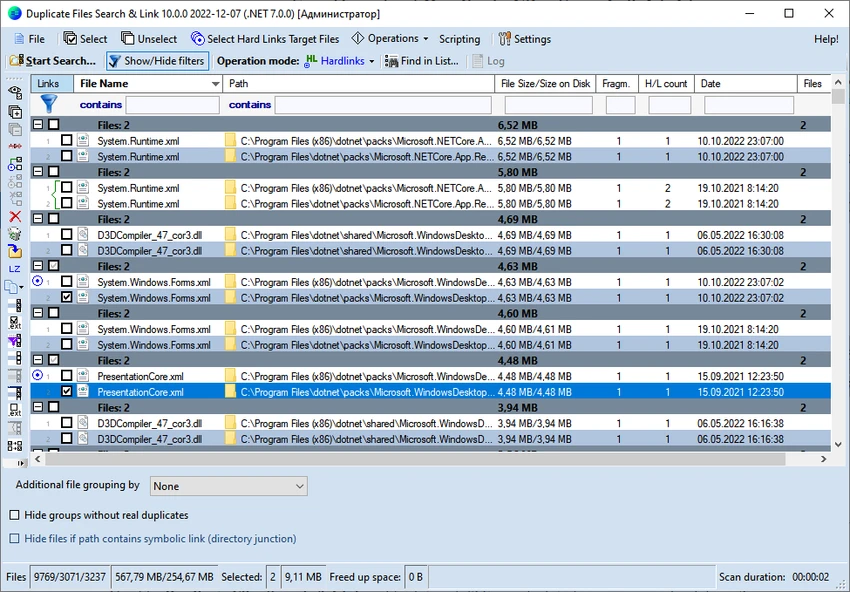
Duplicate & Same Files Searcher is a Windows utility designed to find duplicate files, identical file contents, and NTFS hard links on storage drives. Unlike simple duplicate finders that rely only on file names or sizes, this application performs true byte-to-byte comparisons to identify files with exactly the same content, even when they have different names.

I found the software especially focused on advanced file system management rather than basic cleanup. It can analyze duplicate files, detect NTFS hard links, and display detailed information about file relationships, including junction points and symbolic links. The application also gives users options to delete duplicates, move them to another location, or replace duplicate files with NTFS hard links, which is a distinctive capability.

Designed for Windows systems, Duplicate & Same Files Searcher supports modern NTFS features, long file paths, compressed files, alternate NTFS streams, and permission compatibility checks. It is a specialized tool for users who need deeper control over storage organization and duplicate file handling.

Key Features of Duplicate & Same Files Searcher

  • Accurate duplicate file detection using byte-to-byte comparison instead of relying only on file names.
  • NTFS hard link detection to identify files that reference the same data.
  • Detailed visualization of duplicate files, hard links, junction points, and symbolic links.
  • File fragmentation display to provide additional file information.
  • Color indication for compressed NTFS files for easier identification.
  • Manual and filtered file selection before deleting, moving, or replacing files.
  • Delete or move duplicate files to help manage storage space.
  • Replace duplicate files with NTFS hard links, allowing multiple file entries to reference the same data.
  • Compress files on NTFS volumes to help optimize storage usage.
  • Custom scan locations by selecting specific disks and folders.
  • Support for long file paths exceeding the traditional 260-character limit.
  • Save and load scan results for reviewing previous searches.
  • Support for alternate NTFS streams and NTFS-specific file features.
  • NTFS permission compatibility checking before replacing files with hard links.
  • Experimental MP3 comparison option that can ignore ID3 metadata differences and compare audio content.

Interface and Usability

Duplicate & Same Files Searcher focuses on functionality rather than a modern visual design. The interface is built around technical file analysis, giving users access to detailed information about duplicates, NTFS links, and file properties.

During use, the workflow is straightforward: select the disks or folders to scan, review the search results, and choose how to handle detected duplicates. The filtering and manual selection options provide better control compared with simpler duplicate removal tools that automatically delete files. Because the software includes advanced NTFS-related features, it may feel more technical for casual users. However, users familiar with file management concepts will appreciate the level of detail available, especially the ability to work with hard links and other Windows file system features.

Who Should Use Duplicate & Same Files Searcher?

  • Users who need a precise duplicate file detection tool based on actual file content.
  • Advanced Windows users managing large collections of files.
  • IT professionals or technical users working with NTFS file systems.
  • Users who want more control than standard duplicate cleaners provide.
  • Anyone needing to analyze hard links, symbolic links, or junction points.

Conclusion

Duplicate & Same Files Searcher is a specialized disk management tool for users who need accurate duplicate detection and advanced NTFS support. Its ability to identify hard links, analyze file relationships, and replace duplicates with NTFS hard links makes it different from typical duplicate file finders.

Pros & Cons

✓

Pros

  • Accurate byte-to-byte duplicate file comparison.
  • Supports NTFS hard link detection and replacement.
  • Provides detailed information about file relationships.
  • Supports long file paths and NTFS-specific features.
  • Offers flexible file selection before making changes.
  • Can save and reload scan results.
✕

Cons

  • Advanced features may be difficult for beginners.
  • Interface focuses on technical information rather than simplicity.
  • Some MP3 comparison functionality is experimental.

Frequently Asked Questions

What is Duplicate & Same Files Searcher?

Duplicate & Same Files Searcher is a Windows utility that helps users find duplicate files and NTFS hard links. It uses true byte-to-byte comparison to identify files with identical content, even if they have different names.

How does Duplicate & Same Files Searcher detect duplicate files?

The software compares the actual content of files rather than depending only on file names or file sizes. This byte-to-byte comparison method helps identify exact duplicates across selected drives and folders.

Can Duplicate & Same Files Searcher replace duplicate files with hard links?

Yes. The application can replace duplicate files with NTFS hard links, allowing multiple file entries to reference the same data. This feature is designed for users who need advanced NTFS file management options.

What versions of Windows are supported by Duplicate & Same Files Searcher?

Duplicate & Same Files Searcher supports Windows 7, Windows 8, Windows 8.1, Windows 10, and Windows 11.

Can I choose which folders or drives to scan?

Yes. Users can select specific disks and folders to scan for duplicate files. This makes it possible to analyze only the locations that need checking instead of scanning the entire system.

Is Duplicate & Same Files Searcher suitable for beginners?

The software can be used for basic duplicate file searches, but some advanced features, such as NTFS hard links, symbolic links, and permission compatibility checks, are aimed at more experienced Windows users who understand file system management.

Recommended apps [Freeware]:
  • QueueExplorer 5.0.88 QueueExplorer logo helps developers and admins manage, test, troubleshoot, and monitor message queues across platforms
  • Opera GX 133.0.5932.56 Opera GX logo Chromium-based gaming browser featuring CPU, RAM, and network limiters, built-in VPN, ad blocker, and gaming integrations.
  • Tagman 2025.11.03 Tagman logo Organize MP3 music libraries easily with Tagman using fingerprint technology and fast ID3 tag editing tools
  • ProgDVB 7.72.3 ProgDVB logo a multimedia player for watching digital TV, IPTV, satellite broadcasts, and online radio on Windows
  • Resolume Arena 7.27.0 rev 14395 Resolume Arena logo Professional software for live video mixing, projection mapping, edge blending, and synchronized audiovisual performances.
  • MultiPack .NET Windows Desktop Installer 2.2 MultiPack .NET Windows Desktop Installer logo Install multiple Microsoft .NET Windows Desktop Runtime versions in one package to improve application compatibility and performance.
Recommended apps [Shareware]:
  • Send Anywhere 24.6.1 Send Anywhere logo free cross-platform file-sharing tool that transfers files of any size without registration.
  • MediaHuman YouTube Downloader 3.9.22 MediaHuman YouTube Downloader logo download videos, playlists, and channels in HD, 4K, and 8K with audio support and MP3 extraction
  • EaseUS VoiceWave 3.5.0 EaseUS VoiceWave logo Transform your voice in real time with EaseUS VoiceWave using AI voice effects for gaming, streaming, and meetings
  • MobiKin Transfer for Mobile 5.1.17 MobiKin Transfer for Mobile logo Transfer contacts, photos, messages, and more between iOS and Android devices with MobiKin Transfer for Mobile on Windows
  • PopChar 10.1 Build 3360 PopChar logo insert special Unicode characters easily into documents without memorizing keyboard shortcuts
  • TrainController Gold 11.0 C1 TrainController Gold logo Control model railroads digitally with advanced automation, route management, and safety features for realistic train operations.