MuseScore logo

MuseScore 4.7.4

  • User Rating:
    ★★★★★
    ★★★★★
    0.0 ★ 0Votes
  • Requirements:
    Windows
  • Version: 4.7.4
  • Latest updated: 2 weeks ago
  • License: Open Source  
  • Publisher: MuseScore
  • Size: 122 MB
× app stores

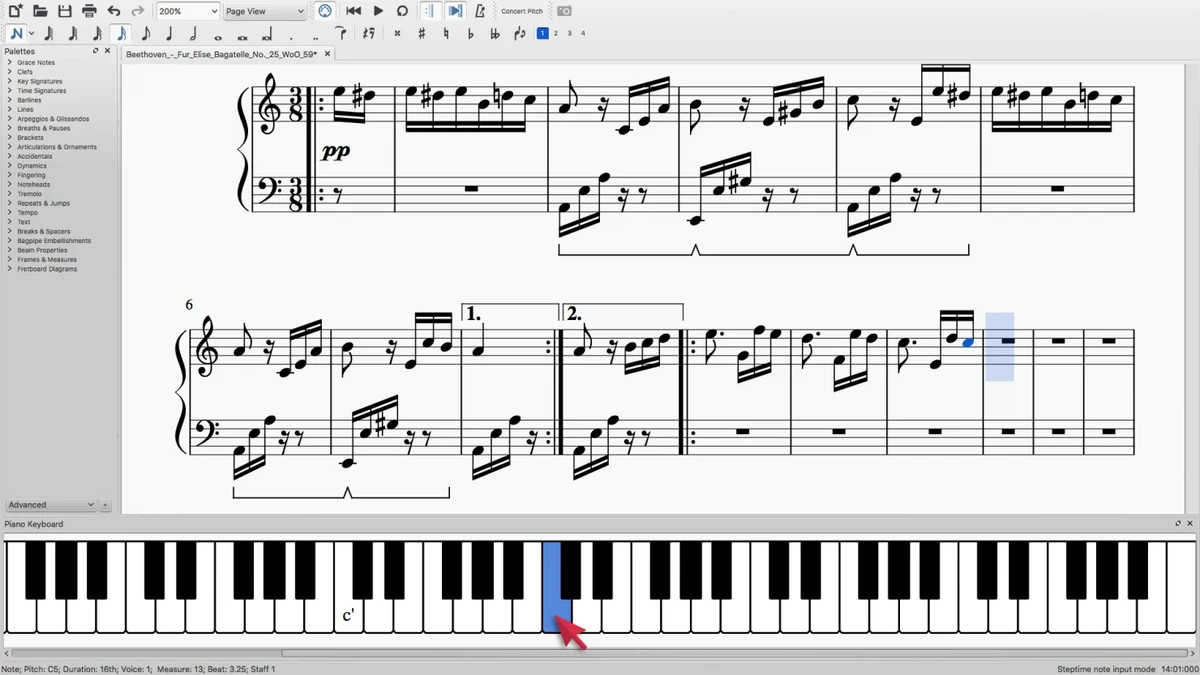
MuseScore is a free and open-source music notation application designed for composers, musicians, students, and educators who need to create professional-looking sheet music. The software allows users to write, edit, print, and share musical scores with support for unlimited staves and up to four voices per staff. It includes tools for creating music for piano, guitar, orchestra, jazz, choir, marching bands, and many other arrangements. MuseScore supports importing and exporting MIDI and MusicXML files, exporting scores as PDF or WAV files, and sharing compositions online. With its visual note sheet interface, MIDI keyboard support, and built-in playback tools, MuseScore provides a complete environment for writing and reviewing musical compositions.

Features of MuseScore

  • WYSIWYG music notation interface with a virtual note sheet.
  • Create scores with unlimited numbers of staves.
  • Support for up to four voices per staff.
  • Write music using keyboard, mouse, or MIDI keyboard input.
  • Supports dynamics, articulations, lyrics, chords, and lead sheet notation.
  • Integrated sequencer and FluidSynth software synthesizer.
  • Import and export support for MusicXML and Standard MIDI Files.
  • Export scores to PDF and WAV formats.
  • Supports online score sharing.
  • Available for Windows, macOS, and Linux.
  • Available in 43 languages.
  • Licensed under the GNU GPL open-source license.

Interface and Usability

MuseScore provides a visual editing experience where users create music directly on a virtual sheet. The WYSIWYG approach makes it easier to see how a finished score will appear while composing. Adding instruments is straightforward, allowing users to select instruments and include them in a score with a simple action. The software supports multiple input methods, including keyboard, mouse, and MIDI keyboard, giving musicians flexibility depending on their preferred workflow. The integrated playback features also allow users to listen to their compositions while editing.

While MuseScore offers many professional-level notation options, beginners may need time to learn the available tools and score creation workflow. However, the structured interface and extensive notation support make it suitable for both learning and advanced composition.

Who Should Use MuseScore?

  • Composers writing original music arrangements.
  • Music students learning notation and composition.
  • Teachers creating musical exercises and teaching materials.
  • Musicians preparing scores for performances.
  • Users looking for a free alternative to paid notation software.

Conclusion

MuseScore is a capable and accessible music notation solution for anyone who wants to create digital sheet music without paying for expensive software. Its combination of professional notation features, MIDI support, playback tools, and open-source availability makes it a strong choice for composers, students, and musicians.

Pros & Cons

✓

Pros

  • Free and open-source music notation software.
  • Supports unlimited staves and multiple voices.
  • Works with MIDI and MusicXML formats.
  • Available on Windows, macOS, and Linux.
  • Includes playback tools with an integrated synthesizer.
  • Supports many types of musical arrangements and instruments.
  • Available in multiple languages.
✕

Cons

  • Advanced features may require time for new users to learn.
  • The available information does not include comparisons with commercial notation applications.

Frequently Asked Questions

What is MuseScore used for?

MuseScore is used to create, edit, play, print, and share sheet music. It helps users write compositions for instruments such as piano, guitar, orchestra, jazz ensembles, choirs, and bands.

Is MuseScore free to use?

Yes. MuseScore is free and open-source software licensed under the GNU GPL.

Can MuseScore create professional sheet music?

Yes. MuseScore supports features such as dynamics, articulations, lyrics, chords, lead sheet notation, and unlimited staves, allowing users to create detailed musical scores.

Does MuseScore support MIDI files?

Yes. MuseScore supports importing and exporting Standard MIDI Files, as well as working with MIDI keyboards for note entry.

Which operating systems support MuseScore?

MuseScore is available for Windows, macOS, and Linux.

Can I export MuseScore files to PDF?

Yes. MuseScore allows users to export their scores as PDF files. It also supports exporting to WAV and sharing scores online.

Recommended apps [Freeware]:
  • Autoruns 14.30 Autoruns logo a Windows startup manager that reveals and controls all autostart programs, services, drivers, and registry entries
  • Tor Browser 15.0.18 Tor Browser logo anonymous web browsing with privacy protection, IP masking, and access to the Tor network
  • Youtube Downloader HD 6.0.0.0 Youtube Downloader HD logo a simple Windows tool for downloading and converting YouTube videos in HD formats
  • NoScript 13.6.30 NoScript logo Protect your browser by blocking scripts, preventing XSS attacks, and controlling trusted websites with customizable security settings.
  • HWiNFO 8.50 HWiNFO logo Analyze hardware components, monitor system sensors, generate detailed reports, and evaluate PC performance with a free diagnostic tool.
  • VidMasta 30.7 VidMasta logo Search, preview, and manage movie downloads with advanced filtering, subtitles, trailers, and detailed title information.
Recommended apps [Shareware]:
  • Sequence Generator Pro 4.5.0.1649 Sequence Generator Pro logo a Windows astrophotography capture suite for automating imaging, focus, and sequencing.
  • Net Monitor for Employees Professional 6.6.6 Net Monitor for Employees Professional logo track screen activity, usage, and productivity in business environments.
  • ON1 Photo RAW 2026.4 ON1 Photo RAW logo advanced AI masking, creative filters, and photo enlargement tools for photographers
  • CoolUtils PDF Combine 8.1.0.76/13 CoolUtils PDF Combine logo Windows tool for merging multiple PDF files into one, with bookmarks, encryption, and batch processing
  • Epic Pen 3.12.182 Epic Pen logo Windows annotation tool for drawing, writing, and highlighting directly on your screen
  • EmEditor 26.2.0 EmEditor logo a fast Windows code editor with large file support, syntax highlighting, regex search, and powerful editing tools