


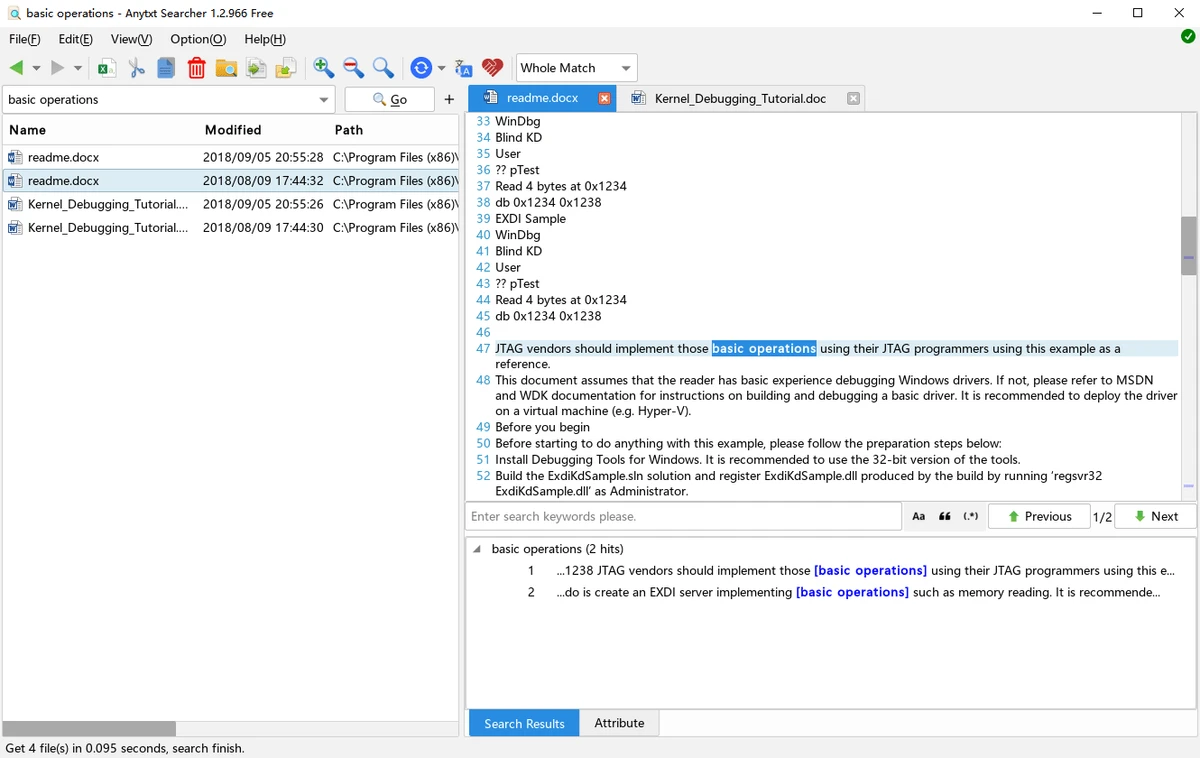

AnyTXT Searcher is a powerful desktop search application designed to help users quickly locate text inside files across their computer. Acting as a local “Google-like” search engine, it goes beyond standard file name searches by indexing and searching the actual content inside documents. The software is positioned as a faster and more advanced alternative to Windows Search and command-line search tools, offering full-text indexing across a wide range of file formats including documents, PDFs, emails, eBooks, images with OCR, and more.
Formats Supported:
- Plain Text Format (txt, java, html, etc.)
- Microsoft Outlook (eml) (beta)
- Microsoft Word (doc, docx)
- Microsoft Excel (xls, xlsx)
- Microsoft PowerPoint (ppt, pptx)
- Portable Document Format, including scanned PDF Document (pdf)
- Microsoft OneNote (one)
- eBook Formats (mobi, epub, azw, djvu, LaTex, etc.)
- Microsoft Compiled HTML Help (chm)
- WPS Format (wps, et, dps)
- Amazon Kindle Format (azw, azw3)
- Mind Map Format (lighten, mmap, emmx, mm, xmind etc.)
- Open Fixed-layout Document Format (ofd)
- WizNote (ziw)
- Edraw Max (eddx)
- OCR. Text In Any Image (png, jpg, bmp, scanned pdf etc.)
- Binary File (exe, dll, so)
- More Document Types are coming
Features of AnyTXT Searcher
- Full-text search across local files and documents
- High-speed indexing engine for rapid search results
- Supports Microsoft Office files (Word, Excel, PowerPoint)
- Searches PDFs, including scanned documents with OCR support
- Supports Outlook emails (EML format)
- eBook format support (EPUB, MOBI, AZW, CHM, and more)
- Image text recognition via OCR (PNG, JPG, scanned files)
- Real-time index synchronization
- Multi-language support (including Chinese, Japanese, Korean)
- SSD-optimized search performance
- HTTP search service for advanced usage
- Keyword preview and snippet view for results
- Supports additional document formats including OneNote and WPS Office files
User Experience
Using AnyTXT Searcher feels significantly faster and more powerful than traditional Windows search. Instead of relying only on file names, the tool indexes the actual content of documents, allowing users to find specific phrases or keywords inside large collections of files. After the initial indexing process, search results appear almost instantly. This makes it especially useful for users who regularly work with large volumes of documents, research files, or archived data.
One of the most impressive aspects is its support for a wide variety of file formats. Whether you are searching through Word documents, PDFs, spreadsheets, or even scanned images, the tool is capable of extracting and indexing text efficiently. The inclusion of OCR support is particularly valuable, as it allows the software to search text inside images and scanned PDFs—something that many basic desktop search tools cannot do.
Conclusion
AnyTXT Searcher is a highly efficient desktop search tool that transforms how users find information on their computers. With its powerful indexing engine, wide file format support, and OCR capabilities, it provides a significantly improved search experience compared to traditional Windows tools.


