Rapid PHP logo

Rapid PHP 2025 v18.7.0.277

  • User Rating:
    ★★★★★
    ★★★★★
    0.0 ★ 0Votes
  • Requirements:
    Windows
  • Version: 2025 v18.7.0.277
  • Latest updated: 2 weeks ago
  • License: Free Trial  
  • Publisher: Blumentals
  • Size: 120 MB
× app stores

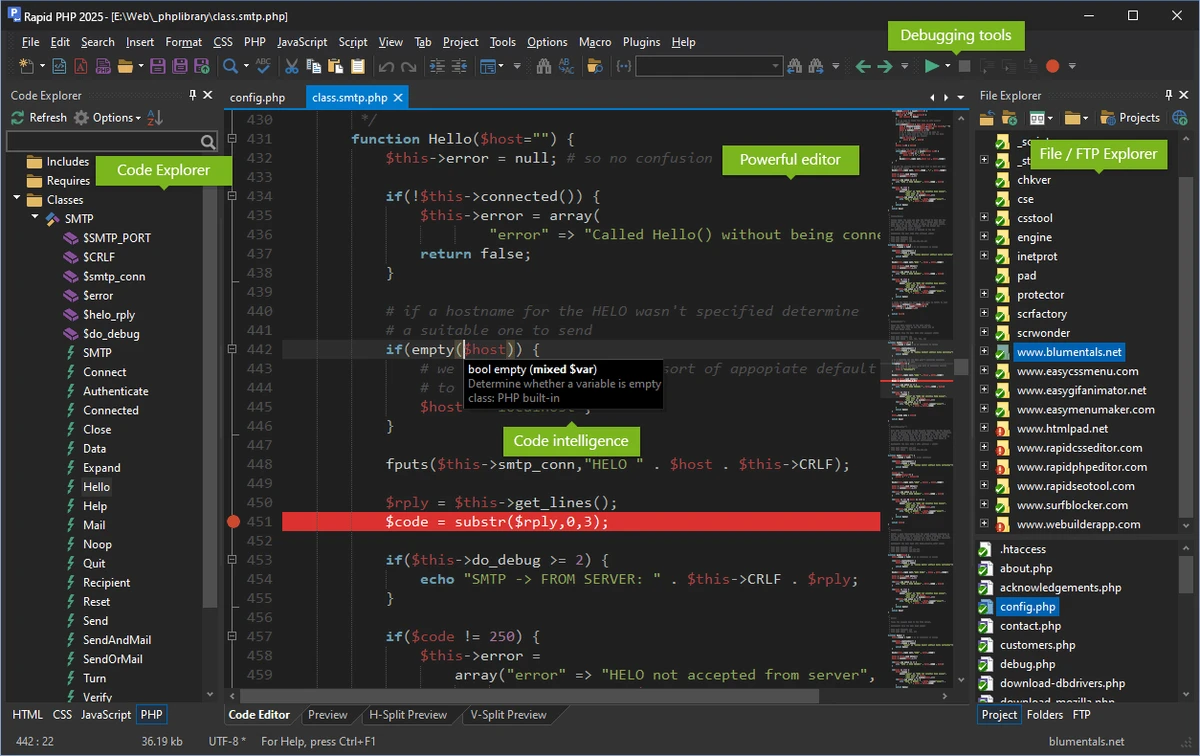
Rapid PHP is a Windows-based code editor that combines the speed of a lightweight text editor with the capabilities of a full-featured PHP IDE. Designed for web developers, it supports PHP alongside HTML, CSS, JavaScript, Smarty, XML, SQL, Apache configuration files, and other web technologies within a single development environment. The software provides intelligent coding tools such as syntax highlighting, code completion, navigation, and validation to help streamline development workflows. It also includes integrated debugging with Xdebug, real-time PHP syntax checking, HTML and CSS validation, and JavaScript checking through JSLint. Additional features such as direct FTP, SFTP, and FTPS connectivity, reusable code snippets, templates, advanced search and replace, and support for modern web standards like HTML5 and CSS3 make Rapid PHP suitable for developing, editing, debugging, and maintaining dynamic websites and web applications on Windows.

Features of Rapid PHP

  • Lightweight PHP editor with fast startup
  • Supports PHP, HTML, CSS, JavaScript, Smarty, XML, SQL, Apache, and more
  • Intelligent code completion, navigation, and suggestions
  • Syntax highlighting for multiple web programming languages
  • HTML5 and CSS3 support
  • Advanced CSS tools including Inspector, compatibility watch, prefixizer, and browser preview
  • Unicode support
  • Bracket matching and code folding
  • Auto-complete and auto-replace
  • Multi-highlight editing
  • Advanced search and replace with regular expression support
  • Smarty template engine support
  • Compatible with popular PHP frameworks
  • Xdebug integration for PHP debugging
  • Real-time PHP syntax checking
  • W3 HTML and CSS validation
  • JSLint JavaScript validation
  • Built-in spell checker
  • Direct FTP, SFTP, and FTPS editing and publishing
  • Code snippets and reusable templates
  • Code beautifier, dynamic ToDo manager, color picker, and XRay tools
  • Compatible with Windows 10 and Windows 11

Interface and Usability

Rapid PHP features a streamlined interface designed to prioritize coding efficiency while remaining lightweight and responsive. Frequently used development tools, including code completion, syntax highlighting, debugging, validation, and project navigation, are integrated into the workspace for quick access. The editor also includes customizable coding assistance, reusable snippets, and direct server connectivity, enabling developers to edit local or remote files without switching between multiple applications. Its focus on speed makes it suitable for both small projects and larger PHP-based web applications.

Who Should Use Rapid PHP?

  • PHP developers
  • Full-stack web developers
  • Front-end developers
  • Freelance web designers
  • Website maintenance professionals
  • Students learning PHP and web development
  • Developers working with PHP frameworks and Smarty templates

Conclusion

Rapid PHP combines the responsiveness of a lightweight code editor with many of the development tools expected from a PHP IDE. Its support for intelligent code editing, debugging, validation, remote file management, and modern web technologies makes it well suited for developing and maintaining PHP-based websites and web applications. Developers who want a fast Windows editor with integrated web development features, without the overhead of larger IDEs, may find Rapid PHP a practical solution for everyday coding tasks.

Pros & Cons

✓

Pros

  • Fast and lightweight compared to traditional PHP IDEs
  • Supports multiple web programming languages
  • Intelligent code completion and navigation
  • Integrated Xdebug debugging and syntax validation
  • Direct FTP, SFTP, and FTPS connectivity
  • Comprehensive HTML5 and CSS3 editing tools
  • Reusable code snippets and templates
  • Advanced search and replace with regex support
✕

Cons

  • Feature set is focused primarily on web development

Frequently Asked Questions

What programming languages does Rapid PHP support?

Rapid PHP supports PHP, HTML, CSS, JavaScript, Smarty, XML, SQL, Apache configuration files, and several other web development languages and technologies.

Does Rapid PHP include a PHP debugger?

Yes. The software integrates with Xdebug, allowing developers to debug PHP applications directly within the editor. It also includes real-time PHP syntax checking.

Can Rapid PHP edit files directly on a web server?

Yes. Rapid PHP supports FTP, SFTP, and FTPS connections, enabling users to edit files directly on remote servers or publish updates with minimal effort.

Does Rapid PHP support modern web development standards?

Yes. The editor includes support for HTML5, CSS3, intelligent code assistance, validation tools, and advanced CSS editing features designed for modern web development.

Is Rapid PHP suitable for beginners?

Yes. Its lightweight interface, intelligent code completion, reusable templates, snippets, and built-in validation tools can help new developers write and understand PHP and web code more efficiently.

What operating systems are supported by Rapid PHP?

According to the provided system requirements, Rapid PHP is compatible with Windows 10 and Windows 11.

Recommended apps [Freeware]:
  • Dr.Web Live Disk 9.0.1 Dr.Web Live Disk logo free bootable antivirus rescue disk that removes malware and helps recover infected systems
  • Jubler Subtitle Εditor 9.0.1 / 10.0.0 Jubler Subtitle Εditor logo edit, sync, translate, and correct subtitles with real-time video preview
  • BitDefender Antivirus Free Edition 27.0.60.339 BitDefender Antivirus Free Edition logo real-time protection against malware, phishing, and viruses for Windows users
  • iTop Voicy 1.3.0.1696 iTop Voicy logo Transform your voice in real time with iTop Voicy using AI-powered voice changing, custom voice models, and built-in noise reduction
  • Argente System Repair 1.0.8.2 Argente System Repair logo scans and fixes Windows errors to improve performance with simple, recommended, and custom modes
  • Waterfox 6.6.16.1 Waterfox logo Browse faster with a 64-bit Firefox-based browser optimized for performance, security, extensions, bookmarks, and downloads.
Recommended apps [Shareware]:
  • Rons WebLynx 2026.07.03.1618 Rons WebLynx logo offline Windows bookmark manager with tagging, automation, RSS support, and link checking
  • WavePad 24.38 WavePad logo audio editor for Windows, macOS, and mobile devices, offering effects, restoration tools, and batch processing
  • Start11 2.7.3 Start11 logo Windows customization tool that restores classic Start Menu styles and enhances taskbar functionality on Windows 10 and 11
  • HelpNDoc 10.7.0.400 HelpNDoc logo Create CHM help files, PDFs, Word docs, and web documentation easily with HelpNDoc’s all-in-one editor and compiler
  • QueueMonitor Professional 1.6.38 QueueMonitor Professional logo Monitor MSMQ queues, automate message processing, detect issues, and integrate external systems with a professional queue management tool.
  • Network LookOut Administrator Pro 5.5.5 Network LookOut Administrator Pro logo Monitor and manage network computers remotely with screen viewing, administration controls, and secure access features for Windows environments.