FileLegit Windows 유용 시스템 도구 Actual Multiple Monitors
Actual Multiple Monitors logo

Actual Multiple Monitors 8.15.4

  • 사용자 평점:
    ★★★★★
    ★★★★★
    0.0 0Votes
  • 시스템 요구사항:
    Windows
  • 버전: 8.15.4
  • 최신 업데이트: 3주 전
  • 라이선스: 무료 체험  
  • 제공자: Actual Tools
  • 크기: 11 MB
× app stores

Actual Multiple Monitors is a Windows utility designed to improve productivity and usability when working with multiple displays. Instead of relying on the default Windows multi-monitor behavior, it adds a wide range of enhancements such as independent taskbars, advanced window management tools, desktop customization features, and multi-display controls.

The software is especially useful for users with dual or multi-monitor setups, allowing each screen to function more independently and efficiently. It also introduces features aimed at gamers, professionals, and multitaskers who want better control over how windows and applications behave across screens. By extending the Windows interface, Actual Multiple Monitors helps users create a more organized and flexible multi-display workspace.

Features of Actual Multiple Monitors

  • Adds taskbar, Start menu, system tray, and task switcher to each monitor
  • Move windows between monitors using title bar buttons
  • Maximize windows across the entire multi-monitor desktop
  • Custom hotkey support for advanced window actions
  • Fully customizable keyboard shortcuts for window management
  • Gaming mode features:
    • Prevent game minimization (Ignore Deactivation)
    • Lock mouse within a screen or window
  • Desktop Divider for splitting screens into customizable zones
  • Window snapping with improved multi-monitor support
  • Snap windows to:
    • Monitor edges
    • Other windows
    • Custom grid layouts
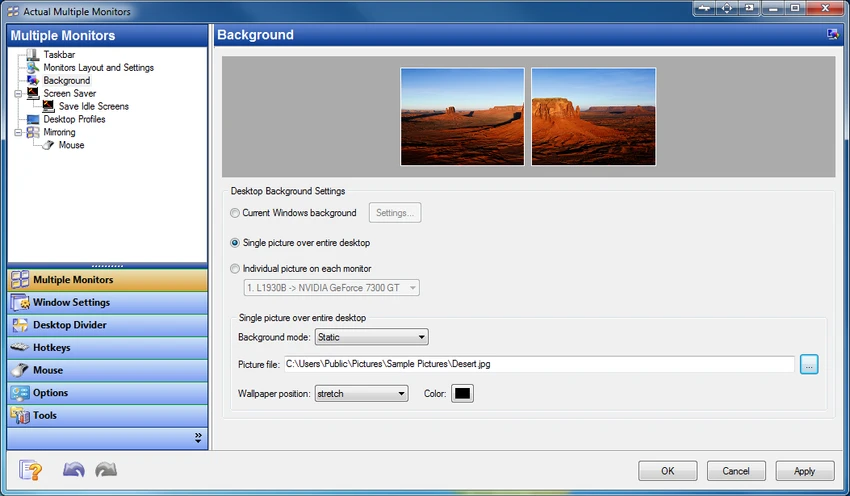
  • Multi-monitor wallpaper options:
    • Single image stretched across screens
    • Different wallpapers per monitor
    • Independent slideshow per display
    • Web-based image slideshows (Google Images, Flickr)
  • Multi-monitor screen saver support:
    • Stretch across all displays
    • Separate screen savers per monitor
  • Desktop mirroring for duplicating or projecting screen content
  • Support for presentations and remote display monitoring
  • Quick switching between laptop and external monitor profiles

Interface and Usability

Actual Multiple Monitors integrates directly into the Windows environment, enhancing the existing interface rather than replacing it. Once installed, additional taskbars and window controls appear across connected displays, making multi-screen navigation more intuitive. Most features are accessible through context menus, hotkeys, or window title bar buttons. Users can also configure profiles for different setups, such as switching between laptop-only mode and full multi-monitor mode.

While the software offers deep customization, its structure remains logical. However, users new to multi-monitor management may need time to explore and configure advanced features such as desktop division or mirroring.

Who Should Use Actual Multiple Monitors?

  • Professionals using dual or multi-monitor setups
  • Software developers and IT specialists
  • Designers, video editors, and creative professionals
  • Gamers who use secondary screens for streaming or browsing
  • Business users delivering presentations or managing workflows
  • Laptop users frequently switching between display configurations

Conclusion

Actual Multiple Monitors is a powerful and feature-rich solution for users who rely on multi-display setups. By extending Windows with per-monitor taskbars, advanced window management, and customizable desktop features, it significantly improves productivity and usability.

장점 및 단점

장점

  • Adds full taskbars and system tools to every monitor
  • Strong multi-window and workspace management tools
  • Excellent support for gaming and productivity workflows
  • Highly customizable hotkeys and window behavior
  • Advanced wallpaper and screen saver options
  • Supports desktop mirroring and presentation use cases
  • Improves usability of multi-monitor setups significantly

단점

  • Requires setup to fully configure advanced features
  • Can feel feature-heavy for casual users
  • Some tools may overlap with built-in Windows features
  • Learning curve for desktop divider and automation tools

자주 묻는 질문

What is Actual Multiple Monitors used for?

Actual Multiple Monitors is used to enhance multi-monitor setups by adding taskbars, window controls, wallpapers, and productivity tools to improve workflow across multiple displays.

Does Actual Multiple Monitors add a taskbar to every monitor?

Yes. It provides a full taskbar, Start menu, system tray, and task switcher on each connected display.

Can I move windows between monitors easily?

Yes. You can move windows using dedicated title bar buttons or hotkeys for quick transfer between screens.

Does Actual Multiple Monitors support gaming?

Yes. It includes gaming-focused features like preventing game minimization and locking the mouse within a screen or window.

Can I use different wallpapers on each monitor?

Yes. The software supports individual wallpapers, stretched images, and even separate slideshows for each display.

Is it suitable for laptop users?

Yes. It includes desktop profiles that allow quick switching between internal and external display setups.

추천 앱 [무료]:
  • TreeSize 9.8.2.2303 TreeSize logo Windows 디스크 공간 분석 도구로 저장 공간을 효율적으로 스캔, 시각화 및 정리하고 보고서를 생성합니다.
  • AB Download Manager 1.9.2 AB Download Manager logo 다운로드 대기열 관리, 예약, 속도 제어 및 브라우저 통합과 같은 기능을 갖춘 파일 다운로드 서비스입니다.
  • YouTube Music (Desktop App) 3.12.0 YouTube Music (Desktop App) logo 맞춤형 플러그인, 광고 차단, 키보드 단축키, 데스크톱 재생 기능을 통해 YouTube Music을 경험해 보세요.
  • Argente System Repair 1.0.8.2 Argente System Repair logo Windows 오류를 검사하고 수정하여 성능을 향상시키며, 간편, 권장 및 사용자 지정 모드를 제공합니다.
  • Volumouse 2.21 Volumouse logo 마우스 휠 단축키를 사용하여 Windows 사운드 볼륨을 빠르게 조절하고, 사용자 지정 규칙과 간단한 백그라운드 컨트롤을 활용할 수 있습니다.
  • Telegram 7.0.2 Telegram logo 다양한 기능을 갖춘 클라우드 메시징 플랫폼을 통해 안전하게 채팅하고, 파일을 공유하고, 대규모 커뮤니티에 참여하고, 여러 기기에서 연결 상태를 유지하세요.
추천 앱 [쉐어웨어]:
  • EF CheckSum Manager 26.07 EF CheckSum Manager logo 파일 무결성을 보장하고 손상을 감지하기 위해 MD5, SHA 및 SFV 체크섬을 생성하고 검증합니다.
  • EF Duplicate Files Manager 26.05 EF Duplicate Files Manager logo 파일 이름, 크기 또는 내용으로 중복 파일을 찾아 제거하여 저장 공간을 확보합니다.
  • Google Antigravity 2.3.0 Google Antigravity logo 자율 에이전트를 사용하여 코딩, 테스트 및 소프트웨어 개발 워크플로를 자동화하는 AI 기반 IDE
  • CMDebug 36.50.70 CMDebug logo Windows용 배치 스크립팅 IDE 및 디버거로, CMD 및 TCC-RT 스크립트 개발을 지원합니다.
  • SmarterMail Build 9686 SmarterMail logo 협업 도구, 스팸 방지, ActiveSync 지원 및 웹 기반 관리 기능을 통해 비즈니스 이메일을 호스팅하고 관리하세요.
  • TextPad 9.9.7 TextPad logo 매크로, 정규 표현식, 맞춤법 검사, 파일 비교 등 다양한 기능을 갖춘 강력한 Windows 편집기를 사용하여 대용량 텍스트 파일을 효율적으로 편집하세요.