


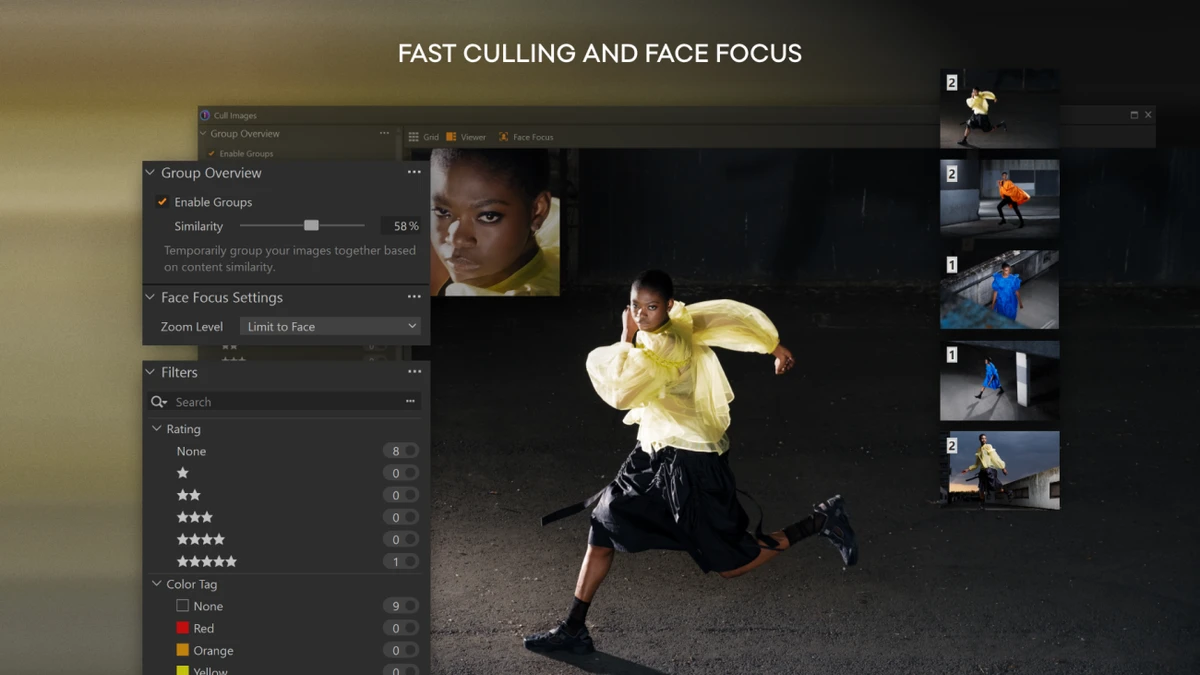

Capture One is a professional-grade RAW photo editing and workflow application designed for photographers who require high color accuracy, fast tethered shooting, and advanced editing control. It is widely used in studio and commercial photography environments due to its precision color science and efficient workflow tools.
The software includes tailored camera and lens profiles for hundreds of devices, enabling highly accurate RAW conversion and consistent image quality across different equipment setups. Capture One also emphasizes speed and collaboration, offering tools for real-time tethered capture, AI-assisted adjustments, and remote client review workflows.
Features of Capture One
Image Quality & Color Processing
- Advanced RAW converter with high-quality image rendering
- Camera profiles for nearly 600 camera models
- Lens profiles for over 700 lenses
- True-to-life color accuracy and professional color grading tools
- High dynamic range editing support
Tethered Shooting & Studio Workflow
- Lightning-fast tethered shooting directly to desktop
- Live View camera control from computer
- Instant image preview for on-set quality control
- Wireless tethering support (select Canon and Nikon cameras)
- Real-time organization during shoots
Editing & Productivity Tools
- Smart Adjustments with AI-assisted exposure and white balance matching
- Speed Edit for keyboard-driven adjustments without sliders
- Batch editing capabilities for large image sets
- Fast image culling with grouped similar shots
- Customizable interface and workspace layout
- Keyboard shortcut customization
Collaboration Tools
- Capture One Live for remote client collaboration
- Share images via link for real-time feedback
- Allows rating, commenting, and color tagging without downloads
- Supports multi-device access without additional software
User Experience
After using Capture One, the most noticeable strength is its exceptional color accuracy and professional-grade RAW processing. Images appear highly detailed and natural, especially when working with supported camera profiles. This makes it a preferred tool for photographers who require consistent and reliable color reproduction. The tethered shooting experience is particularly impressive. Connecting a camera to the software enables instant image transfer and full control from the computer, which significantly improves studio workflow efficiency. The Live View feature is especially useful for composition and lighting adjustments in real time.
The interface is highly customizable, allowing users to tailor layouts for culling, editing, or tethered shooting workflows. Tools like Speed Edit help streamline the editing process by reducing dependency on traditional sliders, which improves efficiency during large editing sessions. AI-assisted Smart Adjustments help maintain consistency across batches of photos taken under varying lighting conditions, reducing repetitive manual corrections. Overall, Capture One delivers a smooth, high-performance workflow designed for professionals who prioritize precision and speed in photography production.
Who Should Use Capture One?
- Professional photographers
- Studio and commercial photography teams
- Users who require tethered shooting workflows
- Photographers who prioritize color accuracy
- Creative professionals working with large RAW libraries
Conclusion
Capture One is a powerful, professional RAW photo editing and tethered shooting platform designed for high-end photography workflows. Its exceptional color accuracy, fast studio tools, and collaborative features make it a strong choice for professional photographers and creative teams.


