


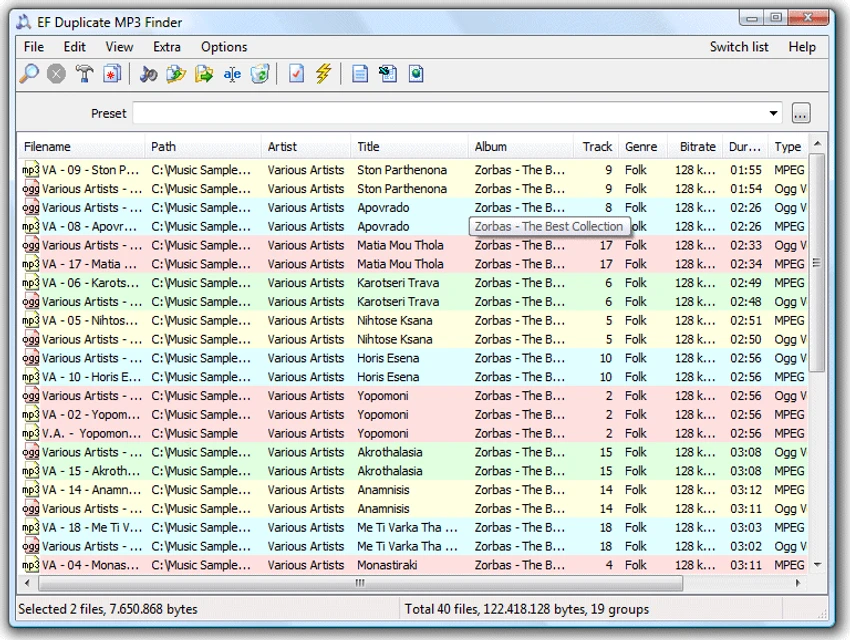

EF Duplicate MP3 Finder is a specialized audio file management utility designed to identify and remove duplicate music files from your computer or server. Unlike traditional duplicate file finders that rely solely on filenames or file sizes, this software analyzes audio metadata such as artist and title information to locate both exact duplicates and similar tracks. Supporting popular audio formats including MP3, FLAC, WMA, OGG/Vorbis, and iTunes-compatible files, EF Duplicate MP3 Finder is particularly useful for users with large music collections who want to reclaim storage space and improve library organization.
Features of EF Duplicate MP3 Finder
Duplicate Audio Detection
- Find exact duplicate audio files
- Detect similar audio files
- Compare artist and title metadata
- Analyze ID3 tag information
- Interpret track information from filenames when tags are unavailable
Supported Audio Formats
- MP3
- FLAC
- WMA
- OGG/Vorbis
- iTunes-compatible audio files
Extended Format Support via Plugins
- AAC
- APE
- CDA
- IT
- M4A
- M4B
- MOD
- MP4
- MPC
- MTM
- OFR
- OFS
- S3M
- SPX
- TTA
- UMX
- VQF
- WV
- XM
Flexible Search Options
- Search for exact duplicates
- Search for similar tracks
- Scan multiple drives
- Scan multiple folders
- Recursive subfolder scanning
Advanced Filtering
- Filter by file date
- Filter by file size
- Custom search parameters
- Save frequently used search presets
Folder Exclusions
- Exclude selected folders
- Exclude subfolders
- Avoid scanning system directories
- Skip backup locations
Duplicate File Management
- Delete duplicate files
- Copy duplicate files
- Move duplicate files
- Rename duplicate files
Reporting & Export
- Export results to HTML
- Export results to CSV
- Export results to plain text
- Save duplicate lists for future review
User-Friendly Results
- Color-coded duplicate display
- Easy identification of duplicate groups
- Clear result organization
Localization
- Multilingual interface support
User Experience
EF Duplicate MP3 Finder is designed specifically for music enthusiasts, collectors, and users managing extensive audio libraries. Its focused approach makes it more effective for audio management than general-purpose duplicate file finders. The standout feature is its metadata-based comparison system. Instead of relying solely on filenames, the software examines artist and title information stored within audio tags. This allows it to identify tracks that may have different filenames but represent the same song. The ability to search for similar files rather than only exact duplicates is particularly useful. Music collections often contain tracks with minor naming differences, alternative tagging, or slightly modified filenames. EF Duplicate MP3 Finder can help uncover these duplicate entries without requiring exact matches.
Scanning multiple drives and folders simultaneously makes the software practical for users with music stored across different locations. The filtering options further improve efficiency by narrowing searches to specific file sizes, dates, or folders. The color-coded results display enhances usability, making duplicate groups easy to review before taking action. Once duplicates are identified, users can choose whether to delete, move, copy, or rename files. For users with large digital music collections accumulated over many years, the software offers a straightforward way to eliminate redundant files and improve library organization.
Conclusion
EF Duplicate MP3 Finder offers a focused approach to music library maintenance by combining duplicate detection with metadata analysis. Its support for multiple audio formats, customizable search options, and ability to identify similar tracks make it a valuable tool for anyone looking to organize and optimize their audio collection.


