


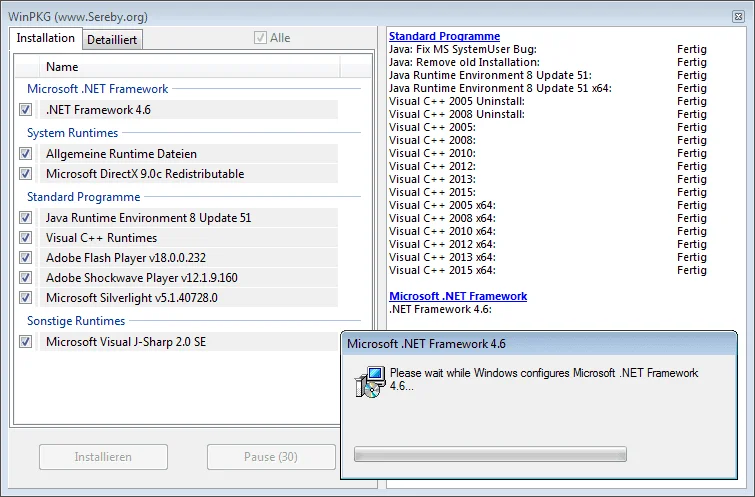

All in One Runtimes is a comprehensive package that installs many of the runtime components commonly required by Windows applications. Instead of downloading and installing multiple dependencies separately, users can deploy a single package that helps ensure software runs correctly across different Windows environments.
Overview
All in One Runtimes is designed to simplify the process of installing essential runtime libraries and frameworks that many applications depend on. The package includes components such as Microsoft .NET Framework, Visual C++ Runtimes, DirectX, Adobe Flash Player, and Adobe Shockwave Player.
One of its most useful features is automatic system detection. Before installation, the software analyzes the operating system and checks which runtime components are already present. This helps prevent unnecessary reinstallations and ensures that only missing dependencies are installed when needed.
The installer also allows users to choose which runtime packages they want to install, offering flexibility for both casual users and advanced system administrators.
Features of All in One Runtimes
- Comprehensive Runtime Collection: Includes multiple runtime components frequently required by Windows applications.
- Automatic System Detection: Scans the system and identifies missing runtime dependencies.
- Selective Installation: Allows users to choose which runtime packages to install.
- Avoids Duplicate Installations: Detects existing runtimes to prevent unnecessary reinstallation.
- Dependency Verification: Automatically checks system requirements before installation.
- Simplified Setup Process: Installs multiple runtime libraries from a single package.
- Broad Software Compatibility: Helps improve compatibility for older and newer Windows applications.
Included Components
Based on the provided information, All in One Runtimes includes:
- Microsoft .NET Framework
- Microsoft Visual C++ Runtimes
- DirectX
- Adobe Flash Player
- Adobe Shockwave Player
The installer automatically determines which components are appropriate for the detected Windows version.
User Experience
Using All in One Runtimes is straightforward. After launching the installer, the software analyzes the system and presents the runtime packages that may be required. Users can review the recommendations and choose which components to install. The automatic detection process is particularly helpful because it reduces guesswork and minimizes the risk of installing unnecessary packages. This makes the tool useful for troubleshooting software compatibility issues or preparing newly installed Windows systems.
For technicians, IT professionals, and users who frequently reinstall Windows, having a single package that bundles multiple runtimes can save considerable time compared to downloading each component individually.
Who Should Use All in One Runtimes?
All in One Runtimes is ideal for:
- Windows users troubleshooting application errors
- PC technicians and IT support professionals
- Users setting up newly installed Windows systems
- Gamers encountering missing runtime or DLL issues
- Anyone looking to simplify runtime dependency management
Conclusion
All in One Runtimes provides a convenient solution for installing many of the runtime components required by Windows software. Its automatic detection capabilities, selective installation options, and bundled approach make it a valuable utility for maintaining application compatibility and reducing setup time. If you frequently encounter missing runtime errors or regularly configure Windows systems, All in One Runtimes is a useful tool to keep on hand.


