


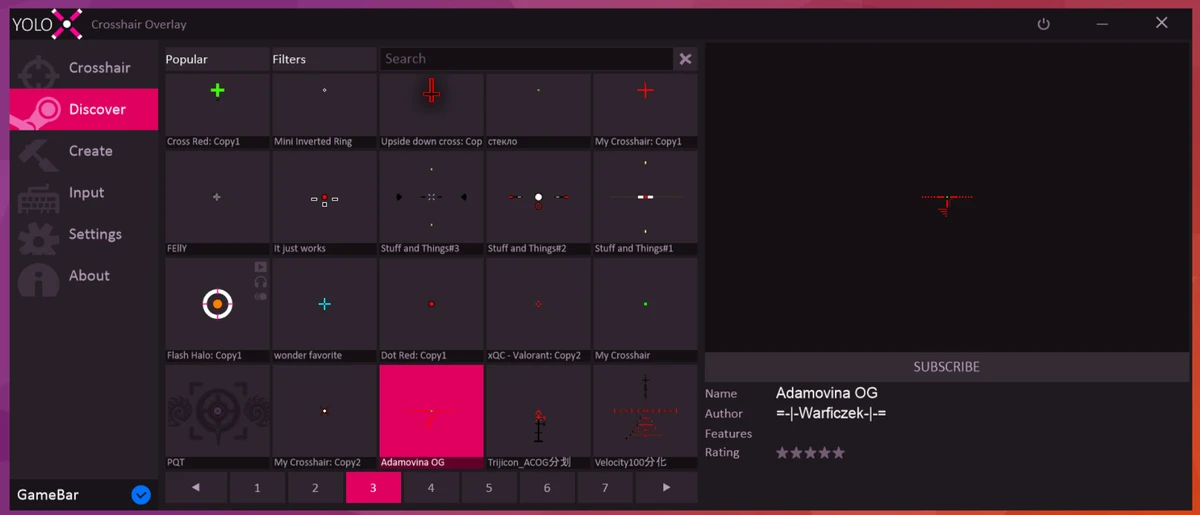

YoloX is a Windows-based crosshair customization tool designed for gamers who want more control over their aiming reticle across different games. Instead of relying on built-in game crosshairs, it provides an external overlay system that allows users to create, adjust, and apply custom crosshair designs in real time.
The software focuses on enhancing visual feedback during gameplay through animations, effects, and sensor-based reactions. It supports multiple profiles per game, making it possible to switch crosshair setups depending on the title or playstyle. YoloX is built as a lightweight overlay solution that works without requiring additional plugins or external game integrations.
Features of YoloX
- Custom crosshair overlay for games
- Inverted color effects and visual enhancements
- Separate animations for main fire, alternate fire, and jumping actions
- Audio sensor reactions that respond to in-game sound or music
- Motion sensor reactions based on mouse movement
- Works in fullscreen and other display modes
- No additional plugins or external overlays required
- Highly optimized performance with minimal system impact
- Game-specific profiles for crosshair size, offset, and settings
- Wide selection of crosshairs from community, pros, and streamers
- Ability to create and publish custom crosshair designs
- Auto-hide crosshair when not needed
- Lossless scaling from 25% to 200%
- Hotkeys for switching crosshairs, scaling, and toggling features
- Autostart and Steam status desync options
- Overlay-only design with anti-cheat compliance
Interface and Usability
YoloX uses a lightweight configuration-based interface focused on speed and quick customization. Users can create or select crosshair profiles and assign them to specific games. Settings are adjusted through menus that control appearance, scaling, animations, and behavior. Once configured, the tool runs in the background as an overlay, displaying the crosshair on top of the game screen. Hotkeys allow quick adjustments during gameplay, such as switching crosshair styles or modifying size and position. The system is designed to minimize disruption while gaming.
Who Should Use YoloX?
- FPS and competitive gamers who want custom crosshairs
- Players looking for visual aiming consistency across multiple games
- Streamers who want personalized HUD elements
- Users who prefer overlay-based tools instead of in-game mods
- Gamers who want animated or responsive crosshair effects
Conclusion
YoloX provides a flexible and modern approach to crosshair customization by using an external overlay system instead of relying on in-game settings. With support for animations, audio and motion reactions, and per-game profiles, it offers a wide range of personalization options for different gaming styles.


