Becky! Internet Mail logo

Becky! Internet Mail 2.83.03

  • User Rating:
    ★★★★★
    ★★★★★
    0.0 0Votes
  • Requirements:
    Windows
  • Version: 2.83.03
  • Latest updated: 2 months ago
  • License: Free Trial  
  • Publisher: RimArts Inc
  • Size: 8 MB
× app stores

Becky! Internet Mail is a long-standing Windows email client designed for users who need a fast, efficient, and highly customizable way to manage multiple email accounts. Since its initial release in 1996, it has evolved into a mature communication tool known for its stability, compact size, and advanced mailbox organization features.

During evaluation of its capabilities, Becky! Internet Mail stands out as a productivity-focused email solution rather than a heavily cloud-integrated modern client. It prioritizes control, performance, and flexibility, making it particularly suitable for users who manage multiple accounts or require structured email workflows. Unlike many modern email clients that emphasize design and integration, Becky! focuses on functionality, speed, and reliability.

Features of Becky! Internet Mail

  • Supports multiple mailboxes and multiple profiles per mailbox.
  • Compatible with POP3, IMAP4, and SMTP protocols.
  • SSL support for secure email communication.
  • Lightweight and optimized Windows application.
  • HTML email viewing and composition using Microsoft IE components.
  • Template system for recurring email tasks and responses.
  • Built-in reminder system for scheduled messages.
  • Advanced filtering manager with complex AND/OR rules.
  • Drag-and-drop filtering rule creation (with Alt key support).
  • Mailing list manager for handling subscriptions.
  • Plug-in interface for extending functionality.
  • Portable usage via “Sync With Portable Media” (USB support).
  • Query feature for searching across folders and saving results.
  • “Agents” system for task management (e.g., follow-ups, reminders).

Interface and Usability

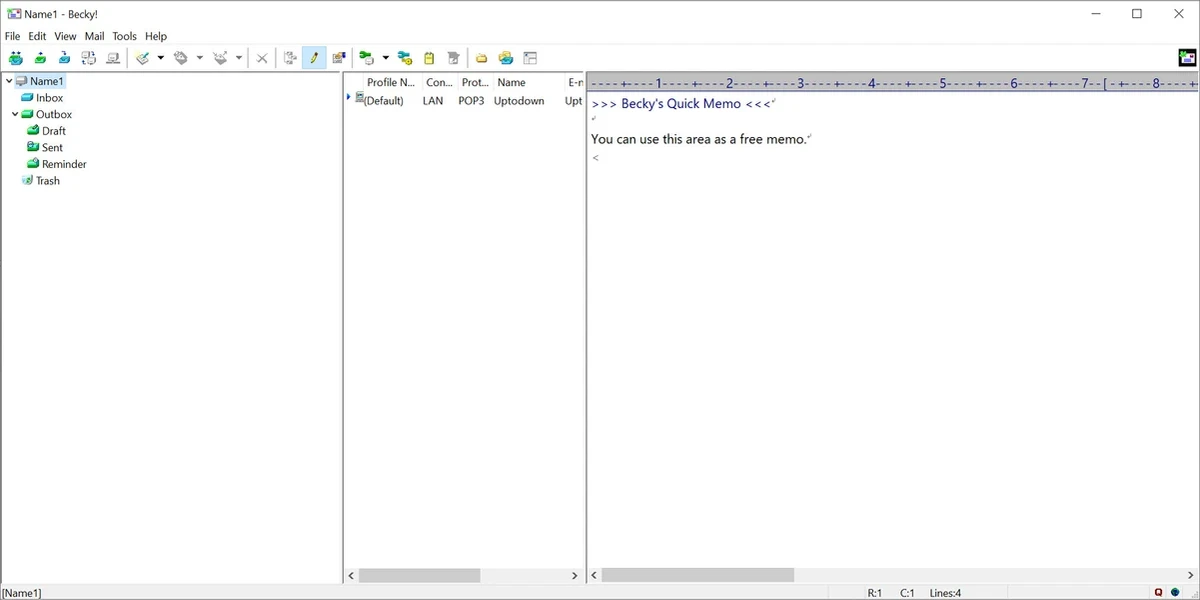
Becky! Internet Mail uses a traditional desktop email interface focused on efficiency and clarity. From my experience reviewing its structure, the layout prioritizes mailbox management and message handling rather than visual modernity.

The multi-mailbox system is particularly well-designed, allowing users to separate accounts while still managing them within a unified environment. The filtering and template systems significantly improve workflow efficiency for users who handle large volumes of email. While the interface may feel less modern compared to cloud-based clients, it compensates with speed, responsiveness, and a strong feature set for power users.

Who Should Use Becky! Internet Mail?

  • Professionals managing multiple email accounts.
  • Users who prefer lightweight desktop software.
  • IT users who need advanced filtering and automation.
  • Organizations requiring structured email workflows.
  • Users who prefer POP3/IMAP-based email clients.
  • People who value stability over modern cloud integrations.

Conclusion

Becky! Internet Mail is a highly capable and efficient email client designed for users who need advanced control over multiple accounts and email workflows. Its strength lies in performance, flexibility, and deep customization rather than modern visual design or cloud integration.

Pros & Cons

Pros

  • Fast and lightweight performance
  • Supports multiple mailboxes and profiles
  • Advanced filtering system with complex rules
  • Template and automation features
  • Plug-in support for extensibility
  • Portable usage via USB synchronization
  • Stable and mature software

Cons

  • Interface feels outdated compared to modern email clients
  • Limited modern cloud/email ecosystem integration
  • Requires manual configuration for advanced features

Frequently Asked Questions

What is Becky! Internet Mail used for?

It is used for managing multiple email accounts with advanced features such as filtering, templates, reminders, and mailbox organization.

Does Becky! Internet Mail support IMAP and POP3?

Yes. It supports POP3, IMAP4, and SMTP protocols with SSL security options.

Can I manage multiple email accounts in Becky! Internet Mail?

Yes. The software supports multiple mailboxes and even multiple profiles per mailbox.

Does Becky! Internet Mail support email automation?

Yes. It includes templates, filtering rules, reminders, and an “Agents” system for managing follow-ups and tasks.

Can Becky! Internet Mail be used on a USB drive?

Yes. It includes a portable synchronization feature that allows usage from removable media.

Is Becky! Internet Mail suitable for modern cloud email services?

It primarily focuses on traditional email protocols like POP3 and IMAP, rather than deep integration with modern cloud-based ecosystems.

Recommended apps [Freeware]:
  • WSCC - Windows System Control Center 10.0.4.0 WSCC - Windows System Control Center logo Windows utility manager that installs, organizes, and runs Sysinternals and system tools from one central interface
  • Smadav 2026 v15.8.2 Smadav logo a lightweight antivirus for Windows that provides USB protection, malware cleaning, and additional security
  • ExpanDrive 2026.06.11 ExpanDrive logo mounts cloud storage and remote servers as local drives for seamless file access in Windows Explorer
  • Calibre 9.11.0 Calibre logo a free, open-source e-book manager for organizing, converting, and reading ebooks across multiple formats on Windows
  • SmartImage 1.3.1 SmartImage logo Find matching images online quickly with a reverse image search tool supporting multiple search engines and flexible input options.
  • WordPress 7.0.2 WordPress logo Create websites, blogs, and online platforms easily with a flexible publishing system offering themes, plugins, and content tools.
Recommended apps [Shareware]:
  • Ant Download Manager 2.17.9 Ant Download Manager logo a Windows tool that speeds up downloads, captures streaming media, supports torrents, and integrates with browsers
  • VideoPad Video Editor 18.38 VideoPad Video Editor logo a Windows movie maker for editing videos, adding effects, transitions, audio, and exporting to social platforms
  • DiskBoss 17.0.14 DiskBoss logo powerful Windows file management tool for disk analysis, duplicate cleanup, file synchronization, and data migration
  • Zebra CardStudio 2.5.44 Zebra CardStudio logo Zebra CardStudio helps businesses design, encode, and print professional ID cards and Digital IDs with advanced data management.
  • Muziza YouTube Downloader Converter 9.5.7 Muziza YouTube Downloader Converter logo Download online videos, convert media files, extract audio, manage playlists, and optimize videos for multiple devices.
  • LastPass Password Manager 5.4.4 LastPass Password Manager logo Securely store passwords, generate strong credentials, autofill logins, and manage your accounts across multiple devices from one vault.