FileLegit Windows Drivers & Hardware USB Tools Universal USB Installer
Universal USB Installer logo

Universal USB Installer 2.0.3.7

  • User Rating:
    ★★★★★
    ★★★★★
    0.0 0Votes
  • Requirements:
    Windows
  • Version: 2.0.3.7
  • Latest updated: 23 hours ago
  • License: Freeware  
  • Publisher: Pendrive Linux
  • Size: 19.2 MB
×

Universal USB Installer is a lightweight Windows utility designed to create bootable Linux USB drives. It allows users to select a Linux distribution, load an ISO file, and write it directly to a USB flash drive in just a few steps. The tool is aimed at users who want a quick and straightforward way to test or install Linux without complex setup procedures.

Overview

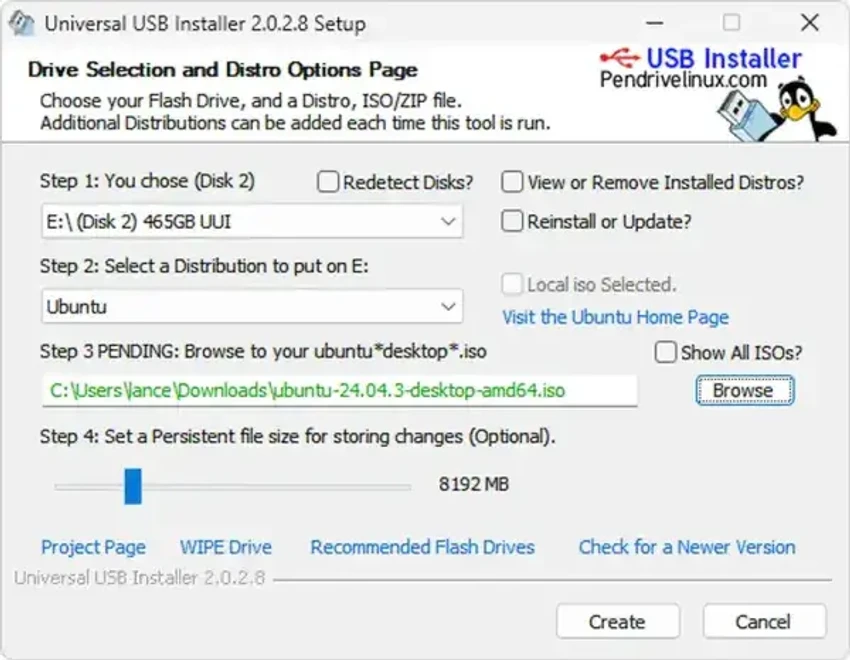
Universal USB Installer focuses on simplicity in creating Live Linux USB drives. It supports selecting from a range of Linux distributions, choosing an ISO file, and preparing a USB flash drive that can boot directly into a Linux environment. The tool also supports optional persistence (when available), allowing users to save data and settings between sessions. Additionally, it can format the USB drive using FAT32, which helps ensure compatibility and a clean installation process.

Overall, it is designed for users who want a fast and minimal approach to preparing Linux boot media from a Windows system.

Features of Universal USB Installer

  • Create bootable Linux USB drives from ISO files
  • Supports multiple Linux distributions
  • Simple step-by-step interface for beginners
  • FAT32 formatting option for clean USB preparation
  • Persistence support (when available for selected distributions)
  • Direct installation to USB flash drives
  • Lightweight utility with minimal setup requirements
  • Designed for use on Windows systems

User Experience

Using Universal USB Installer feels straightforward and focused. The workflow is guided: users select a distribution, choose an ISO file, pick a USB drive, and start the installation process.

The interface is minimal, which reduces confusion and makes it accessible even for users who have never created a bootable drive before. The inclusion of formatting and persistence options adds useful flexibility without overwhelming the user with advanced configuration settings.

Conclusion

Universal USB Installer is a practical and easy-to-use tool for creating bootable Linux USB drives on Windows. Its guided process and minimal interface make it especially useful for beginners or users who need quick access to Linux without complex setup steps.

Pros & Cons

Pros

    • Very simple and beginner-friendly interface
    • Quick creation of bootable Linux USB drives
    • Supports multiple Linux distributions
    • Includes FAT32 formatting option
    • Offers persistence support where available
    • Lightweight and easy to use

Cons

    • Limited advanced configuration options
    • Focused mainly on Linux ISO use cases
    • No official rating or changelog provided
    • Less suitable for complex multi-boot setups

Frequently Asked Questions

What is Universal USB Installer used for?

Universal USB Installer is used to create bootable Linux USB drives from ISO files on Windows systems.

Does it support multiple Linux distributions?

Yes, it allows users to choose from a selection of Linux distributions before creating a bootable drive.

Can I save data on the USB after installation?

It supports persistence for certain Linux distributions, allowing saved data between sessions.

Do I need to format my USB drive?

The tool includes a FAT32 formatting option, which is recommended for a clean installation.

Is Universal USB Installer beginner-friendly?

Yes, it is designed with a simple step-by-step process that makes it easy for beginners to use.

Recommended apps [Freeware]:
  • Trillian 6.6 Build 15 Trillian logo all-in-one chat software designed to simplify online communication
  • WinScan2PDF 9.77 WinScan2PDF logo scan documents and save them as PDFs or JPEGs with minimal setup and low CPU usage.
  • StaxRip 2.52.4 StaxRip logo powerful Windows GUI for video/audio encoding using FFmpeg, x265, AviSynth+, VapourSynth, and more.
  • Visual Studio Code 1.124.2 Visual Studio Code logo Free and powerful code editor from Microsoft with extensions, debugging, Git support, and multi-language development
  • CalendarTask 3.29.287.9038 CalendarTask logo lightweight desktop calendar with note-taking, cloud sync, reminders, and desktop scheduling tools
  • CS Easy Unlocker 1.1.5.0 CS Easy Unlocker logo unlock restricted folders and fix “Access Denied” errors with a simple one-click tool.
Recommended apps [Shareware]:
  • iBackup Viewer 4.3.14.2 iBackup Viewer logo extract contacts, messages, photos, and app data from iPhone backups
  • Wondershare Filmora 15.3.20.18660 Wondershare Filmora logo a powerful, user-friendly video editor with effects, transitions, and 4K support.
  • Wondershare PDFelement Professional 12.1.23 Wondershare PDFelement Professional logo a PDF editor for editing, converting, signing, and managing documents easily.
  • HyperSnap 10.0.3 HyperSnap logo captures screenshots, scrolling windows, OCR text and video with advanced editing tools on Windows.
  • Bandizip 7.44 Bandizip logo Fast and intuitive file compression software supporting ZIP, RAR, 7Z, and more with high-speed archiving features
  • Secret Disk 2026 v323 Secret Disk logo create hidden, password-protected virtual drives to securely store private files on Windows