OCCT logo

OCCT 16.1.11.99

  • User Rating:
    ★★★★★
    ★★★★★
    0.0 0Votes
  • Requirements:
    Windows
  • Version: 16.1.11.99
  • Latest updated: 5 days ago
  • License: Freeware  
  • Publisher: ocbase
  • Size: 288 MB
×

OCCT is a hardware monitoring and stress testing utility designed for users who want to evaluate system stability, monitor performance, and test overclocked components. It provides dedicated testing modules for processors, graphics cards, memory, and power supplies, helping users identify potential hardware issues before they affect everyday use. The software is particularly popular among PC enthusiasts, overclockers, and technicians who need reliable system diagnostics and performance validation.

Overview

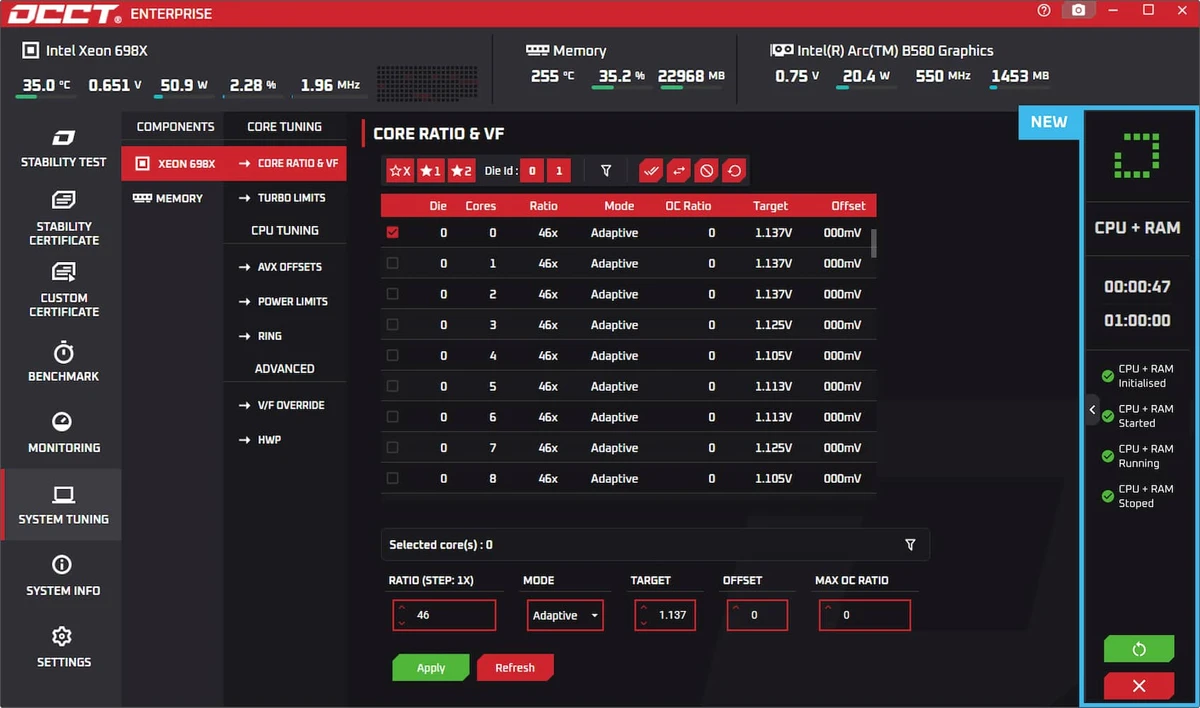
OCCT combines hardware monitoring with stress testing in a single application. It allows users to run intensive workloads on specific system components while monitoring temperatures, frequencies, power usage, and overall stability in real time. The software includes specialized tests such as OCCT Benchmark and LINPACK for CPU analysis, alongside GPU and power supply testing tools. These tests can be customized with various parameters, giving users control over workload intensity and duration. Its clean interface makes it easy to switch between monitoring and testing modes, while live graphs provide immediate feedback on system behavior.

Features of OCCT

  • CPU stress testing with OCCT Benchmark and LINPACK tests
  • GPU stability and performance testing
  • Power supply stress testing
  • Real-time hardware monitoring and performance graphs
  • CPU and memory usage tracking
  • Live monitoring of CPU frequencies and system activity
  • Customizable test duration and workload settings
  • Adjustable memory allocation for LINPACK testing
  • GPU test customization with resolution and FPS limits
  • Support for external monitoring solutions such as AIDA64
  • Detailed hardware information for CPU and motherboard components
  • Easy start and stop controls for testing sessions

User Experience

OCCT delivers a straightforward experience focused on diagnostics and system validation. The interface is divided into monitoring and testing sections, allowing users to quickly launch stress tests while keeping an eye on system performance metrics. The real-time graphs are particularly useful during testing, providing immediate visibility into CPU load, memory usage, and frequency changes. Users experimenting with overclocking can easily observe how hardware behaves under sustained workloads. While beginners can run basic tests without difficulty, understanding the results requires some familiarity with hardware performance and stability testing concepts.

Who Should Use OCCT?

OCCT is ideal for:

  • PC enthusiasts testing hardware stability
  • Overclockers validating CPU and GPU configurations
  • IT technicians diagnosing hardware problems
  • System builders stress-testing newly assembled PCs
  • Gamers monitoring performance under heavy workloads

Conclusion

OCCT is a powerful diagnostic and stress-testing tool that helps users evaluate system stability and hardware performance. Its combination of monitoring features and configurable testing modules makes it particularly valuable for enthusiasts, overclockers, and technicians.

Pros & Cons

Pros

    • Comprehensive CPU, GPU, and PSU testing tools
    • Real-time monitoring with detailed performance graphs
    • Customizable stress-testing parameters
    • Easy-to-use interface for launching tests
    • Useful for validating overclocked systems

Cons

    • Primarily focused on testing rather than optimization
    • Advanced results may be difficult for beginners to interpret
    • Limited utility for users who do not perform hardware diagnostics

Frequently Asked Questions

What is OCCT used for?

OCCT is used to stress test and monitor hardware components such as CPUs, GPUs, memory, and power supplies.

Can OCCT test overclocked systems?

Yes. It is commonly used to verify the stability of overclocked CPUs and GPUs under heavy workloads.

Does OCCT monitor hardware temperatures?

OCCT monitors various hardware metrics and can work alongside supported monitoring solutions to provide detailed system data.

Is OCCT suitable for beginners?

Basic testing is easy to perform, but understanding hardware stability results may require some technical knowledge.

Recommended apps [Freeware]:
  • EarthTime 6.33.4 EarthTime logo displays world clocks, weather, and local times for 120,000+ cities with customizable alarms and maps.
  • WinScan2PDF 9.77 WinScan2PDF logo scan documents and save them as PDFs or JPEGs with minimal setup and low CPU usage.
  • DirPrintOK 7.61 DirPrintOK logo fast and portable tool to print or export directory contents in XLS, HTML, CSV, or TXT formats.
  • Stretchly 1.21.0 Stretchly logo reminds you to take breaks while working on your computer, promoting better health and productivity.
  • Android Studio 2026.1.1.9 Android Studio logo Google’s official IDE for Android, offering intelligent coding, fast emulators, and cloud integration.
  • Glow 26.9 Glow logo advanced Windows system analysis tool offering deep hardware insights, diagnostics, benchmarks, and system optimization utilities
Recommended apps [Shareware]:
  • Coolutils Print Maestro 4.2.0.0 Coolutils Print Maestro logo print folder contents, export directory trees, and generate detailed file reports quickly
  • iBackup Viewer 4.3.14.2 iBackup Viewer logo extract contacts, messages, photos, and app data from iPhone backups
  • SketchUp Pro 2026 SketchUp Pro logo powerful 3D modeling software for architects, designers, and engineers with intuitive tools.
  • Adobe Illustrator 2026 Adobe Illustrator logo professional vector graphic editor for creating logos, illustrations, and scalable designs.
  • Foxit PDF Editor 2026.1.1.36485 Foxit PDF Editor logo complete PDF solution for businesses, offering advanced editing, collaboration, and document security features.
  • Charles 5.2.0 Charles logo HTTP proxy tool for web debugging, allowing developers to inspect, modify, and analyze network traffic in real time