Chris-PC Game Booster logo

Chris-PC Game Booster 7.26.0706

  • User Rating:
    ★★★★★
    ★★★★★
    0.0 ★ 0Votes
  • Requirements:
    Windows
  • Version: 7.26.0706
  • Latest updated: 3 weeks ago
  • License: Free Trial  
  • Publisher: Chris-PC Software
  • Size: 3 MB
× app stores

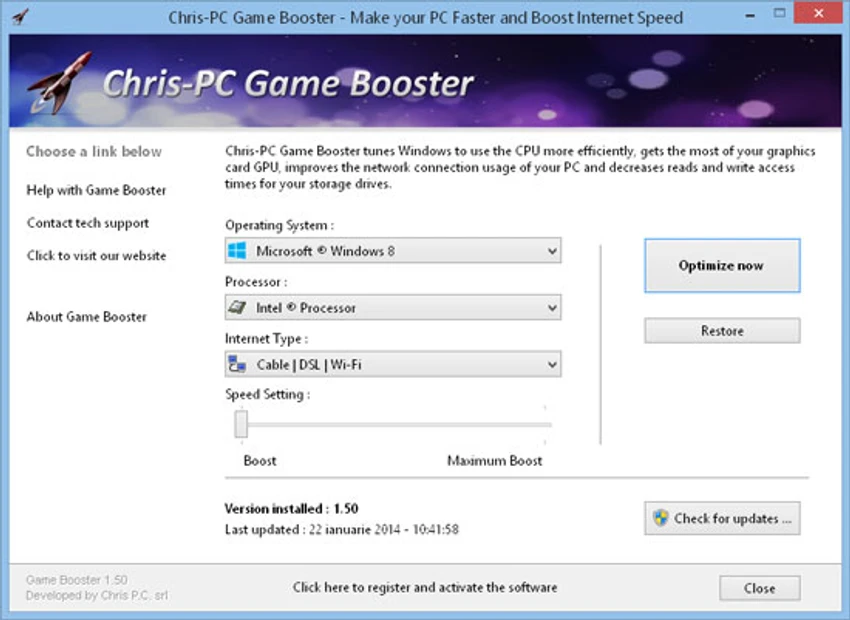
Chris-PC Game Booster is a Windows optimization tool designed to help gamers get better performance from their existing PC hardware. The software adjusts various Windows parameters, registry settings, and configuration files to optimize system resources used by games. It focuses on improving access to RAM, CPU, GPU, storage drives, and cache memory while also adjusting network settings for online gaming. Unlike software that modifies game files, Chris-PC Game Booster applies system-level optimizations without patching games. The tool is designed for users who want to improve gaming responsiveness, frame rates, and online multiplayer performance without upgrading hardware. It supports Windows 11, Windows 10, Windows 8, Windows 7, Windows Vista, Windows XP, and selected Windows Server versions.

Features of Chris-PC Game Booster

  • Windows gaming optimization: Adjusts system settings to help Windows better handle gaming workloads.
  • CPU optimization: Tunes processor usage to improve efficiency during gameplay.
  • GPU performance tuning: Helps make better use of available graphics processing resources.
  • RAM and cache optimization: Improves access to memory resources used by games.
  • Storage optimization: Adjusts settings related to storage drive access performance.
  • Network optimization: Tunes Windows network parameters for a gaming-focused setup.
  • No game file modification: Applies system adjustments without patching or changing game files.
  • Online gaming improvements: Designed to help reduce lag and provide a smoother multiplayer experience.
  • Simple installation process: Allows users to apply optimizations without requiring advanced system knowledge.

Interface and Usability

Chris-PC Game Booster is designed around simplicity, allowing users to apply gaming-related system optimizations without manually changing Windows settings. The software works by adjusting system parameters rather than modifying individual games, making the process more straightforward for users who want a quicker setup.

The application is aimed at gamers who want to optimize their existing hardware configuration. Instead of managing multiple Windows settings individually, users can rely on the software to handle performance-related adjustments in one place.

Who Should Use Chris-PC Game Booster?

Chris-PC Game Booster is suitable for PC gamers who want to optimize their Windows system for gaming performance without upgrading hardware. It may be useful for users who experience performance limitations related to system settings, resource management, or network configuration.

The software can also appeal to users who prefer a simple optimization tool instead of manually adjusting Windows settings related to CPU, GPU, memory, and network performance.

Conclusion

Chris-PC Game Booster provides a convenient way for gamers to optimize Windows settings for a better gaming experience. By focusing on CPU, GPU, memory, storage, and network adjustments, the software aims to help users get more performance from their current hardware setup.

Pros & Cons

✓

Pros

  • Designed specifically for PC gaming optimization
  • Adjusts multiple Windows performance settings in one tool
  • Optimizes CPU, GPU, RAM, storage, cache, and network usage
  • Does not modify game files
  • Supports many Windows versions
  • Lightweight system requirements
✕

Cons

  • Performance improvements may vary depending on hardware and game configuration

Frequently Asked Questions

What is Chris-PC Game Booster?

Chris-PC Game Booster is a Windows optimization tool designed to improve gaming performance by adjusting system settings related to hardware and network usage.

How does Chris-PC Game Booster improve gaming performance?

The software optimizes Windows parameters, registry settings, and configuration files to improve access to system resources such as CPU, GPU, RAM, storage, and cache memory.

Does Chris-PC Game Booster modify game files?

No. According to the available information, Chris-PC Game Booster does not patch or modify game files. It applies system-level optimizations instead.

Can Chris-PC Game Booster improve online gaming performance?

The software includes network parameter tuning designed for online gaming profiles and aims to provide a smoother multiplayer experience.

Does Chris-PC Game Booster require new hardware?

No. Chris-PC Game Booster is designed to optimize existing hardware and Windows settings without requiring hardware upgrades.

Which versions of Windows does Chris-PC Game Booster support?

According to the available system requirements, Chris-PC Game Booster supports Windows 11, Windows 10, Windows 8, Windows 7, Windows Vista, Windows XP, and Windows Server 2012 and 2008.

Recommended apps [Freeware]:
  • Dr.Web Live Disk 9.0.1 Dr.Web Live Disk logo free bootable antivirus rescue disk that removes malware and helps recover infected systems
  • Mozilla Firefox 152.0.6 Mozilla Firefox logo Browse the web securely and quickly with Mozilla Firefox, a customizable browser with strong privacy and add-on support
  • TreeSheets 3223 TreeSheets logo combines spreadsheets, outlines, notes, and mind mapping into a lightweight data organization tool
  • UninstallView 1.52 UninstallView logo View detailed information about installed programs and uninstall software on local or remote Windows computers
  • OpenVPN 2.7.5-I001 OpenVPN logo Create secure VPN connections with OpenVPN using SSL/TLS encryption, flexible authentication, and remote access support
  • Waterfox 6.6.16.1 Waterfox logo Browse faster with a 64-bit Firefox-based browser optimized for performance, security, extensions, bookmarks, and downloads.
Recommended apps [Shareware]:
  • VovSoft Tree Notes 3.3 VovSoft Tree Notes logo organize notes with a hierarchical structure, rich text editing, and single-file storag
  • Jutoh 3.31.7 Jutoh logo Create, edit, and publish ebooks in multiple formats with Jutoh
  • WinCatalog 2026.2.0.629 WinCatalog logo a disk and file cataloging tool for Windows that indexes files for fast search and organization
  • Learn to Speak English 12.0.0.40 Learn to Speak English logo interactive language software with real-world scenarios, speech recognition and flexible learning paths.
  • HTMLPad 2025 v18.7.0.277 HTMLPad logo Fast HTML editor with CSS and JavaScript tools, code completion, FTP support, validation, and browser preview for Windows.
  • Cisdem Video Compressor 3.0.0 Cisdem Video Compressor logo Compress video and audio files while preserving quality with customizable settings, batch processing, and support for popular media formats.