FileLegit Windows Multimedia Audio Editors GiliSoft Audio Editor
GiliSoft Audio Editor logo

GiliSoft Audio Editor 3.2.0

  • User Rating:
    ★★★★★
    ★★★★★
    0.0 ★ 0Votes
  • Requirements:
    Windows
  • Version: 3.2.0
  • Latest updated: 2 weeks ago
  • License: Free Trial  
  • Publisher: GiliSoft
  • Size: 167 MB
× app stores

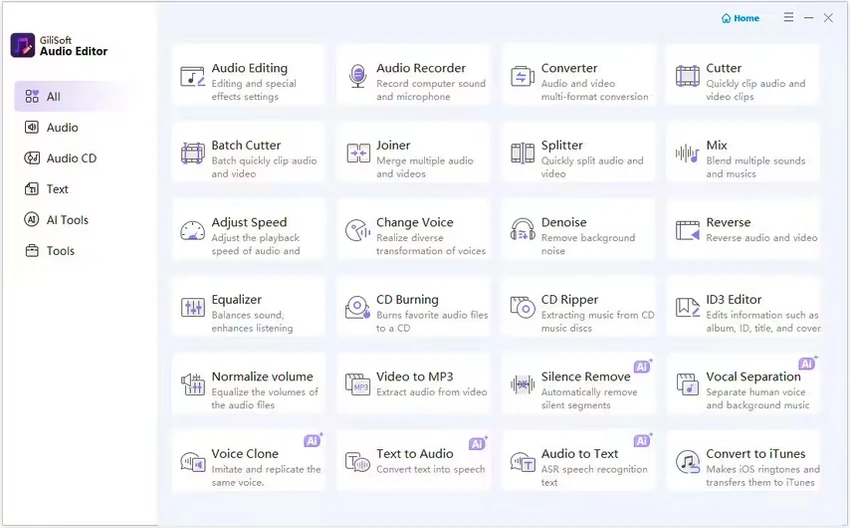
GiliSoft Audio Editor is a lightweight audio editing application built for users who need quick and straightforward audio editing rather than a feature-packed digital audio workstation. After using it, I found it particularly effective for common tasks such as trimming songs, joining multiple audio clips, batch processing files, and extracting audio from videos. The workflow is refreshingly uncomplicated—import your files, choose the cut points or arrange the merge order, preview the result, and export. It supports a wide range of popular audio formats, making it a practical choice for students, casual users, and anyone looking to complete simple audio editing jobs without unnecessary complexity.

Features of GiliSoft Audio Editor

  • Precise trimming and cutting of individual audio files
  • Merge multiple audio files into a single track
  • Batch cutting for processing multiple files efficiently
  • Live preview before exporting edits
  • Supports MP3, WAV, AAC, FLAC, WMA, and M4A formats
  • Convert video files to MP3 audio
  • Batch processing support for faster workflows

Interface and Usability

One of the strongest aspects of GiliSoft Audio Editor is its simplicity. The interface is clean, uncluttered, and easy to navigate, even for first-time users. I was able to import files by dragging them into the application, define cut points with minimal effort, preview the output, and export the finished file in just a few clicks.

The layout focuses entirely on core editing functions, which helps reduce the learning curve. While the interface lacks modern visual polish and advanced editing controls, it succeeds in making everyday audio editing quick and accessible.

Who Should Use GiliSoft Audio Editor?

  • Beginners looking for an easy audio editor
  • Users creating custom ringtones
  • Anyone merging voice recordings or podcasts
  • Students extracting audio from video files
  • Users who frequently batch-process multiple audio files
  • Windows users who want simple editing without a steep learning curve

Conclusion

GiliSoft Audio Editor focuses on doing the essentials well. If your daily workflow involves trimming songs, combining recordings, batch-editing audio files, or converting video into audio, it provides a straightforward experience without overwhelming you with professional editing tools.

Pros & Cons

✓

Pros

  • Extremely easy to learn and use
  • Fast batch processing saves time
  • Reliable preview before exporting
  • Supports multiple popular audio formats
  • Quick video-to-audio conversion
✕

Cons

  • No advanced editing features
  • No multitrack editing, EQ, or audio effects
  • Interface is functional but visually basic

Frequently Asked Questions

Can GiliSoft Audio Editor cut MP3 files without affecting the original quality?

Yes. The software is designed to trim and cut supported audio files accurately. The output quality depends on the export settings and format you choose.

Can I merge multiple audio files into one track?

Yes. GiliSoft Audio Editor allows you to import multiple audio files, arrange their order, and combine them into a single audio file.

Which audio formats are supported?

The software supports several common formats, including MP3, WAV, AAC, FLAC, WMA, and M4A. It also supports extracting audio from video files to MP3.

Does GiliSoft Audio Editor support batch processing?

Yes. It includes batch operations for cutting multiple audio files, making repetitive editing tasks much faster.

Is GiliSoft Audio Editor suitable for professional music production?

No. It is intended for basic editing tasks such as trimming, joining, and converting audio. It does not include advanced features like multitrack editing, equalizers, or audio effects.

Which operating systems support GiliSoft Audio Editor?

According to the available information, GiliSoft Audio Editor is available only for Windows.

Recommended apps [Freeware]:
  • CCleaner 7.08.1355 CCleaner logo removes junk files, clears browsing traces, and helps optimize Windows for better performance
  • Google Drive 127.0.1 Google Drive logo secure cloud storage, file syncing, collaboration tools, and 15GB of free storage
  • StarDesk 1.4.1 StarDesk logo remote desktop solution offering low-latency connections, file transfer, remote assistance, Quick Launch, and remote device management.
  • Display Driver Uninstaller (DDU) 18.1.5.6 Display Driver Uninstaller (DDU) logo Completely remove AMD, NVIDIA, and Intel GPU drivers with DDU for clean installs and troubleshooting Windows issues
  • Picture Window Pro 8.0.569 Picture Window Pro logo Edit and enhance photos with non-destructive tools, high-resolution support, multi-core performance, and flexible workflows.
  • ESET Online Scanner 3.7.11.0 ESET Online Scanner logo Scan and remove malware, viruses, spyware, and other online threats with a lightweight browser-based security scanner.
Recommended apps [Shareware]:
  • ExamDiff Pro 17.0.1.5 ExamDiff Pro logo a Windows file comparison tool for code review, folder sync, and document diffing with merge support.
  • Photo Supreme 2026.3.1.9350 Photo Supreme logo Organize, search, and manage thousands of photos with Photo Supreme's powerful cataloging features
  • FileCenter 12.5.36 FileCenter logo organize documents, scan files, manage PDFs, and build an efficient digital filing system
  • TapinRadio 2.17.00 TapinRadio logo simple internet radio player for Windows with recording, equalizer, search and alarms and sleep timer
  • UniFab 4.1.7.0 UniFab logo Enhance videos with AI using UniFab. Upscale footage, reduce noise, boost frame rates, convert HDR, and improve audio quality
  • Light Image Resizer 7.6.4.173 Light Image Resizer logo Resize, compress, convert, organize, and watermark images quickly with batch processing, quality optimization, and format support.