Easy Gamer Utility logo

Easy Gamer Utility 1.3.106

  • User Rating:
    ★★★★★
    ★★★★★
    0.0 0Votes
  • Requirements:
    Windows
  • Version: 1.3.106
  • Latest updated: 2 days ago
  • License: Freeware  
  • Publisher: ComputerSluggish
  • Size: 2.9 MB
×

Easy Gamer Utility is a Windows optimization tool designed to improve gaming performance and troubleshoot common issues that affect gameplay. It focuses on cleaning unnecessary system files, adjusting performance settings, and applying quick fixes for popular games. The software is built for users who experience lag, low FPS, or general game instability and want a centralized tool to improve system responsiveness without manually tweaking Windows settings.

Overview

Easy Gamer Utility provides a collection of system-level tools aimed at improving gaming performance. It combines cleanup utilities, game repair functions, and system tuning options into a single interface. The application helps remove temporary files, manage GPU-related cache data, and adjust system priorities for running games. It also includes troubleshooting tools for network issues and game-specific repair options for popular titles. Overall, it functions as a gaming-focused maintenance utility for Windows users who want quicker access to optimization tasks.

Features of Easy Gamer Utility

  • Clears temporary files and game cache data
  • Removes DirectX Shader Cache and launcher-related junk files
  • Locates installed game files on the system
  • Removes outdated GPU drivers
  • Network troubleshooting tools for connection issues
  • Adjusts game process priority for better performance
  • Game analysis and diagnostic tools
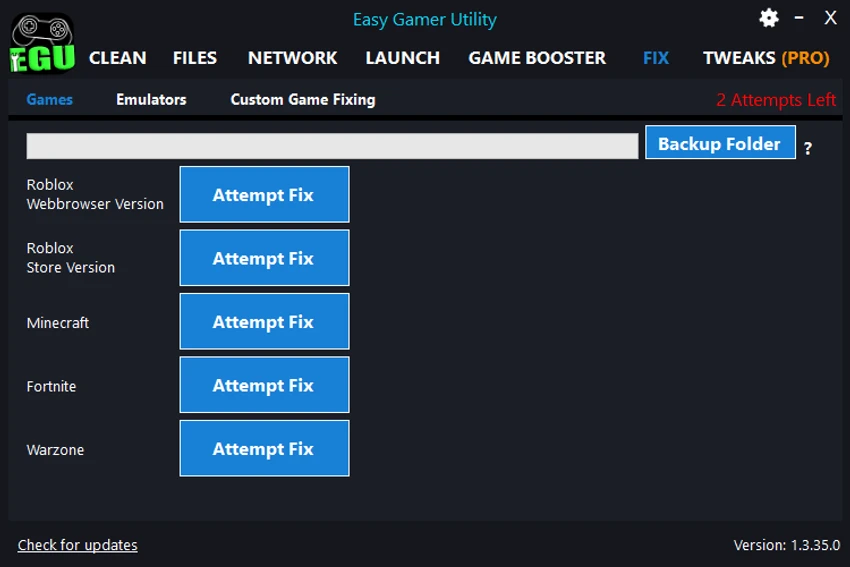
  • Built-in repair options for popular games (e.g., Roblox, Minecraft, Fortnite, Warzone)
  • Deep repair and system analysis mode
  • Checks game server status
  • Force high-priority mode for games
  • Game junk file cleanup
  • Windows troubleshooting and BIOS access shortcuts
  • Network adapter reset and cleanup tools
  • Launch games on Windows startup
  • Automatic updates and system tuning options

User Experience

Easy Gamer Utility is designed with simplicity in mind, offering quick-access buttons for common gaming fixes. Instead of manually navigating Windows settings or system folders, users can perform maintenance tasks with a single click. The tool is particularly useful for users who are not comfortable troubleshooting system performance issues manually. It groups multiple optimization functions into one interface, reducing the time needed to diagnose and fix gaming problems. However, many of its improvements rely on system-level changes and cleanup actions, so results may vary depending on the user’s hardware and game configuration.

Who Should Use Easy Gamer Utility?

This tool is best suited for:

  • PC gamers experiencing lag or low FPS
  • Users who frequently play online multiplayer games
  • Beginners who want one-click game optimization tools
  • Users who don’t want to manually tweak Windows settings
  • Players needing quick fixes for common game issues

Conclusion

Easy Gamer Utility is a practical optimization tool for Windows gamers who want quick fixes for performance issues and system cleanup. While it is not a substitute for hardware upgrades or advanced tuning, it provides a convenient set of tools for improving gaming stability and reducing common issues.

Pros & Cons

Pros

    • Easy-to-use interface with one-click optimization tools
    • Combines multiple game troubleshooting functions in one app
    • Useful cleanup tools for cache and temporary files
    • Game-specific repair options for popular titles
    • Includes network and system performance tools

Cons

    • Results may vary depending on system hardware
    • Some features overlap with built-in Windows tools
    • Primarily focused on gaming, less useful for general PC management

Frequently Asked Questions

What is Easy Gamer Utility used for?

It is used to optimize Windows performance for gaming and fix common game-related issues.

Does Easy Gamer Utility increase FPS?

It may improve performance by clearing cache, adjusting priorities, and optimizing system settings, but results depend on the system.

Can it fix game errors?

Yes, it includes repair tools for popular games like Roblox, Minecraft, Fortnite, and Warzone.

Is Easy Gamer Utility beginner-friendly?

Yes, it is designed for users who want simple, one-click optimization tools without manual system tweaking.

Recommended apps [Freeware]:
  • EarthView 7.16.4 EarthView logo dynamic wallpapers and screensavers with day, night, and weather effects
  • DirPrintOK 7.61 DirPrintOK logo fast and portable tool to print or export directory contents in XLS, HTML, CSV, or TXT formats.
  • StaxRip 2.52.4 StaxRip logo powerful Windows GUI for video/audio encoding using FFmpeg, x265, AviSynth+, VapourSynth, and more.
  • Stretchly 1.21.0 Stretchly logo reminds you to take breaks while working on your computer, promoting better health and productivity.
  • FastCopy 5.11.3 FastCopy logo a lightweight Windows tool for ultra-fast file copying, syncing, and error-resilient data transfer
  • FBackup 9.9.1044 FBackup logo a free Windows backup tool offering automatic backups, cloud support, encryption, and easy file recovery options
Recommended apps [Shareware]:
  • Quick Heal AntiVirus Pro 26.1.0.2 Quick Heal AntiVirus Pro logo real-time malware protection, ransomware defense, and email security
  • Typing Instructor Platinum 21.1 Typing Instructor Platinum logo improve typing speed and accuracy through interactive lessons, games, and 10-finger typing practice.
  • Sidify Spotify Music Converter 2026 Sidify Spotify Music Converter logo convert Spotify songs, playlists, and podcasts to MP3, AAC, FLAC, and WAV formats.
  • Adobe Photoshop 2026 Adobe Photoshop logo powerful image editing and graphic design tool for creating, enhancing, and transforming photos, illustrations
  • Topaz Photo 1.6.1 Topaz Photo logo advanced AI to sharpen photos, remove noise, and enhance image quality with ease
  • COAA PlanePlotter 6.7.5.9 COAA PlanePlotter logo a Windows tool that decodes live aircraft data like ADS-B and ACARS and displays real-time radar-style tracking