Actual Multiple Monitors logo

Actual Multiple Monitors 8.15.4

  • Avaliação dos usuários:
    ★★★★★
    ★★★★★
    0.0 0Votes
  • Requisitos:
    Windows
  • Versão: 8.15.4
  • Última atualização: há 2 meses
  • Licença: Teste gratuito  
  • Editor: Actual Tools
  • Tamanho: 11 MB
× app stores

Actual Multiple Monitors is a Windows utility designed to improve productivity and usability when working with multiple displays. Instead of relying on the default Windows multi-monitor behavior, it adds a wide range of enhancements such as independent taskbars, advanced window management tools, desktop customization features, and multi-display controls.

The software is especially useful for users with dual or multi-monitor setups, allowing each screen to function more independently and efficiently. It also introduces features aimed at gamers, professionals, and multitaskers who want better control over how windows and applications behave across screens. By extending the Windows interface, Actual Multiple Monitors helps users create a more organized and flexible multi-display workspace.

Features of Actual Multiple Monitors

  • Adds taskbar, Start menu, system tray, and task switcher to each monitor
  • Move windows between monitors using title bar buttons
  • Maximize windows across the entire multi-monitor desktop
  • Custom hotkey support for advanced window actions
  • Fully customizable keyboard shortcuts for window management
  • Gaming mode features:
    • Prevent game minimization (Ignore Deactivation)
    • Lock mouse within a screen or window
  • Desktop Divider for splitting screens into customizable zones
  • Window snapping with improved multi-monitor support
  • Snap windows to:
    • Monitor edges
    • Other windows
    • Custom grid layouts
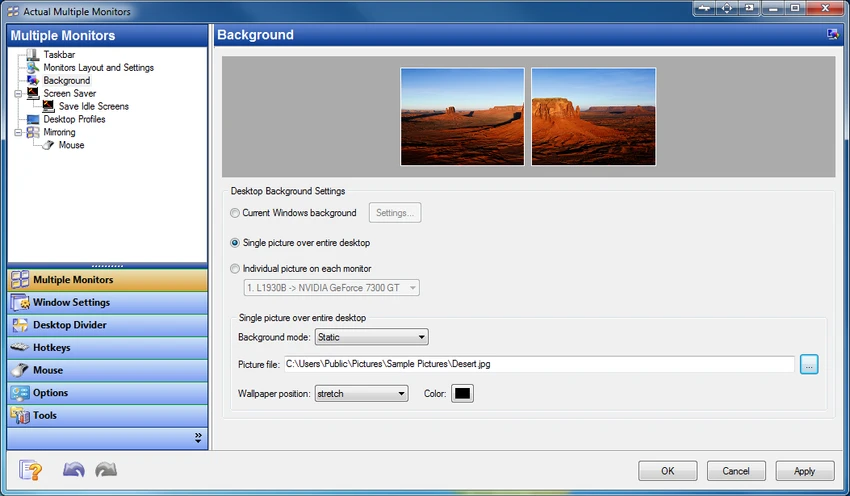
  • Multi-monitor wallpaper options:
    • Single image stretched across screens
    • Different wallpapers per monitor
    • Independent slideshow per display
    • Web-based image slideshows (Google Images, Flickr)
  • Multi-monitor screen saver support:
    • Stretch across all displays
    • Separate screen savers per monitor
  • Desktop mirroring for duplicating or projecting screen content
  • Support for presentations and remote display monitoring
  • Quick switching between laptop and external monitor profiles

Interface and Usability

Actual Multiple Monitors integrates directly into the Windows environment, enhancing the existing interface rather than replacing it. Once installed, additional taskbars and window controls appear across connected displays, making multi-screen navigation more intuitive. Most features are accessible through context menus, hotkeys, or window title bar buttons. Users can also configure profiles for different setups, such as switching between laptop-only mode and full multi-monitor mode.

While the software offers deep customization, its structure remains logical. However, users new to multi-monitor management may need time to explore and configure advanced features such as desktop division or mirroring.

Who Should Use Actual Multiple Monitors?

  • Professionals using dual or multi-monitor setups
  • Software developers and IT specialists
  • Designers, video editors, and creative professionals
  • Gamers who use secondary screens for streaming or browsing
  • Business users delivering presentations or managing workflows
  • Laptop users frequently switching between display configurations

Conclusion

Actual Multiple Monitors is a powerful and feature-rich solution for users who rely on multi-display setups. By extending Windows with per-monitor taskbars, advanced window management, and customizable desktop features, it significantly improves productivity and usability.

Prós e Contras

Prós

  • Adds full taskbars and system tools to every monitor
  • Strong multi-window and workspace management tools
  • Excellent support for gaming and productivity workflows
  • Highly customizable hotkeys and window behavior
  • Advanced wallpaper and screen saver options
  • Supports desktop mirroring and presentation use cases
  • Improves usability of multi-monitor setups significantly

Contras

  • Requires setup to fully configure advanced features
  • Can feel feature-heavy for casual users
  • Some tools may overlap with built-in Windows features
  • Learning curve for desktop divider and automation tools

Perguntas frequentes

What is Actual Multiple Monitors used for?

Actual Multiple Monitors is used to enhance multi-monitor setups by adding taskbars, window controls, wallpapers, and productivity tools to improve workflow across multiple displays.

Does Actual Multiple Monitors add a taskbar to every monitor?

Yes. It provides a full taskbar, Start menu, system tray, and task switcher on each connected display.

Can I move windows between monitors easily?

Yes. You can move windows using dedicated title bar buttons or hotkeys for quick transfer between screens.

Does Actual Multiple Monitors support gaming?

Yes. It includes gaming-focused features like preventing game minimization and locking the mouse within a screen or window.

Can I use different wallpapers on each monitor?

Yes. The software supports individual wallpapers, stretched images, and even separate slideshows for each display.

Is it suitable for laptop users?

Yes. It includes desktop profiles that allow quick switching between internal and external display setups.

Aplicativos recomendados [Gratuitos]:
  • AIMP 5.40.2727 AIMP logo Um reprodutor de áudio leve com som de alta qualidade, ferramentas de lista de reprodução, equalizador e recursos de conversão de áudio.
  • WonderPen 3.2.0.8457 WonderPen logo Aplicativo de escrita com suporte a Markdown, organização em estrutura de árvore e ferramentas de exportação para usuários do Windows.
  • Krita 6.0.2.1 Krita logo a free digital painting software for artists, offering advanced brushes, layers, and professional drawing tools
  • VeraCrypt 1.26.29 VeraCrypt logo Protect sensitive data with advanced disk and partition encryption, customizable algorithms, and strong password-based security.
  • Win11Debloat 2026.07.11 Win11Debloat logo Remova aplicativos indesejados, reduza a telemetria e personalize as configurações do Windows com um script leve do PowerShell para limpeza do sistema.
  • StereoPhoto Maker 6.41 StereoPhoto Maker logo Crie e edite imagens estéreo 3D com ferramentas de alinhamento, processamento em lote, múltiplos modos de visualização e ampla compatibilidade com formatos de imagem.
Aplicativos recomendados [Shareware]:
  • Amazing Laptop Cooling Wizard 1.1.5.8 Amazing Laptop Cooling Wizard logo Reduza o superaquecimento do seu laptop otimizando o desempenho de resfriamento da CPU e da ventoinha no Windows.
  • Typing Instructor Platinum 21.1 Typing Instructor Platinum logo Aprimore a velocidade e a precisão da digitação por meio de lições interativas, jogos e prática de digitação com 10 dedos.
  • COAA PlanePlotter 6.7.6.3 COAA PlanePlotter logo Uma ferramenta para Windows que decodifica dados de aeronaves em tempo real, como ADS-B e ACARS, e exibe rastreamento em tempo real no estilo radar.
  • 4K YouTube to MP3 26.2.0 4K YouTube to MP3 logo Uma ferramenta simples para extrair áudio do YouTube, Vimeo e outros sites, convertendo-os para MP3, M4A ou OGG.
  • RadioBOSS 7.2.2.0 RadioBOSS logo Uma ferramenta de automação de rádio para agendar playlists, anúncios, streaming e gerenciar transmissões de áudio profissionais.
  • Vovsoft Speech to Subtitle Converter 2.4 Vovsoft Speech to Subtitle Converter logo Converta arquivos de áudio e vídeo em legendas sincronizadas com suporte para mais de 50 idiomas e os formatos populares SRT e VTT.