


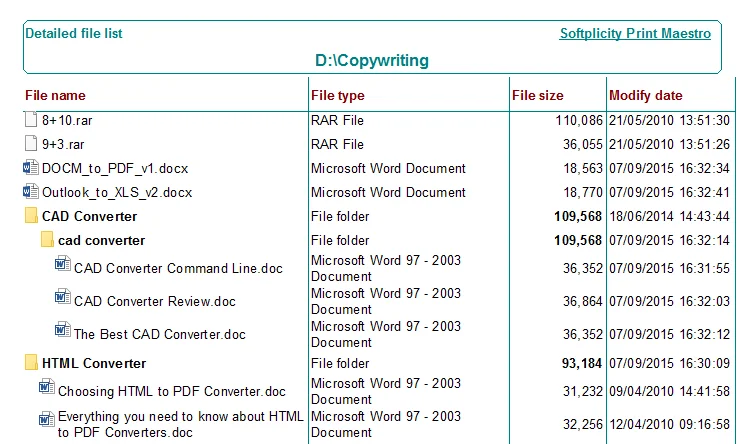

Coolutils Print Maestro is a Windows utility designed to make printing and exporting folder contents simple and efficient. Whether you need a quick file list, a full directory tree, or detailed reports for media files, Print Maestro offers a point-and-click interface that eliminates the need for command-line work.
Overview
Windows does not natively support printing folder contents in a structured or customizable way. Traditional methods like CMD outputs are plain, unformatted, and difficult to use. Print Maestro solves this problem with a clean, intuitive interface. You can select folders, choose which files or attributes to include, and print or export results in formats like PDF, Excel, HTML, or RTF.
Designed for both casual users and IT professionals, it supports everything from simple file listings to detailed reports of photos, videos, songs, emails, and version information. It is compact at just 37 MB and focuses on productivity, simplicity, and flexibility.
Using Print Maestro feels straightforward. Upon launching, you navigate a standard folder tree, select the type of report you want, and click to print or export. Preview options are clear and well-laid-out, while the software handles multiple file types without crashing or slowing down. Generating a detailed report of your music or photo library is easier than manually compiling spreadsheets or text files. Overall, it streamlines a task that would otherwise require technical know-how.
Features of Coolutils Print Maestro
- Print a simple list of files in a folder.
- Generate folder (directory) trees with file sizes.
- Print folder lists without files.
- Combine folder tree and file list in one report.
- Detailed file reports with full path, name, date, size, type, and more.
- Media reports for emails, videos, photos, and songs with customizable fields.
- File version info reports including company name, version info, and copyright.
- Custom reports using any EXIF or metadata fields.
- Export reports to PDF, Excel (XLS), HTML, RTF, CSV, SQL, DBF, XML, or plain text.
- Preview reports before printing and apply filters by file type or sort order.
Who Should Use Coolutils Print Maestro
- IT professionals documenting folder structures.
- Photographers, videographers, and musicians cataloging media files.
- Windows users who need to print or export directory listings regularly.
- Anyone seeking a faster alternative to CMD or manual file listing.
Conclusion
Coolutils Print Maestro is a practical and efficient solution for printing and exporting folder contents on Windows. Its intuitive interface, flexible export options, and detailed reporting features make it a standout tool for both casual and professional users. If you regularly need organized file listings or media reports, Print Maestro simplifies the process in just a few clicks.
Download Coolutils Print Maestro today to streamline folder printing and reporting tasks effortlessly.


