FileLegit Windows Utilities System Tools Microsoft PowerToys
Microsoft PowerToys logo

Microsoft PowerToys 0.100.2

  • User Rating:
    ★★★★★
    ★★★★★
    0.0 0Votes
  • Requirements:
    Windows
  • Version: 0.100.2
  • Latest updated: 4 days ago
  • License: Freeware  
  • Publisher: Microsoft
  • Size: 272 MB
× app stores

Microsoft PowerToys is a collection of free utilities designed to help power users customize and streamline their Windows experience. Inspired by the original Windows 95 PowerToys project, this modern reboot brings a variety of tools aimed at improving productivity and making everyday tasks more efficient. During my time using it, I found that PowerToys adds practical enhancements without changing the familiar Windows workflow.

Features of Microsoft PowerToys

  • FancyZones for creating custom window layouts and managing multitasking
  • File Explorer Preview Pane add-ons with support for Markdown (.md) and SVG (.svg) previews
  • Image Resizer for resizing one or multiple images directly from File Explorer
  • Keyboard Manager for remapping keys and creating custom keyboard shortcuts
  • PowerRename for advanced batch file renaming with search, replace, and regular expressions
  • PowerToys Run for quickly searching and launching applications with Alt + Space
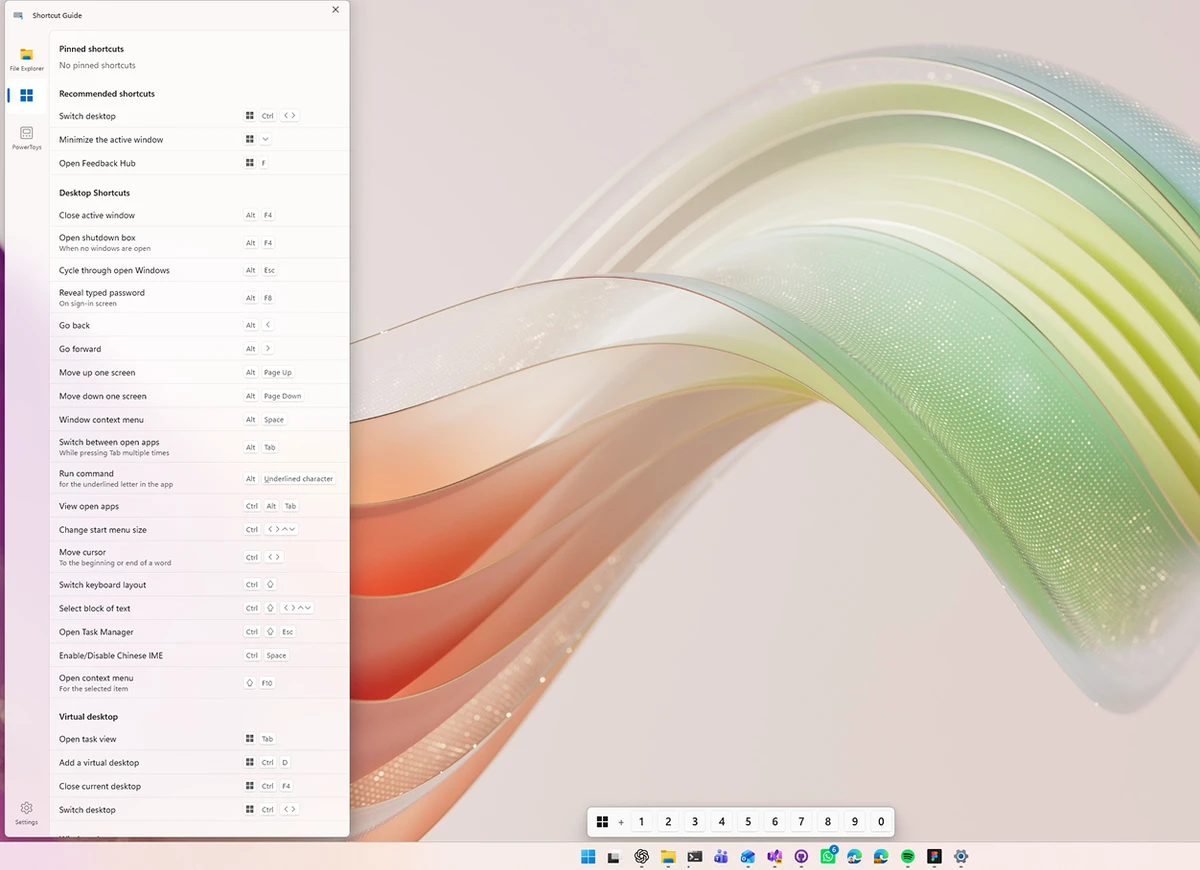
  • Shortcut Guide displaying available Windows keyboard shortcuts
  • Open-source and modular design
  • Compatible with Windows 11 and Windows 10

User Experience

After installing Microsoft PowerToys, I immediately noticed how well the utilities integrate with Windows. Rather than acting like separate applications, most features feel like natural extensions of the operating system. FancyZones quickly became one of the most useful tools for multitasking. Creating custom layouts made organizing multiple windows much easier, especially on larger displays. Image Resizer also proved convenient, allowing me to resize images directly from File Explorer without opening additional software.

PowerRename offers a surprisingly powerful way to rename large groups of files. The live preview helps avoid mistakes, and because it uses the Windows file operations engine, rename actions can be undone later. PowerToys Run provides a fast launcher that makes finding and opening apps nearly instant. Meanwhile, Keyboard Manager gives advanced users more control over their workflow by enabling custom shortcuts and key remapping.

Despite offering many utilities, the interface remains clean and easy to navigate. Beginners can use individual tools without feeling overwhelmed, while advanced users can take advantage of the deeper customization options.

Who Should Use Microsoft PowerToys?

  • Power users seeking greater productivity
  • Professionals who frequently multitask with multiple windows
  • Users who want advanced file renaming capabilities
  • Anyone looking to customize keyboard shortcuts and key mappings
  • People who regularly work with images and need quick resizing options
  • Windows users wanting additional features without replacing the operating system

Conclusion

Microsoft PowerToys is one of the best free utility suites available for Windows 10 and Windows 11. It enhances the operating system with practical features that save time and improve workflow without adding unnecessary complexity. Whether you need better window management, faster app launching, or advanced file handling, PowerToys is well worth installing.

Pros & Cons

Pros

  • Completely free to use
  • Excellent integration with Windows
  • Multiple productivity tools in one package
  • Powerful window management with FancyZones
  • Fast application launcher with PowerToys Run
  • Advanced batch renaming capabilities
  • Custom keyboard remapping and shortcuts
  • Easy-to-use interface

Cons

  • Some features require Windows 10 Version 1903 or newer
  • Certain tools may appeal more to advanced users
  • Utility selection is focused on productivity rather than broader system optimization

Frequently Asked Questions

What is Microsoft PowerToys used for?

Microsoft PowerToys is a collection of utilities designed to improve productivity and provide additional customization options for Windows users.

Is Microsoft PowerToys free?

Yes. Microsoft PowerToys is completely free and open source.

What does FancyZones do?

FancyZones is a window manager that allows users to create custom layouts and quickly arrange windows for better multitasking.

Can PowerToys resize images?

Yes. The Image Resizer utility allows users to resize one or multiple images directly from File Explorer.

What is PowerRename?

PowerRename is a batch renaming tool that supports search and replace operations as well as regular expressions, with a live preview before changes are applied.

Which Windows versions are supported?

Microsoft PowerToys supports Windows 11 and Windows 10. Some features require Windows 10 Version 1903 (Build 18362) or newer.

Is Microsoft PowerToys suitable for beginners?

Yes. Although it was designed with power users in mind, the interface is straightforward and individual tools can be enabled or disabled as needed.

Recommended apps [Freeware]:
  • Dr.Web Live Disk 9.0.1 Dr.Web Live Disk logo free bootable antivirus rescue disk that removes malware and helps recover infected systems
  • PC Timer 19.7 PC Timer logo a lightweight Windows tool to schedule shutdown, restart, logout, or lock actions with a simple timer or calendar-based scheduler
  • K-Lite Codec Pack Mega 19.8.2 K-Lite Codec Pack Mega logo Play all audio and video formats on Windows with K-Lite Codec Pack Mega, a full multimedia codec and filter package
  • ToDoList 9.2.0 ToDoList logo customizable task manager for Windows with subtasks, reminders, notes, tracking, and project tools
  • MSI Center 2.0.71.0 MSI Center logo a system utility for MSI devices that manages performance, gaming modes, monitoring, RGB, and hardware optimization tools
  • Google Drive 127.0.1 Google Drive logo secure cloud storage, file syncing, collaboration tools, and 15GB of free storage
Recommended apps [Shareware]:
  • 4DDiG File Repair 4.4.2.9 4DDiG File Repair logo a Windows tool for repairing damaged photos and videos in batch mode with a simple, automated workflow
  • Text Edit Plus 16.5 Text Edit Plus logo a lightweight text editor with text analysis, word frequency statistics, and document editing tools
  • App Builder 2026.15 App Builder logo a visual development environment for creating HTML5, mobile, desktop, and PWA applications
  • reaConverter Pro 8.0.229 reaConverter Pro logo batch image converter and editor supporting 700+ formats with automation and advanced processing tools
  • Image for Windows 4.12 Image for Windows logo disk imaging tool for full system backup, restore, and recovery with encryption, compression, and bootable rescue medi
  • Start11 2.72 Start11 logo Windows customization tool that restores classic Start Menu styles and enhances taskbar functionality on Windows 10 and 11