HWdetails logo

HWdetails 2.0

  • User Rating:
    ★★★★★
    ★★★★★
    0.0 0Votes
  • Requirements:
    Windows
  • Version: 2.0
  • Latest updated: 2 weeks ago
  • License: Freeware  
  • Publisher: TkoSoft
  • Size: 4 MB
× app stores

HWdetails is a free Windows system information utility designed to provide detailed information about computer hardware, operating system settings, connected devices, network configuration, and overall system status. The software collects important PC details and presents them in an organized way, helping users understand their computer configuration without manually checking multiple Windows settings.

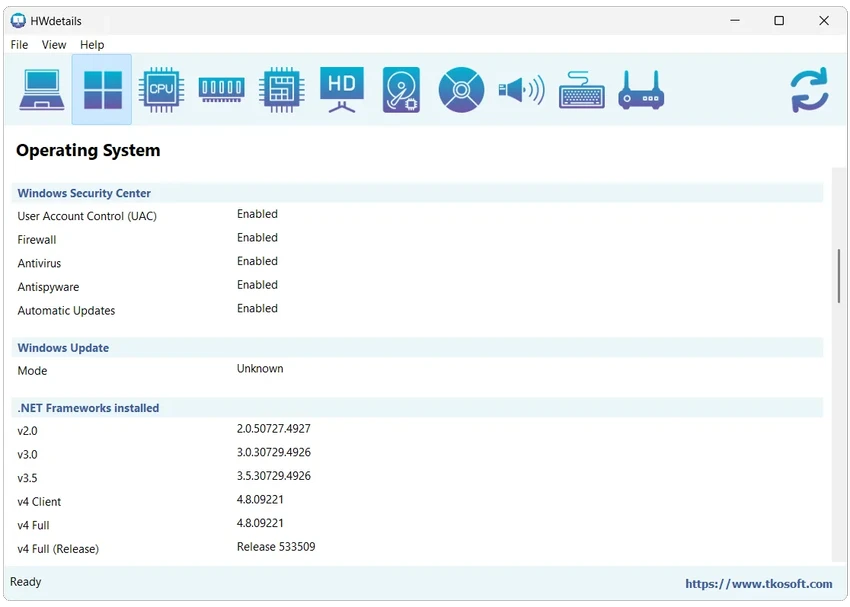
The application provides a complete overview of key hardware components, including the processor, memory, motherboard, BIOS, graphics adapter, storage devices, audio equipment, and network hardware. It also displays Windows-related information such as system version, installed updates, .NET versions, PowerShell details, security settings, and system folders.

HWdetails goes beyond basic system summaries by including monitoring and technical information. Users can view CPU activity, clock speed, temperature information when available, RAM module details, GPU specifications, storage usage, USB devices, and network connections. The software also supports exporting collected information into TXT or XML reports. This makes it useful for documenting PC specifications, sharing system details with technical support, or comparing hardware configurations before and after upgrades.

Features of HWdetails

  • Complete hardware and system overview
  • Windows version and operating system details
  • CPU model, cores, threads, cache, and virtualization information
  • Live CPU usage and per-core activity monitoring
  • Detailed RAM module information
  • Memory usage and hardware configuration details
  • Motherboard, BIOS, chipset, and PCI slot information
  • GPU and display specifications
  • DirectX, monitor, and resolution details
  • Storage drive and partition information
  • Audio devices and connected peripherals listing
  • USB device information
  • Printer and input device details
  • Network adapter and Wi-Fi information
  • IP address, MAC address, DNS, and TCP connection details
  • Export reports in TXT and XML formats

Interface and Usability

After using HWdetails, I found the application focused on presenting technical information clearly rather than adding unnecessary features. The information is organized into categories, making it easier to locate details about specific hardware components or system settings.

The overview section provides a quick look at major PC specifications, while more detailed sections allow users to examine individual components such as CPU, memory modules, graphics hardware, and network adapters.

The export function is especially useful for saving system reports or sharing configuration details with others. While the amount of technical information may be more than casual users need, the organized layout makes it practical for troubleshooting, upgrades, and hardware documentation.

Who Should Use HWdetails?

  • Users checking their PC specifications
  • IT technicians managing Windows computers
  • Users preparing hardware reports
  • People upgrading or comparing computer components
  • Troubleshooting and support situations
  • Anyone needing detailed system information

Conclusion

HWdetails is a comprehensive system information utility for Windows users who need detailed insight into their computer hardware and configuration. Its wide range of information categories, from CPU and RAM details to network and storage data, makes it a useful tool for diagnostics, documentation, and hardware planning.

Pros & Cons

Pros

  • Provides extensive hardware information
  • Covers both hardware and Windows details
  • Includes CPU monitoring features
  • Displays detailed RAM and motherboard data
  • Shows network and peripheral information
  • Supports TXT and XML report exports
  • Free to use

Cons

  • Large amount of technical data may be overwhelming for beginners
  • Focused on information gathering rather than system optimization

Frequently Asked Questions

What is HWdetails used for?

HWdetails is used to view detailed information about a computer’s hardware, operating system, devices, network settings, and system configuration.

Can HWdetails show CPU and RAM details?

Yes. HWdetails provides processor information such as cores, threads, cache, clock speed, and CPU activity. It also displays RAM capacity, module details, speed, and memory usage.

Does HWdetails show graphics card information?

Yes. HWdetails can display GPU details, video memory, driver information, DirectX version, display resolution, and monitor information.

Can HWdetails create system reports?

Yes. The software can export collected system information into TXT and XML files for documentation or sharing.

Does HWdetails display network information?

Yes. HWdetails shows network adapters, IP addresses, MAC addresses, DNS settings, Wi-Fi details, active TCP connections, and related network information.

Who should use HWdetails?

HWdetails is useful for anyone who needs detailed PC information, including home users checking specifications, technicians troubleshooting systems, and users preparing hardware reports.

Recommended apps [Freeware]:
  • Vivaldi Browser 8.1.4087.55 Vivaldi Browser logo a Chromium-based browser with built-in mail, calendar, notes, ad blocker, and deep customization features.
  • Process Monitor 4.04 Process Monitor logo a Windows tool that tracks real-time file, registry, and process activity for system troubleshooting and malware analysis
  • Digital Clock 5.2.2 Digital Clock logo customizable desktop clock app with skins, alarms, opacity control, and system tray support
  • Prevent Restore 2026 v123 Prevent Restore logo securely wipes deleted files, blocks data recovery, and protects sensitive information on Windows
  • Google Chrome 150.0.7871.125 Google Chrome logo fast, secure, and stable web browser with sandboxing, tab isolation, and a minimal interface for modern web applications
  • Diffractor 126.3 Diffractor logo Organize, view, and manage photos and videos easily with Diffractor, a fast media management tool for Windows
Recommended apps [Shareware]:
  • MobiKin Backup Manager for Android 2.0.30 MobiKin Backup Manager for Android logo Back up and restore Android data with one click using MobiKin Backup Manager for Android for Windows PCs
  • Glary Utilities 6.44.0.48 Glary Utilities logo Windows optimization suite with 20+ tools for cleaning junk files, fixing errors, boosting performance, and improving privacy
  • BeerSmith 4.0.22 BeerSmith logo brewing software for designing beer, mead, wine, and cider recipes with style matching, mash calculations, and ingredient management
  • Process Lasso 18.2.2.10 Process Lasso logo Optimize process behavior, manage CPU priorities, monitor system responsiveness, and control background tasks with advanced tools.
  • Zoom Player STREAM 22.5 Zoom Player STREAM logo Stream live TV and VOD content with 4K HDR playback, EPG support, customizable controls, and advanced media engine options.
  • Wise Care 365 8.0.4.732 Wise Care 365 logo Optimize Windows performance with system cleanup, registry tools, privacy protection, and hardware monitoring features.