SecureCRT logo

SecureCRT 9.7.3 Build 3916

  • User Rating:
    ★★★★★
    ★★★★★
    0.0 ★ 0Votes
  • Requirements:
    Windows
  • Version: 9.7.3 Build 3916
  • Latest updated: 2 weeks ago
  • License: Free Trial  
  • Publisher: VanDyke Software Inc
  • Size: 38 MB
× app stores

SecureCRT is a professional terminal emulator and remote access application designed for administrators, developers, and IT professionals who need secure connections to remote systems. The software supports multiple communication protocols, including SSH, Telnet, Telnet/TLS, and serial connections, allowing users to manage network devices and remote environments from a single interface.

The application focuses on secure remote access by providing encrypted SSH1 and SSH2 connections, flexible authentication options, certificate support, smart card compatibility, and configurable security settings. These features make it suitable for organizations that require controlled access to servers, network equipment, and other remote systems.

SecureCRT includes advanced session management tools that help users organize multiple connections efficiently. Features such as tabbed sessions, grouped tabs, color schemes, key mappings, scrollback customization, and session importing/exporting improve productivity when working with numerous remote hosts.

The software also provides automation capabilities through scripting support for VBScript, JScript, Python, and PerlScript. Users can record and automate repetitive tasks, reducing manual work in routine administrative operations.

SecureCRT integrates with SecureFX for secure file transfers using protocols such as SFTP, SCP, FTP over TLS, and FTP. Together, the applications provide a complete environment for remote management, terminal access, and secure file operations.

Features of SecureCRT

  • Secure terminal emulation for professional users
  • Supports SSH1 and SSH2 protocols
  • Supports Telnet, Telnet/TLS, and serial connections
  • Encrypted remote sessions
  • Certificate-based authentication support
  • X.509 certificate and smart card support
  • Two-factor authentication options
  • Port forwarding support
  • Multiple concurrent session management
  • Tabbed sessions and grouped tabs
  • Customizable colors, fonts, and key mappings
  • Session importing and exporting
  • Script automation support
  • Supports VBScript, JScript, Python, and PerlScript
  • Built-in script recorder
  • Secure file transfer support through SFTP, SCP, FTP/TLS, and FTP
  • Support for Xmodem, Ymodem, Zmodem, and Kermit transfers
  • Integration with SecureFX for file management

Interface and Usability

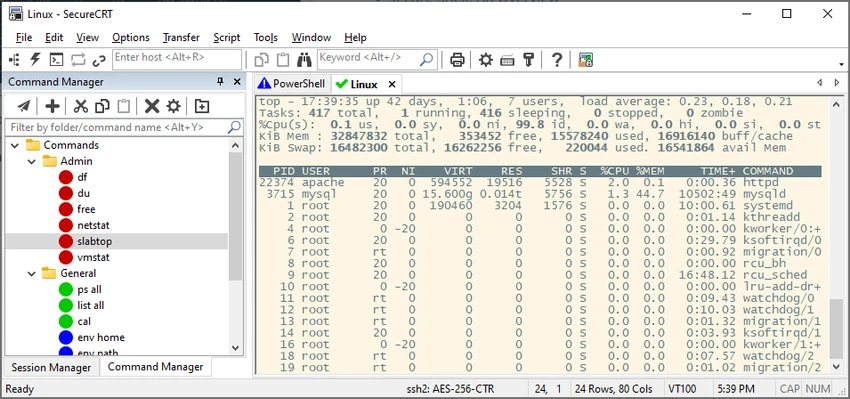
SecureCRT provides a structured interface designed for users managing multiple remote connections. The tabbed session system makes it easier to work with several hosts at the same time, while session organization tools help administrators maintain large collections of connections.

The application allows users to customize many aspects of the terminal experience, including colors, fonts, keyboard mappings, and display settings. These options make it possible to adapt the environment to different workflows and preferences.

Automation features add further convenience for repetitive administration tasks. Users can create scripts or record actions to streamline recurring operations instead of manually repeating commands. The combination of terminal access, session organization, and scripting makes SecureCRT a practical tool for network administrators and technical professionals.

Who Should Use SecureCRT?

  • Network administrators
  • System administrators
  • IT professionals managing remote servers
  • Developers working with remote environments
  • Organizations requiring secure terminal access
  • Users managing multiple SSH or Telnet sessions

Conclusion

SecureCRT is a feature-rich terminal emulator built for professionals who need reliable and secure remote access tools. Its combination of SSH support, session management, scripting capabilities, and file transfer integration makes it a comprehensive solution for managing remote systems.

Pros & Cons

✓

Pros

  • Strong support for secure SSH connections
  • Handles multiple remote protocols
  • Advanced session management features
  • Powerful scripting and automation tools
  • Customizable terminal environment
  • Supports secure file transfers
  • Suitable for enterprise environments
✕

Cons

  • Designed primarily for professional users
  • Advanced features may require technical knowledge

Frequently Asked Questions

What is SecureCRT used for?

SecureCRT is used for secure remote access, terminal emulation, server management, and connecting to network devices using protocols such as SSH, Telnet, and serial connections.

Which protocols does SecureCRT support?

SecureCRT supports SSH1, SSH2, Telnet, Telnet/TLS, serial protocols, and additional file transfer protocols through its integration with SecureFX.

Does SecureCRT support file transfers?

Yes. SecureCRT supports file transfers using protocols such as SFTP, SCP, Xmodem, Ymodem, Zmodem, and Kermit. Integration with SecureFX adds additional secure transfer options.

Can SecureCRT automate repetitive tasks?

Yes. SecureCRT includes scripting support for VBScript, JScript, Python, and PerlScript. It also provides a script recorder for creating automation scripts.

Can I manage multiple remote sessions with SecureCRT?

Yes. SecureCRT supports multiple concurrent sessions, tabbed sessions, grouped tabs, and session organization features for managing many remote connections.

Which operating systems support SecureCRT?

According to the provided system requirements, SecureCRT supports Windows 10, Windows 11, Windows Server 2016, Windows Server 2019, Windows Server 2022, and Windows Server 2025.

Recommended apps [Freeware]:
  • WSCC - Windows System Control Center 10.0.4.0 WSCC - Windows System Control Center logo Windows utility manager that installs, organizes, and runs Sysinternals and system tools from one central interface
  • Disk Drill 6.3.1398.0 Disk Drill logo advanced data recovery software for Windows to restore deleted files from drives, USB, and partitions
  • StarDesk 1.4.1 StarDesk logo remote desktop solution offering low-latency connections, file transfer, remote assistance, Quick Launch, and remote device management.
  • YouTube Music (Desktop App) 3.12.0 YouTube Music (Desktop App) logo Experience YouTube Music with custom plugins, ad blocking, keyboard shortcuts, and desktop playback
  • Free Music & Video Downloader 3.19 Free Music & Video Downloader logo Download music and videos from supported online sources, save MP3 files, and organize downloaded media with a simple search tool.
  • cPicture LE 4.14 cPicture LE logo Manage, browse, crop, search, and process digital photos with a lightweight image workflow application supporting plugins and JPEG tools.
Recommended apps [Shareware]:
  • Total Audio Converter 6.1.0.302 Total Audio Converter logo convert MP3, WAV, FLAC, AAC and more with batch processing, CD ripping, and Windows integration.
  • R-Studio 9.5 Build 191810 R-Studio logo powerful data recovery software for recovering deleted, formatted, or damaged files across multiple file systems
  • EmEditor 26.2.0 EmEditor logo a fast Windows code editor with large file support, syntax highlighting, regex search, and powerful editing tools
  • Adobe Bridge 2026 Adobe Bridge logo digital asset manager for organizing, previewing, and batch processing creative files in Adobe workflows
  • FolderMatch 5.1.3.0 FolderMatch logo Compare folders, synchronize files, find duplicates, and batch rename files with FolderMatch for Windows.
  • FileSearchEX 1.1.0.9 FileSearchEX logo Quickly locate files, folders, and document content with a lightweight Windows search tool supporting network shares and PDF searches.