


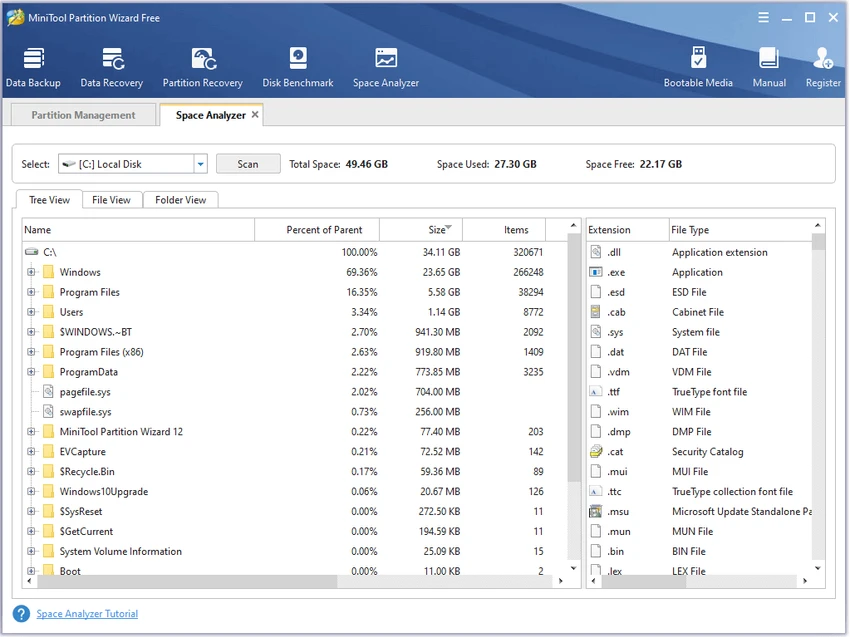

MiniTool Partition Wizard is a comprehensive disk and partition management solution designed to help users optimize storage devices, manage partitions, and protect important data. The software provides a wide range of tools for creating, deleting, formatting, resizing, copying, and checking partitions. Users can also migrate operating systems to SSDs, clone disks, recover lost partitions, and convert disk formats without complicated procedures. With support for HDDs, SSDs, external drives, USB flash drives, SD cards, and RAID storage, MiniTool Partition Wizard offers flexible management options for different storage environments. Its user-friendly interface provides step-by-step guidance, making advanced disk operations more accessible for both regular users and experienced administrators.
Features of MiniTool Partition Wizard
- Create, delete, and format partitions: Easily manage disk partitions and format inaccessible drives.
- Partition resizing and moving: Resize partitions, extend system drives, and manage available storage space.
- Disk and partition cloning: Copy entire disks or individual partitions for upgrades, backups, or migration.
- OS migration to SSD: Move Windows systems to SSDs or other storage devices for improved performance or backup purposes.
- Partition recovery: Scan and recover lost partitions with supported editions.
- Data protection tools: Perform disk operations while helping preserve important data.
- Disk wiping: Permanently erase partition data to prevent recovery.
- Partition merging and splitting: Combine or divide partitions for better storage organization.
- Disk health checking: Perform file system checks, surface tests, and view disk properties.
- File system conversion: Convert between supported file systems such as NTFS and FAT without formatting.
- MBR and GPT conversion: Convert disk partition tables to support modern storage requirements.
- Storage device support: Works with HDD, SSD, SSHD, external drives, USB flash drives, SD cards, and dynamic disks.
Interface and Usability
MiniTool Partition Wizard offers a straightforward interface that makes disk management tasks easier to understand. The software presents available drives and partitions visually, helping users identify storage layouts before applying changes. Common tasks such as resizing partitions, copying disks, formatting drives, and checking storage can be performed through guided workflows. The clear organization of tools makes complex operations more approachable compared with traditional disk management utilities.
For users upgrading hardware, reorganizing storage, or maintaining computer performance, MiniTool Partition Wizard provides a convenient way to manage disks from a single application.
Who Should Use MiniTool Partition Wizard?
MiniTool Partition Wizard is suitable for home users, PC enthusiasts, IT professionals, and system administrators who need advanced control over storage devices. It can be useful for users who want to upgrade from HDD to SSD, reorganize partitions, solve low disk space issues, recover lost partitions, or prepare storage devices for different operating systems and workloads.
Conclusion
MiniTool Partition Wizard is a feature-rich disk management application that provides tools for partition control, storage optimization, cloning, migration, and recovery. Its combination of advanced capabilities and an accessible interface makes it a useful solution for managing modern storage devices.


