


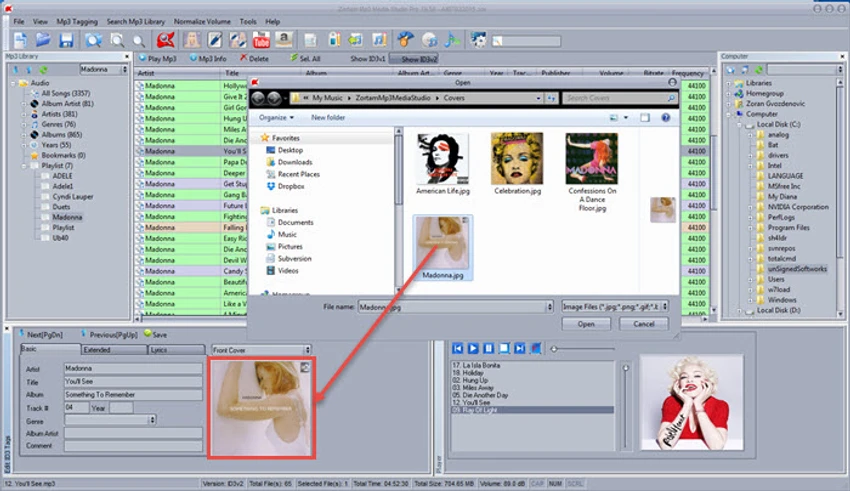

Zortam Mp3 Media Studio is a comprehensive music management application designed to help users organize, tag, convert, rip, and manage their MP3 collections from a single interface. Combining multiple music-related utilities into one package, the software serves as a central hub for maintaining large audio libraries. From automatic MP3 tagging and lyric downloads to CD ripping, playlist management, duplicate file detection, and audio conversion, Zortam Mp3 Media Studio provides a wide range of tools for music enthusiasts who want greater control over their collections.
Features of Zortam Mp3 Media Studio
- Automatic MP3 tagging using the Zortam Music Internet Database
- Edit ID3v1 and ID3v2.4 tags
- Organize and catalog MP3 libraries
- Built-in MP3 player with lyrics and album artwork support
- CD ripping with automatic metadata retrieval
- Download lyrics and album artwork during CD ripping
- Batch lyric finder and cover art downloader
- MP3 volume normalization with custom dB settings
- WAV to MP3 and MP3 to WAV conversion
- Audio and MP3 CD burning
- Playlist management with drag-and-drop functionality
- Duplicate MP3 file detection
- Batch file renaming using ID3 tag information
- Generate HTML lyric books with album artwork
- Write ID3 tags from filenames
- Remove ID3 tags, lyrics, and embedded artwork
- Karaoke and MIDI file integration into ID3 tags
- Extensive batch processing support
User Experience
After using Zortam Mp3 Media Studio, it becomes clear that the software is designed for users who maintain extensive music collections. Instead of relying on several separate applications, users can handle tagging, organization, playback, conversion, and CD management within a single environment. The automatic tagging feature is particularly useful for cleaning up poorly organized music libraries. Album information, lyrics, and artwork can be retrieved automatically, saving considerable time compared to manual editing.
The CD ripping functionality also stands out. During the ripping process, metadata, lyrics, and album artwork can be added automatically, resulting in well-organized music files from the moment they are imported into the library.
Who Should Use Zortam Mp3 Media Studio?
- Music collectors with extensive MP3 libraries
- Users who need advanced tagging and metadata management
- CD collectors converting physical media to digital formats
- Audiophiles organizing large music archives
- Users seeking automatic lyric and album artwork downloads
- Anyone looking for an all-in-one music management solution
System Requirements
- Operating System: Windows 11, Windows 10, Windows 7, Windows Vista, Windows XP
- Architecture: Optimized for modern Windows systems
Conclusion
Zortam Mp3 Media Studio successfully combines music playback, tagging, library management, CD ripping, conversion, and playlist tools into one comprehensive package. Its extensive automation capabilities help users maintain clean, organized, and information-rich music collections with minimal effort.


