Burp Suite logo

Burp Suite 2026.4.3

  • User Rating:
    ★★★★★
    ★★★★★
    0.0 0Votes
  • Requirements:
    Windows
  • Version: 2026.4.3
  • Latest updated: 1 week ago
  • License: Freeware  
  • Publisher: PortSwigger
  • Size: 390 MB
× app stores

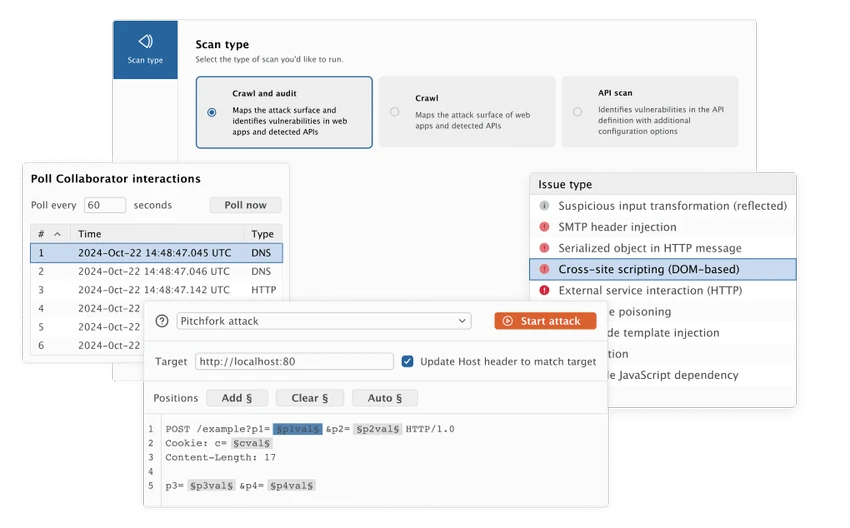
Burp Suite is a professional web application security testing platform designed to help security researchers, penetration testers, and developers analyze and secure web applications. It works by intercepting and manipulating HTTP and HTTPS traffic between a browser and a target application, enabling deep inspection and testing of web requests and responses. The software provides a suite of integrated tools that support the full security testing lifecycle, from crawling and scanning applications to manual testing and exploitation analysis.

Key Features of Burp Suite

  • HTTP/HTTPS proxy for intercepting web traffic
  • Burp Proxy for real-time request and response analysis
  • Burp Spider for crawling web applications and discovering content
  • Burp Repeater for manually modifying and replaying HTTP requests
  • Burp Intruder for automated attack simulation on web applications
  • Burp Sequencer for analyzing randomness of session tokens
  • Burp Decoder for encoding and decoding data formats
  • Burp Comparer for comparing application responses
  • Web vulnerability scanning (Professional Edition)
  • Content discovery and application mapping tools
  • Task scheduling and automation features (Professional Edition)
  • Save and restore testing sessions
  • Target scope configuration and filtering
  • Integration with external browsers via proxy configuration
  • Compatible with Windows 11 (64-bit Intel)

User Experience

After reviewing Burp Suite, it is clear that the software is built for users who need fine-grained control over web application traffic. The setup process requires configuring the browser to route traffic through Burp’s proxy, which allows full visibility into HTTP/S requests and responses. Once configured, the Proxy tool becomes the central point of interaction, capturing and displaying all web traffic in real time. This allows users to inspect headers, modify requests, and replay interactions with precision.

Tools like Repeater provide a hands-on way to test endpoints by manually modifying requests and observing server responses. This is particularly useful for debugging and vulnerability testing. The Intruder tool automates repetitive testing tasks, allowing users to define payloads and run structured attack simulations against web applications. Meanwhile, Sequencer helps evaluate the randomness of session tokens, which is critical for assessing authentication security.

Burp Suite’s modular design makes it highly flexible. Each tool operates independently but integrates seamlessly into a unified workflow, giving security testers full control over the application testing process. Although powerful, the platform assumes a certain level of technical knowledge. Users unfamiliar with HTTP protocols or security testing concepts may need time to become comfortable with its workflow.

Who Should Use Burp Suite?

  • Penetration testers and ethical hackers
  • Cybersecurity professionals
  • Web application developers
  • Security researchers
  • QA testers focusing on security testing
  • Organizations performing vulnerability assessments

Conclusion

Burp Suite delivers a complete environment for web application security testing, combining powerful interception tools with advanced scanning and analysis capabilities. Its flexibility and depth make it a standard tool in cybersecurity workflows.

Pros & Cons

Pros

  • Comprehensive web security testing toolkit
  • Powerful HTTP/HTTPS interception proxy
  • Modular tools for different testing phases
  • Supports both manual and automated testing
  • Highly configurable environment
  • Essential for penetration testing workflows
  • Strong integration between tools

Cons

  • Steep learning curve for beginners
  • Requires understanding of web protocols
  • Setup requires manual browser proxy configuration
  • Advanced features primarily in Professional Edition

Frequently Asked Questions

What is Burp Suite used for?

Burp Suite is used for testing the security of web applications by intercepting and analyzing HTTP/S traffic.

Does Burp Suite require proxy setup?

Yes. It works as an HTTP proxy, so browsers must be configured to route traffic through it.

What is Burp Intruder used for?

Burp Intruder is used for automated testing and attack simulations against web applications.

Is Burp Suite suitable for beginners?

It is more suitable for users with basic understanding of HTTP and web security concepts.

Does Burp Suite include vulnerability scanning?

Yes, but full scanning capabilities are available in the Professional Edition.

What operating systems are supported?

Burp Suite supports Windows 11 (64-bit Intel).

Recommended apps [Freeware]:
  • EarthView 7.16.6 EarthView logo dynamic wallpapers and screensavers with day, night, and weather effects
  • EarthTime 6.33.6 EarthTime logo displays world clocks, weather, and local times for 120,000+ cities with customizable alarms and maps.
  • Video Repair Tool 5.0.2.3 Video Repair Tool logo repair corrupted, broken, or unplayable video files on Windows and Mac with simple recovery workflows.
  • Recuva 1.55.133 Recuva logo recover deleted files from PCs, USB drives, memory cards, and damaged or formatted disks
  • Adobe Acrobat Reader DC 2026.001.21691 Adobe Acrobat Reader DC logo trusted PDF viewer for reading, printing, and annotating PDFs with strong security and cloud sync support
  • HttpMaster Professional 7.0.0 HttpMaster Professional logo web testing tool for developers to automate HTTP requests, API testing, and response validation
Recommended apps [Shareware]:
  • Total Audio Converter 6.1.0.299 Total Audio Converter logo convert MP3, WAV, FLAC, AAC and more with batch processing, CD ripping, and Windows integration.
  • UPDF 2.5.5 UPDF logo AI-powered PDF editor for Windows that simplifies editing, annotating, converting, and managing PDFs
  • DBF Converter 7.85 DBF Converter logo convert DBF files to CSV, Excel, SQL and text with fast batch processing and filtering
  • Yamicsoft Windows Manager 2.3.9 Yamicsoft Windows Manager logo optimizes, cleans, secures, and customizes Windows 10 and 11 with over 40 tools.
  • Coolutils PDF Splitter Pro 6.1.0.85/57 Coolutils PDF Splitter Pro logo Split large PDF files by keywords, page breaks, or document patterns with Coolutils PDF Splitter Pro for Windows.
  • Macro Commander Pro 2.8.7 Macro Commander Pro logo Automate repetitive tasks using macros, scripting, scheduling, and powerful data entry tools