


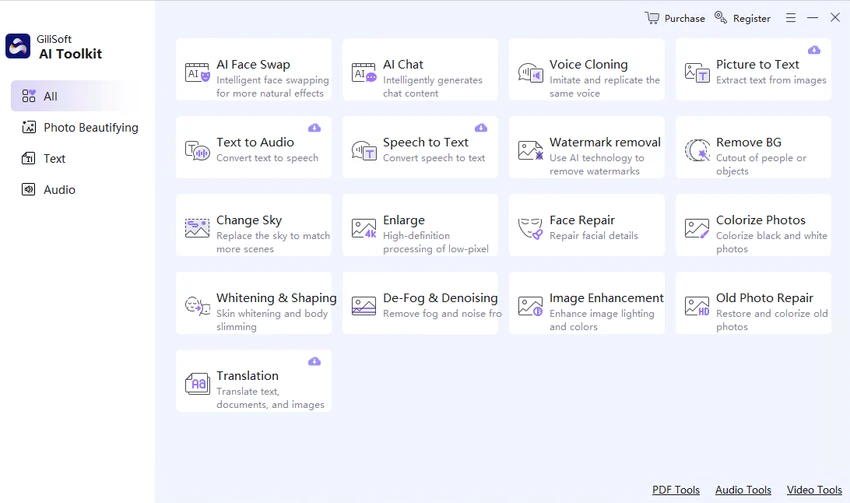

GiliSoft AI Toolkit is an all-in-one artificial intelligence utility suite designed to help users integrate AI-powered features into everyday workflows. Based on its feature set, the software combines multiple tools into a single package, including chatbot creation, optical character recognition (OCR), text-to-speech (TTS), speech-to-text (ASR), and image processing utilities.
During review of its capabilities, the toolkit appears to focus on simplifying tasks that involve text extraction, voice processing, and image manipulation. Instead of using separate applications for each function, users can perform multiple AI-related tasks within one environment. It is positioned as a productivity tool for both individuals and businesses looking to automate repetitive content processing tasks using AI technologies.
Features of GiliSoft AI Toolkit
- AI chatbot creation and customization tools.
- AI-powered prompt structuring support for improved interactions.
- Audio-to-text conversion (speech recognition / ASR).
- Supports transcription of audio formats such as MP3, WAV, and M4A.
- Text-to-audio conversion (Text-to-Speech / TTS).
- Multiple voice, language, and accent options for output audio.
- Picture-to-text (OCR) for extracting text from images.
- Converts scanned documents, receipts, and images into editable text.
- Image watermark removal tool.
- Designed to preserve image quality while removing watermarks.
- Integrated AI toolkit combining multiple productivity utilities.
Interface and Usability
GiliSoft AI Toolkit is designed as a multi-function suite rather than a single-purpose application. Based on its structure, users can switch between different AI tools such as chatbot, OCR, speech recognition, and image processing within the same environment.
The workflow is centered around task selection, where users choose the required AI function and apply it to their input (text, audio, or image). This makes it accessible for general users, though the experience may vary depending on the complexity of the task being performed. Because multiple AI technologies are combined in one interface, usability depends on how clearly each module is organized and separated within the toolkit.
Who Should Use GiliSoft AI Toolkit?
- Office users who process documents and audio files.
- Students needing transcription or OCR tools.
- Content creators working with text, voice, and images.
- Small businesses automating document workflows.
- Users looking for an all-in-one AI utility suite.
- Anyone needing quick image-to-text or speech conversion tools.
Conclusion
GiliSoft AI Toolkit is a versatile AI-powered utility suite that brings together several productivity-focused tools, including chatbot interaction, speech processing, OCR, and image editing functions. Its main strength lies in consolidation—reducing the need for separate applications for common AI-assisted tasks.


