Winstep Nexus logo

Winstep Nexus 26.6

  • User Rating:
    ★★★★★
    ★★★★★
    0.0 0Votes
  • Requirements:
    Windows
  • Version: 26.6
  • Latest updated: 3 days ago
  • License: Freeware  
  • Publisher: Winstep
  • Size: 40 MB
× app stores

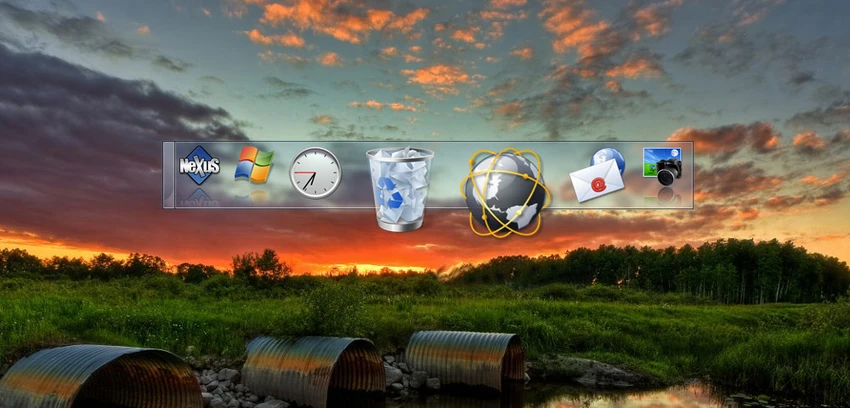
Winstep Nexus is a highly customizable desktop dock designed for Windows users who want quick access to applications, system tools, and shortcuts in a visually appealing interface. Inspired by macOS-style docks, it replaces or complements the traditional taskbar by allowing users to place icons and launch applications directly from a sleek dock on the desktop. Beyond simple shortcuts, Nexus also supports modules such as system monitors and utility widgets, making it both a launcher and a lightweight desktop enhancement tool.

Features of Winstep Nexus

  • Add application shortcuts, files, and system commands to the dock.
  • macOS-style dock interface for quick app launching.
  • Supports modules including:
    • CPU monitor
    • Network activity monitor
    • Clock
    • Weather information
    • Recycle Bin control
  • Supports separators for organizing dock items.
  • Built-in Windows commands (e.g., Control Panel, volume control, screensaver).
  • Highly customizable themes and visual styles.
  • Visual effects such as magnification, reflections, and sound effects.
  • Running indicators for active applications.
  • Multi-monitor support for extended desktop setups.
  • Automatic thumbnail previews for documents.
  • Lightweight background performance with low system impact.

User Experience

Using Winstep Nexus feels like upgrading the Windows desktop with a modern, fluid launcher system. The dock is responsive and visually polished, offering quick access to frequently used apps and system functions. Customization is one of its strongest aspects. From changing themes to adjusting animation effects, the dock can be tailored to match personal preferences. The magnification effect when hovering over icons adds a dynamic feel that improves usability without being distracting.

The built-in modules are particularly useful for keeping an eye on system performance and quick system actions without opening additional tools. Multi-monitor support also makes it practical for users working across extended desktop setups. Despite its visual enhancements, Nexus remains lightweight and runs smoothly in the background without noticeably affecting system performance.

Who Should Use Winstep Nexus?

  • Users who want a macOS-style dock on Windows.
  • Power users who rely on quick app access and shortcuts.
  • Multi-monitor workstation users.
  • Anyone who enjoys customizing their desktop environment.
  • Users looking for lightweight system enhancement tools.

Conclusion

Winstep Nexus enhances the Windows desktop experience with a flexible and visually appealing dock system. It goes beyond simple shortcuts by offering widgets, system controls, and deep customization options while maintaining smooth performance.

Pros & Cons

Pros

  • Highly customizable desktop dock.
  • Supports apps, files, and system commands.
  • Useful built-in widgets and system modules.
  • Attractive visual effects and animations.
  • Multi-monitor support.
  • Lightweight performance.

Cons

  • May feel unnecessary for users satisfied with the default Windows taskbar.
  • Requires time to configure for optimal setup.

Frequently Asked Questions

What is Winstep Nexus used for?

Winstep Nexus is used to create a customizable desktop dock for launching applications, accessing system tools, and organizing shortcuts.

Does Winstep Nexus support widgets?

Yes. It includes modules such as CPU monitor, weather, clock, network monitor, and recycle bin controls.

Can Winstep Nexus be customized?

Yes. It supports themes, visual effects, animations, magnification, and sound customization.

Does Winstep Nexus support multiple monitors?

Yes. It includes multi-monitor support for extended desktop setups.

Which Windows versions are supported?

According to the provided information, it supports Windows 10 and Windows 11.

Recommended apps [Freeware]:
  • Exportizer 10.3.4.822 Exportizer logo view, edit, and export databases to Excel, CSV, SQL, and more with advanced conversion tools.
  • Zortam Mp3 Media Studio 33.96 Zortam Mp3 Media Studio logo Manage, tag, rip, organize, convert, and play MP3 files with the all-in-one Zortam Mp3 Media Studio
  • SoundSwitch 7.1.0 / 7.1.1 Beta 1 SoundSwitch logo a lightweight Windows tool that lets you switch audio devices instantly using customizable hotkeys
  • Urban VPN 5.2.1 Urban VPN logo virtual private network tool designed to help users protect their identity and privacy while browsing the internet
  • Prime95 31.06 Build 1 Prime95 logo CPU stress testing tool used for overclocking stability checks and Mersenne prime number calculations
  • 7-Zip 26.02 7-Zip logo free file compression tool with high compression ratio, strong encryption, and wide format support on Windows
Recommended apps [Shareware]:
  • Sync Breeze 18.2.32 Sync Breeze logo fast and reliable file synchronization tool for local drives, NAS devices, and enterprise storage systems.
  • Secret Disk 2026 v323 Secret Disk logo create hidden, password-protected virtual drives to securely store private files on Windows
  • Mountain Duck 5.3.0.29446 Mountain Duck logo mounts cloud storage and servers as local drives with smart sync, offline access, and seamless file integration
  • Copy Protect 3.0.2 Copy Protect logo converts media files into secured executables to prevent copying, duplication, and unauthorized distribution on Windows.
  • SyncBackPro 12.0.17 SyncBackPro logo advanced backup, restore, synchronization, encryption, FTP support, and automation tools
  • Capture One 16.8.2.3615 Capture One logo professional RAW photo editor with advanced color accuracy, tethered shooting, and studio workflow tools for photographers