MailWasher Pro logo

MailWasher Pro 8.0.119

  • User Rating:
    ★★★★★
    ★★★★★
    0.0 0Votes
  • Requirements:
    Windows
  • Version: 8.0.119
  • Latest updated: 6 days ago
  • License: Free Trial  
  • Publisher: Firetrust Limited
  • Size: 31.5 MB
× app stores

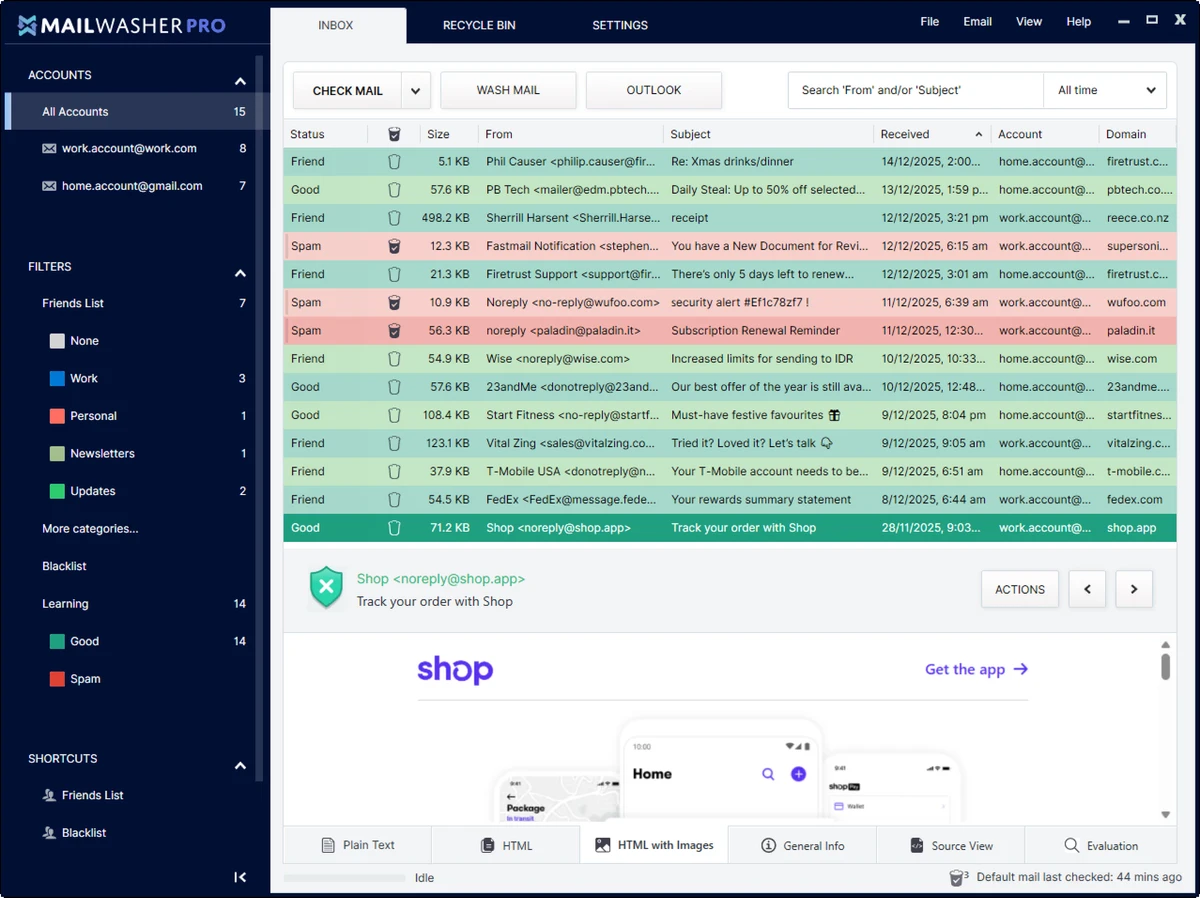
MailWasher Pro is an email filtering and spam-blocking solution designed to help users eliminate unwanted messages before they reach their inbox. Compatible with virtually all major email providers and email clients, the software provides a simple yet effective way to identify, preview, and remove spam, scams, and junk mail before downloading them to your computer.

Overview

Managing spam can be time-consuming and frustrating, especially when inboxes become flooded with promotional messages, phishing attempts, and scams. MailWasher Pro addresses this problem by allowing users to view incoming email directly on the mail server before downloading it. The software analyzes messages using advanced spam detection logic, helping users identify suspicious emails quickly. With support for unlimited email accounts and compatibility with popular services such as Gmail, Outlook.com, Yahoo, AOL, and Hotmail, MailWasher Pro provides a centralized solution for email filtering and inbox protection.

Its focus on pre-download screening helps users reduce clutter, avoid malicious content, and spend less time sorting through unwanted messages.

Features of MailWasher Pro

  • Blocks spam and scam emails before they reach your inbox
  • Preview emails directly on the mail server
  • View all parts of incoming emails before downloading
  • Delete unwanted messages before retrieval
  • Advanced spam filtering technology
  • Supports unlimited email accounts
  • Compatible with Gmail, Outlook.com, Yahoo, AOL, Hotmail, and more
  • Works alongside popular email clients
  • Friends List feature for trusted contacts
  • Automatically recognizes approved senders
  • Helps prevent downloading potentially harmful attachments
  • Simple setup wizard for quick configuration
  • Available in multiple languages

User Experience

After using MailWasher Pro, one of the most valuable features is the ability to review incoming emails before they are downloaded. This extra layer of screening provides greater control over inbox management and allows users to remove unwanted messages immediately.

The setup process is straightforward. The built-in wizard guides users through account configuration, making it easy to connect multiple email accounts without requiring advanced technical knowledge. The email preview functionality is particularly useful for identifying spam, scams, and suspicious messages. Instead of opening emails within a traditional email client, users can inspect incoming content first and decide whether it deserves a place in their inbox.

The Friends List feature further improves accuracy by ensuring emails from trusted contacts are recognized and treated appropriately. This helps reduce false positives and minimizes the risk of important emails being flagged incorrectly. For users managing several email accounts, the ability to monitor everything from a single interface contributes to a more efficient workflow.

Who Should Use MailWasher Pro?

  • Home users overwhelmed by spam
  • Professionals managing multiple email accounts
  • Small business users
  • Users concerned about phishing and scam emails
  • Individuals who receive large volumes of unwanted messages
  • Anyone seeking an additional layer of email protection

Conclusion

MailWasher Pro offers a practical and effective way to reduce spam, scams, and unwanted email before it reaches your inbox. Its ability to preview messages on the server, combined with advanced spam filtering and broad compatibility, makes it a valuable tool for both personal and professional users.

Pros & Cons

Pros

  • Blocks spam before emails are downloaded
  • Easy setup process with guided configuration
  • Supports unlimited email accounts
  • Compatible with most major email providers
  • Works with popular email clients
  • Email preview helps identify scams and junk mail
  • Friends List improves sender recognition
  • Helps reduce inbox clutter

Cons

  • Focused primarily on spam management rather than full email handling
  • Requires a separate email account or client for normal email usage
  • Advanced filtering may require occasional adjustment for optimal results

Frequently Asked Questions

What is MailWasher Pro?

MailWasher Pro is a spam-filtering application that allows users to preview, identify, and delete unwanted emails before downloading them from the mail server.

Does MailWasher Pro work with Gmail and Outlook?

Yes. MailWasher Pro supports Gmail, Outlook.com, Yahoo, AOL, Hotmail, and many other email providers.

Can MailWasher Pro manage multiple email accounts?

Yes. The software supports unlimited email accounts, allowing users to monitor and filter messages from multiple addresses.

Is MailWasher Pro an email client?

No. MailWasher Pro is an email filtering and spam-blocking solution that works alongside existing email services and email clients.

How does the Friends List feature work?

The Friends List allows users to add trusted contacts so that emails from those senders are automatically recognized and less likely to be treated as spam.

Can MailWasher Pro help protect against phishing emails?

Yes. By allowing users to preview messages before downloading them and by using spam detection technology, MailWasher Pro can help identify suspicious emails and potential scams.

Recommended apps [Freeware]:
  • Trillian 6.6 Build 16 Trillian logo all-in-one chat software designed to simplify online communication
  • OCCT 16.1.11.99 OCCT logo hardware monitoring and stress testing tool for CPU, GPU, memory, and power supply performance analysis.
  • NewFileTime 8.28 NewFileTime logo a lightweight Windows utility that lets users change file creation, modification, and access timestamps easily
  • Video Repair Tool 5.0.2.3 Video Repair Tool logo repair corrupted, broken, or unplayable video files on Windows and Mac with simple recovery workflows.
  • K-Lite Codec Pack Full 19.8.2 K-Lite Codec Pack Full logo Play all audio and video formats on Windows with K-Lite Codec Pack Full, a lightweight and reliable codec package
  • Tor Browser 15.0.17 Tor Browser logo anonymous web browsing with privacy protection, IP masking, and access to the Tor network
Recommended apps [Shareware]:
  • VovSoft AI Requester 5.2 VovSoft AI Requester logo a program that can connect to OpenAI API and OpenAI-compatible APIs with ease
  • Total PDF Converter 6.5.0.171 Total PDF Converter logo converts PDF to DOC, XLS, images, TXT, PDF/A and more with batch processing and advanced tools.
  • Mountain Duck 5.3.0.29446 Mountain Duck logo mounts cloud storage and servers as local drives with smart sync, offline access, and seamless file integration
  • DocuFreezer 7.0.2606.20080 DocuFreezer logo a Windows batch converter for documents and images, converting files to PDF, JPG, TIFF, PNG, and TXT formats
  • Pazu StreamGet 3.1.5 Pazu StreamGet logo Download movies and TV shows from major streaming platforms to MP4 or MKV
  • SysTools SQL Backup Recovery 12.0.0 SysTools SQL Backup Recovery logo Repair and recover corrupt SQL Server BAK files, restore database objects, and export recovered data with ease.