FileLegit Windows Utilities System Tools TweakNow WinSecret Plus
TweakNow WinSecret Plus logo

TweakNow WinSecret Plus 9.5.4

  • User Rating:
    ★★★★★
    ★★★★★
    0.0 0Votes
  • Requirements:
    Windows
  • Version: 9.5.4
  • Latest updated: 1 day ago
  • License: Free Trial  
  • Publisher: TweakNow
  • Size: 35 MB
× app stores

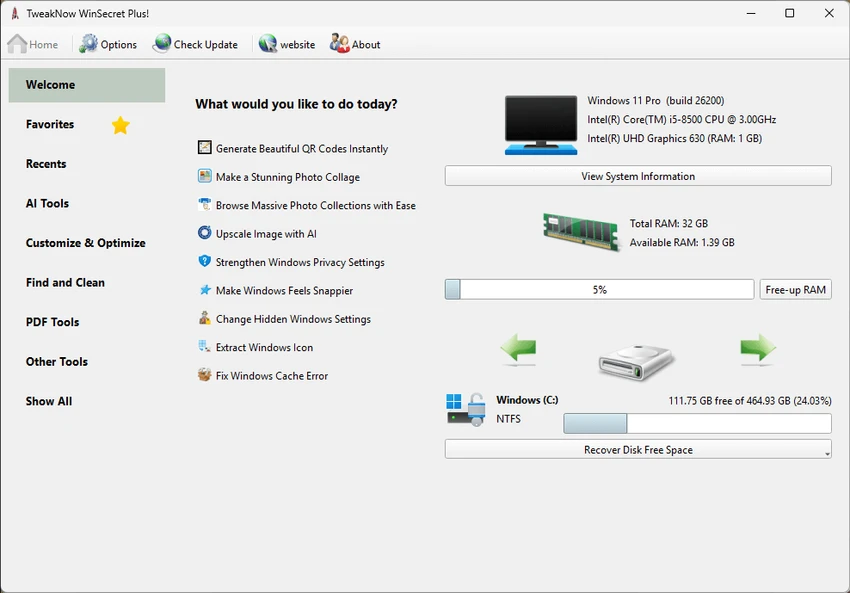
TweakNow WinSecret Plus is a comprehensive Windows utility suite designed to optimize, customize, and maintain Windows 10 and Windows 11 systems. Featuring more than 25 integrated tools, the software combines system tweaking, performance enhancement, file conversion, maintenance utilities, and productivity features within a single application. The toolkit caters to both casual users looking for convenient automation and advanced users interested in unlocking hidden Windows settings and fine-tuning system behavior.

Features of TweakNow WinSecret Plus

Windows Customization & Tweaking

  • Access hidden Windows 10 and Windows 11 settings
  • Customize taskbar behavior
  • Personalize desktop settings
  • Modify privacy-related settings
  • Adjust various system preferences

Auto Dark Mode

  • Automatically switch between light and dark themes
  • Simplify theme management without manual changes

System Information

  • View detailed hardware information
  • Monitor system components
  • Access PC performance information
  • Lightweight system analysis tools

Performance Optimization

  • Adjust application priority levels
  • Allocate more system resources to selected applications
  • Improve responsiveness for demanding programs and games

PDF Tools

  • Convert images to PDF
  • Split PDF files
  • Merge PDF files
  • Convert PDF documents to image formats
  • Offline PDF processing without web services

Image Conversion Tools

  • Convert HEIC files to JPG
  • Simplify compatibility with Windows applications
  • Process image files locally

Wi-Fi QR Code Generator

  • Generate QR codes for Wi-Fi connections
  • Share network access without manually entering passwords

Utility Tools

  • Keep PC awake and prevent sleep mode
  • Prevent hibernation during specific tasks
  • View Windows system icons
  • Extract icons from Windows libraries such as imageres.dll and shell32.dll

User Experience

TweakNow WinSecret Plus focuses on convenience by bringing together a variety of Windows maintenance and productivity tools into a single interface. Rather than installing separate applications for PDF conversion, image processing, system tweaking, and diagnostics, users can access everything from one centralized dashboard. The software is particularly appealing because it balances advanced functionality with accessibility. Basic users can take advantage of practical tools such as Auto Dark Mode, PDF conversion, Wi-Fi QR code generation, and sleep prevention without needing technical expertise.

Power users, meanwhile, may find the hidden Windows customization options especially valuable. The ability to modify settings that are not readily available through standard Windows menus provides additional control over the operating system's appearance and behavior.

The built-in PDF and image conversion tools are useful additions that eliminate reliance on online services. This not only improves convenience but also allows users to process files locally. System Information and performance-related utilities further enhance the package by providing quick access to hardware details and resource management tools. Overall, the application feels like a versatile Windows companion rather than a single-purpose utility.

Conclusion

TweakNow WinSecret Plus delivers a broad collection of useful Windows utilities that go beyond traditional system optimization software. By combining customization tools, performance enhancements, PDF management, image conversion, and practical productivity features, it provides strong value in a single application.

Pros & Cons

Pros

  • More than 25 integrated utilities
  • Access to hidden Windows settings
  • Convenient Auto Dark Mode feature
  • Built-in PDF conversion and management tools
  • HEIC to JPG conversion support
  • Detailed system information module
  • Wi-Fi QR code generation
  • Ability to prioritize applications and games
  • Offline file conversion tools
  • User-friendly interface for both beginners and advanced users

Cons

  • Broad utility collection may include features some users never need
  • Advanced tweaking options may require caution when modifying system settings
  • Focused primarily on Windows 10 and Windows 11 users

Frequently Asked Questions

What is TweakNow WinSecret Plus?

TweakNow WinSecret Plus is a Windows utility suite that provides system optimization, customization, PDF tools, image conversion features, and various productivity utilities.

Which operating systems are supported?

The software supports Windows 10 and Windows 11.

Can TweakNow WinSecret Plus access hidden Windows settings?

Yes. It allows users to modify various hidden settings related to the taskbar, desktop, privacy options, and other Windows features.

Does the software include PDF tools?

Yes. Users can convert images to PDF, split PDF files, merge PDF documents, and convert PDFs into image formats.

What is Auto Dark Mode?

Auto Dark Mode automatically switches between Windows light and dark themes, providing a more seamless user experience.

Can TweakNow WinSecret Plus convert HEIC files?

Yes. The software includes a tool for converting HEIC images into JPG format.

Does it provide system information?

Yes. The System Information module offers detailed information about hardware components and system performance.

Recommended apps [Freeware]:
  • Password Safe 3.72.0 Password Safe logo encrypted password manager for Windows to store, organize, and generate secure passwords
  • Norton 360 Remover 26.6.11050.2580 Norton 360 Remover logo a utility that completely uninstalls Norton 360 security software, removing leftover files and settings
  • UninstallView 1.52 UninstallView logo View detailed information about installed programs and uninstall software on local or remote Windows computers
  • Dolphin Emulator 2606 Dolphin Emulator logo play Nintendo GameCube and Wii games on PC with improved graphics and performance options
  • Hasleo Backup Suite 5.8.2.2 Hasleo Backup Suite logo Windows backup software for system restore, disk imaging, and cloning with emergency recovery support
  • F-Secure Uninstallation Tool 19.3.15 F-Secure Uninstallation Tool logo completely removes F-Secure security products, including files, services, and registry entries from Windows
Recommended apps [Shareware]:
  • Charles 5.2.0 Charles logo HTTP proxy tool for web debugging, allowing developers to inspect, modify, and analyze network traffic in real time
  • FontExpert 2026 21.0 Release 1 FontExpert logo a Windows font manager for installing, organizing, previewing, and fixing fonts with advanced tools.
  • DroidKit 2.3.9.20260625 DroidKit logo Recover data, unlock Android devices, repair system issues, and manage phone content with DroidKit for Windows
  • WYSIWYG Web Builder 21.1.0 WYSIWYG Web Builder logo create responsive websites visually with drag-and-drop tools and automatic HTML generation
  • BootIt Bare Metal 2.12 BootIt Bare Metal logo combines partition management, multi-boot support, and disk imaging into one powerful tool for Windows users
  • Glary Utilities 6.44.0.48 Glary Utilities logo Windows optimization suite with 20+ tools for cleaning junk files, fixing errors, boosting performance, and improving privacy