



Imagine is a lightweight Windows image viewing application designed for users who need a fast and flexible way to open, manage, and process image files. The software supports a wide range of image and animation formats, making it suitable for viewing everything from common pictures such as JPG, PNG, BMP, and GIF to specialized formats including RAW camera files and high dynamic range images.
Beyond simple image viewing, Imagine provides several useful management and editing functions. Users can view detailed file information, including EXIF and IPTC metadata, copy, move, delete, and rename images directly within the application. The software also allows users to perform basic adjustments such as flipping, resizing, rotating, changing colors, adjusting transparency levels, and modifying color depth.
Imagine is designed with performance in mind, offering fast loading and saving of image and animation files. It supports extracting individual or all frames from animated files, making it useful for working with GIF and other animation formats. The application also includes a thumbnail browser, batch conversion tools, screenshot capture, shell extension support, and plugin compatibility for expanded functionality.
The software supports multiple languages and is available in both 64-bit and Unicode versions. With its broad file compatibility and lightweight design, Imagine provides a practical alternative for users who want more control than a basic default image viewer.
Features of Imagine
- Fast viewing and saving of image and animation files
- Supports numerous image formats, including JPG, PNG, GIF, BMP, TIFF, ICO, TGA, and more
- Supports RAW camera image formats such as CR2, DNG, NEF, ARW, and other formats
- Displays image file details and EXIF/IPTC information
- Extracts individual or all frames from animation files
- Supports image resizing, rotation, flipping, and color adjustments
- Allows transparency viewing and adjustment
- Supports high dynamic range image formats such as HDR and EXR
- Opens images stored in various archive formats including ZIP, RAR, and 7Z
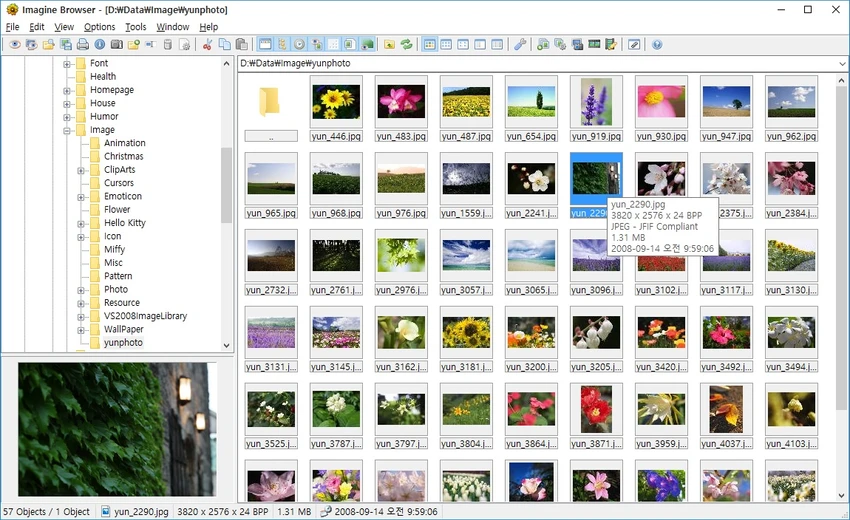
- Includes a thumbnail browser for easier image navigation
- Provides batch conversion functionality
- Includes screenshot capture tools
- Supports shell extensions and additional plugins
- Available in 64-bit and Unicode versions
- Supports multiple languages
Interface and Usability
Imagine focuses on speed and simplicity, providing a lightweight interface that allows users to quickly open and browse image files. The application is designed around efficient image viewing rather than complex editing workflows, making it easy to access viewing tools and file information without unnecessary complexity.
The built-in thumbnail browser helps users navigate collections of images more conveniently, while support for many file formats reduces the need for separate viewers. Image management options such as copying, moving, deleting, and renaming files are integrated into the workflow, making everyday organization tasks easier.
For users who work with digital cameras, the ability to display RAW formats and EXIF information adds extra value. Additional tools such as batch conversion and screenshot capture expand its usefulness beyond a standard image viewer.
Who Should Use Imagine?
- Users looking for a lightweight Windows image viewer
- Photographers who need RAW image format support and metadata viewing
- Users managing large image collections
- People who work with multiple image and animation formats
- Users who need basic image adjustments and batch conversion tools
Conclusion
Imagine offers a compact and versatile solution for viewing and managing images on Windows. Its extensive format support, fast performance, metadata viewing, animation handling, and additional processing tools make it more capable than a basic photo viewer.


