Wipe Professional logo

Wipe Professional 2026.07

  • User Rating:
    ★★★★★
    ★★★★★
    0.0 0Votes
  • Requirements:
    Windows
  • Version: 2026.07
  • Latest updated: 1 week ago
  • License: Free Trial  
  • Publisher: Clean Space LTD
  • Size: 6 MB
× app stores

Wipe Professional is a system utility designed to improve both privacy and performance by removing temporary files, browser data, and various system traces. It focuses on cleaning unnecessary data that accumulates during everyday computer and internet use, helping users free up disk space and reduce digital footprints.

Overview of Wipe Professional

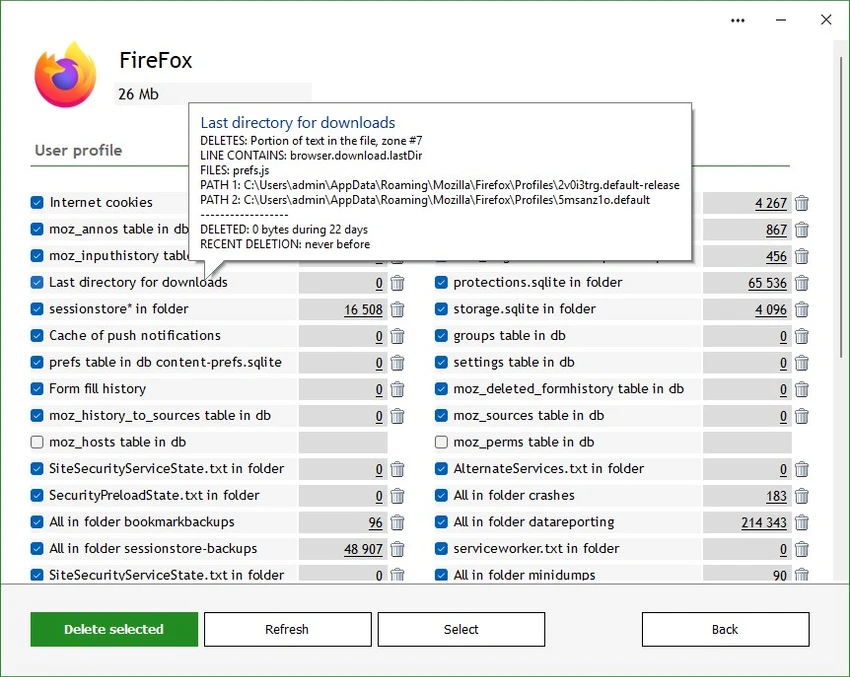
Wipe Professional is built around a simple but important idea: keeping your computer clean and minimizing stored traces of activity. The software targets temporary files, caches, cookies, and Internet history, helping users recover disk space—especially valuable on systems using smaller SSD drives. A key highlight is its broad cleaning coverage, supporting over 2500 zones. This means it can go beyond basic browser cleanup and address deeper system-level and application-generated junk files.

Unlike some system optimization tools that expand into unrelated features, Wipe Professional focuses primarily on cleaning and privacy protection, keeping its functionality centered on system maintenance.

Features of Wipe Professional

  • Deletes temporary files, caches, cookies, and browsing history
  • Frees up disk space, improving system performance
  • Privacy-focused cleaning to reduce tracking traces
  • Supports over 2500 cleaning zones across system and applications
  • Removes internet-generated junk files beyond standard browser data
  • Designed to improve confidentiality and reduce digital footprint
  • Lightweight utility focused solely on cleanup tasks
  • Compatible with Windows 7, 8, 10, and 11

User Experience

Wipe Professional presents itself as a straightforward cleanup utility rather than a complex system suite. The workflow is centered on scanning and removing unnecessary files, making it accessible even for non-technical users. During use, the focus on privacy cleaning is noticeable. The tool emphasizes removing traces that can accumulate from browsing and system usage. Its broad cleaning database means users can expect deeper cleanup compared to basic built-in Windows tools. The interface prioritizes function over visual design, keeping the experience efficient and direct without unnecessary features or distractions.

Who Should Use Wipe Professional?

  • Users concerned about online privacy and activity traces
  • People looking to free up disk space on SSD or HDD systems
  • Users who want a dedicated cleanup tool without extra system bloat
  • Windows users needing deeper cleaning than default system utilities
  • Anyone who regularly browses the internet and wants to remove stored traces

Conclusion & Recommendation

Wipe Professional is a focused cleanup utility that prioritizes privacy and system efficiency. It avoids unnecessary extras and concentrates on removing junk files and reducing digital traces across a wide range of system areas.

Pros & Cons

Pros

  • Strong focus on privacy and system cleanup
  • Supports a very large number of cleaning zones (2500+)
  • Helps free disk space efficiently
  • Removes more than just basic browser history
  • Works across multiple Windows versions

Cons

  • No advanced system optimization tools beyond cleaning
  • Interface design is functional rather than modern or polished
  • No performance metrics or smart automation details provided

Frequently Asked Questions

What does Wipe Professional do?

It removes temporary files, cookies, cache, and browsing history to improve privacy and free disk space.

Does Wipe Professional improve computer speed?

Yes, indirectly. By removing junk files and freeing storage, it can help improve system responsiveness.

Is Wipe Professional only for browsers?

No, it also cleans system-level and application-generated junk files across many areas.

Which Windows versions are supported?

Windows 7, 8, 10, and 11 are supported according to the provided data.

Is Wipe Professional a security tool?

It is primarily a privacy and system cleanup utility, not an antivirus or full security suite.

Recommended apps [Freeware]:
  • Trillian 6.6 Build 16 Trillian logo all-in-one chat software designed to simplify online communication
  • Audacity 3.7.8 Audacity logo Free open-source audio editor and recorder with multi-track editing, effects, audio analysis, and format conversion
  • Tixati 3.43 Tixati logo a fast, ad-free BitTorrent client offering advanced peer control, bandwidth management, and detailed swarm analysis
  • ReIcon 2.3 ReIcon logo save and restore desktop icon layouts, keeping your Windows desktop organized after resolution changes
  • Hasleo Backup Suite 5.8.2.2 Hasleo Backup Suite logo Windows backup software for system restore, disk imaging, and cloning with emergency recovery support
  • LDPlayer 9.5.19.0 LDPlayer logo Android 5.1 emulator for Windows that lets you run mobile apps and games with keyboard control
Recommended apps [Shareware]:
  • Audio Transcoder 2.12.24 Audio Transcoder logo all-in-one audio converter and CD ripper supporting MP3, FLAC, AAC, WMA, and more
  • Coolutils Total Doc Converter 5.1.0.394/167 Coolutils Total Doc Converter logo Convert DOC, DOCX, RTF, and TXT files into PDF, HTML, images, and more with fast batch processing
  • ThunderSoft Watermark Remover 6.3.0 ThunderSoft Watermark Remover logo removes watermarks, logos, and unwanted objects with easy selection and photo editing tools
  • HTTP Debugger Pro 10.3 HTTP Debugger Pro logo captures and analyzes HTTP and HTTPS traffic from browsers and apps, helping developers debug web requests in real time
  • IObit Uninstaller 15.4.0.1 IObit Uninstaller logo Windows tool for removing programs, browser extensions, leftovers, and unwanted apps
  • priPrinter Server 7.0.1.2625 priPrinter Server logo virtual printer driver that lets users preview, edit, and optimize print jobs before printing or exporting to PDF and image formats