


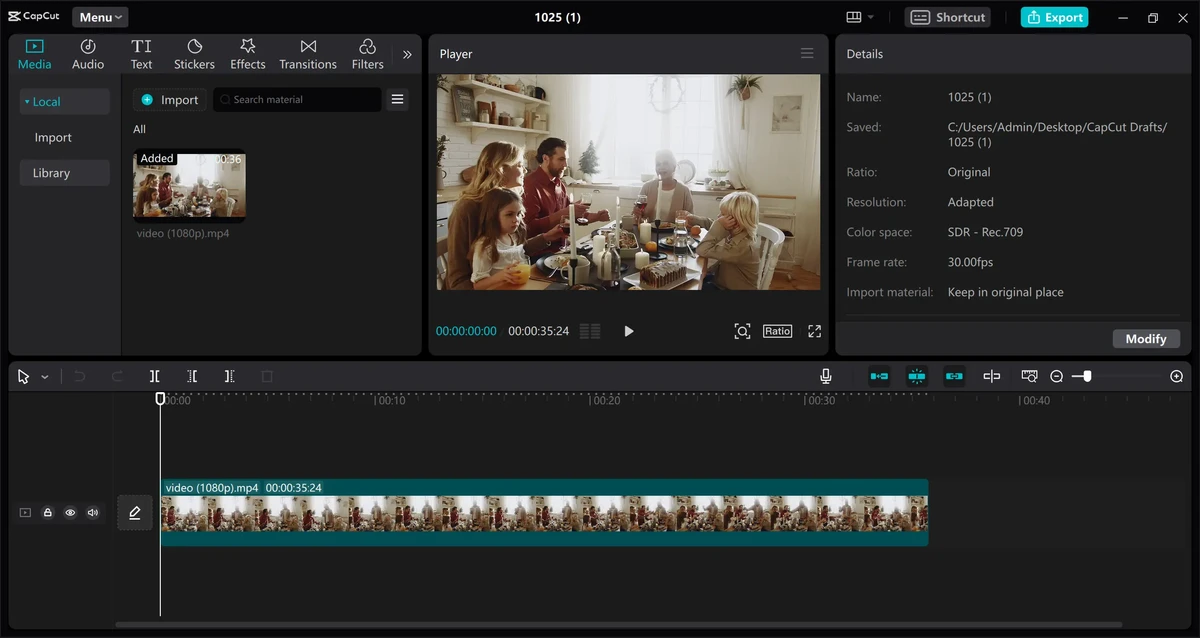

CapCut is a versatile video editing application designed to help users create, edit, and enhance videos across desktop, mobile, and browser platforms. Developed as an accessible editing solution, it combines traditional timeline-based editing tools with AI-powered features, making it suitable for beginners, content creators, and users who want to produce polished videos without complex workflows.
The software allows users to edit videos by arranging clips on a timeline, adding effects, adjusting visuals, and applying creative elements to improve the final result. Its intuitive design helps users with limited editing experience create professional-looking content while still providing tools for more advanced projects.
CapCut supports a wide range of video creation needs, from short social media clips and daily vlogs to marketing videos, online learning content, and personal projects. Users can create videos for platforms such as TikTok, Instagram, YouTube Shorts, and other digital channels.
The application includes AI-powered editing features that help enhance images and videos. These tools include background removal, resolution enhancement, color improvements, AI portrait generation, and video background adjustments. CapCut also provides collaboration features and access to built-in creative resources to support faster content production.
With support for desktop and mobile workflows, CapCut offers flexibility for users who want to edit videos at home or while traveling. Its combination of simple controls, creative tools, and AI features makes it a practical choice for a wide range of video editing tasks.
Features of CapCut
- Timeline-based video editing tools
- AI-powered video and image enhancement features
- Remove video backgrounds and replace them with custom images or colors
- Increase image and video resolution
- AI color adjustment tools for improving visuals
- Restore or enhance older images
- Create AI-generated portraits in different styles
- Change video aspect ratios for different platforms
- Add colors, images, or blur effects to video backgrounds
- Support for creative effects and editing elements
- Tools for social media videos, advertisements, presentations, and personal projects
- Available across desktop, browser, and mobile platforms
Interface and Usability
CapCut provides a user-friendly editing environment designed to make video creation accessible to different experience levels. The timeline-based workflow allows users to arrange clips, add effects, and make adjustments in a familiar editing style. The interface focuses on simplicity, helping beginners quickly start creating videos while still offering advanced tools for users who want more control over their projects. AI features can reduce the time needed for tasks such as background removal, image enhancement, and video improvements.
The ability to work across desktop, browser, and mobile platforms also provides flexibility for users who switch between devices. Whether editing short social media clips or working on longer projects, CapCut provides a streamlined experience for managing creative tasks.
Who Should Use CapCut?
- Social media creators making TikTok, Instagram, or YouTube Shorts videos
- Vloggers editing personal content
- Businesses creating promotional videos and advertisements
- Educators producing online learning materials
- Beginners looking for an easy-to-use video editor
- Creators who need AI-assisted editing tools
Conclusion
CapCut is a flexible video editing solution that combines accessible editing tools with modern AI features. It provides enough creative options for casual users while offering advanced capabilities for creators who need more control over their videos. From quick social media clips to promotional content and personal projects, CapCut provides tools that help users create polished results without requiring extensive video editing experience. Its cross-platform availability also makes it convenient for creators who edit on different devices.


