FileLegit Windows Multimedia Audio Editors VovSoft Batch Audio Converter
VovSoft Batch Audio Converter logo

VovSoft Batch Audio Converter 2.0

  • User Rating:
    ★★★★★
    ★★★★★
    0.0 0Votes
  • Requirements:
    Windows
  • Version: 2.0
  • Latest updated: 1 week ago
  • License: Free Trial  
  • Publisher: VovSoft
  • Size: 16.6 MB
× app stores

VovSoft Batch Audio Converter is a lightweight Windows application designed for fast and efficient bulk audio conversion. It focuses on simplicity, allowing users to quickly convert multiple audio files into different formats with minimal setup while still offering useful customization options for output quality.

Overview of VovSoft Batch Audio Converter

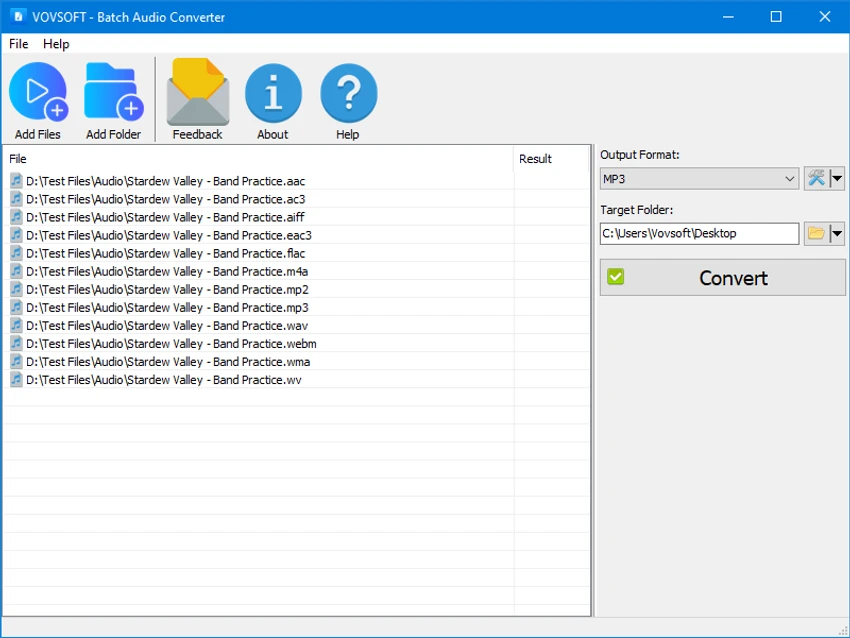
This software is built around one core idea: making audio conversion as quick and effortless as possible. Users can drag and drop files directly into the program, select an output format, and process multiple files at once. It supports a wide range of audio formats including MP3, WAV, FLAC, AAC, OGG, OPUS, and more. In addition to basic conversion, it also includes options for metadata preservation, audio normalization, and detailed output configuration. A notable feature is its use of the EBU R128 loudness normalization standard, which helps maintain consistent volume levels across different audio files.

Features of VovSoft Batch Audio Converter

  • Bulk audio conversion for multiple files at once
  • Drag-and-drop file importing from Windows Explorer
  • Supports popular formats including MP3, WAV, FLAC, AAC, OGG, OPUS, and AC3
  • Preserves metadata such as ID3 tags when supported
  • Custom output settings including bitrate, sample rate, and audio channels (mono, stereo, 5.1, 7.1)
  • Flexible output folder selection for better file organization
  • Loudness normalization using EBU R128 standard for consistent audio levels
  • Simple and lightweight interface designed for fast workflows

User Experience

In real-world use, VovSoft Batch Audio Converter feels straightforward and efficient. The drag-and-drop workflow significantly reduces setup time, especially when processing large batches of files. The interface is minimal, focusing on functionality rather than visual design. Users can quickly select output formats and adjust quality settings without navigating complex menus. The inclusion of volume normalization is especially useful for users working with mixed audio sources like music playlists or podcast collections, where consistent loudness matters.

Who Should Use VovSoft Batch Audio Converter

  • Users who frequently convert large batches of audio files
  • Content creators managing music, podcasts, or voice recordings
  • Anyone needing quick format conversion without advanced editing tools
  • Users who want simple drag-and-drop audio processing
  • People who need consistent audio volume across multiple tracks

Conclusion

VovSoft Batch Audio Converter is a practical choice for users who need fast and reliable batch audio conversion without unnecessary complexity. While it does not offer advanced editing tools, its simplicity, format support, and normalization feature make it a strong utility for everyday audio processing tasks.

Pros & Cons

Pros

  • Very easy to use with drag-and-drop support
  • Efficient batch processing for multiple files
  • Wide range of supported audio formats
  • Includes professional loudness normalization (EBU R128)
  • Customizable output settings for advanced control

Cons

  • Limited advanced audio editing features
  • Interface is functional but very basic

Frequently Asked Questions

What is VovSoft Batch Audio Converter used for?

It is used to convert multiple audio files between formats quickly and easily on Windows.

Does it support batch conversion?

Yes, it is specifically designed for bulk audio file conversion.

Can it normalize audio volume?

Yes, it supports EBU R128 loudness normalization for consistent audio levels.

Is it suitable for professional audio editing?

It is mainly a conversion tool, not a full audio editing suite.

Recommended apps [Freeware]:
  • Garmin Express 7.29.0.0 Garmin Express logo manage Garmin GPS devices with map updates, backups, software updates, and device registration
  • Microsoft Edge 149.0.4022.96 Microsoft Edge logo modern Chromium-based browser offering fast performance, strong security, privacy controls, and cross-platform support
  • Bulk Crap Uninstaller 6.2 Bulk Crap Uninstaller logo a free Windows tool that quickly removes multiple applications and cleans leftover files
  • NanaZip 6.5.1750.0 NanaZip logo a modern file compression and extraction tool based on 7-Zip, offering strong encryption and wide format support
  • RustDesk 1.4.8 RustDesk logo open-source remote desktop solution with self-hosting, cross-platform support, and customizable remote access tools
  • BitDefender Antivirus Free Edition 27.0.60.339 BitDefender Antivirus Free Edition logo real-time protection against malware, phishing, and viruses for Windows users
Recommended apps [Shareware]:
  • Topaz Photo 1.6.1 Topaz Photo logo advanced AI to sharpen photos, remove noise, and enhance image quality with ease
  • VideoPad Video Editor 18.38 VideoPad Video Editor logo a Windows movie maker for editing videos, adding effects, transitions, audio, and exporting to social platforms
  • Classroom Spy Pro 5.6.6 Classroom Spy Pro logo Monitor, control, and manage student computers remotely with Classroom Spy Pro for Windows classrooms
  • CloudMounter 3.7.2137 CloudMounter logo mounts cloud storage and remote servers like local drives for easy file access and management on Windows
  • Axialis IconVectors 1.70 Axialis IconVectors logo a lightweight SVG icon editor for developers, featuring live code previews, vector editing tools, and workflow integration
  • Image for Windows 4.12 Image for Windows logo disk imaging tool for full system backup, restore, and recovery with encryption, compression, and bootable rescue medi