GoodSync logo

GoodSync 12.11.4.4

  • User Rating:
    ★★★★★
    ★★★★★
    0.0 0Votes
  • Requirements:
    Windows
  • Version: 12.11.4.4
  • Latest updated: 1 week ago
  • License: Free Trial  
  • Publisher: Siber Systems
  • Size: 77 MB
× app stores

GoodSync is a file backup and synchronization solution designed to keep data safely replicated across multiple devices, drives, and cloud services. It focuses on automation, reliability, and security, offering both one-way backups and two-way synchronization. In practical use, it functions as a dependable background tool that ensures files remain consistent and recoverable without constant manual intervention.

Key Features of GoodSync

  • File backup to multiple destinations
  • One-way and two-way file synchronization
  • Real-time, scheduled, and automated operations
  • Block-level data transfer (only changed data is synced)
  • Background service for unattended operation
  • AES-256 encryption for secure data transfer and storage
  • Version history control with multiple restore points
  • File move/rename detection and automatic handling
  • Copy support for locked or in-use files
  • Security attribute propagation across systems
  • RealDisk online storage integration
  • Cross-platform file synchronization support
  • Minimal user interaction required after setup

User Experience

Using GoodSync feels like setting up a “set-and-forget” system for data protection. Once synchronization jobs are configured, the software runs quietly in the background and handles file changes automatically. This is particularly useful for users managing multiple devices or cloud accounts. The block-level synchronization is a noticeable advantage. Instead of transferring entire files repeatedly, GoodSync only sends the changed portions, which significantly improves performance and reduces bandwidth usage. This is especially beneficial when working with large files or slow networks.

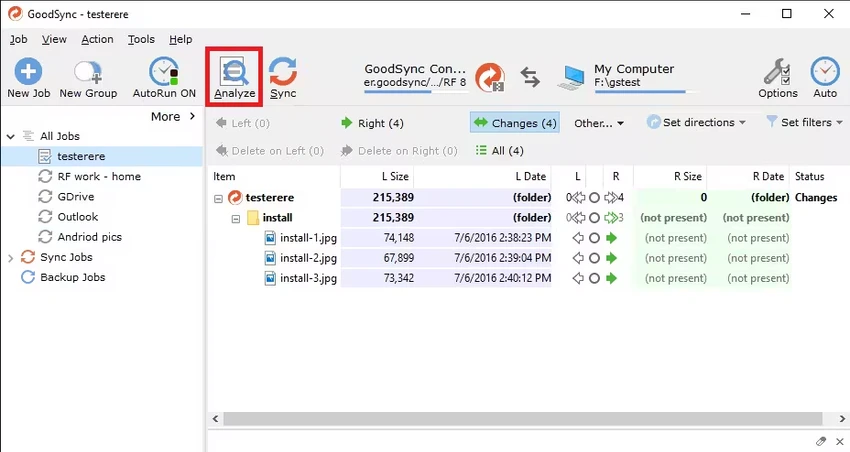
The interface is functional and focused on task configuration rather than visual polish. While it may not feel as modern as some newer tools, it provides clear control over sync rules, destinations, and scheduling. One of its strongest aspects is reliability. Features like version history and locked file handling ensure that even complex or active file environments are backed up safely without interruption.

Who Should Use GoodSync?

  • Users who need automatic file backups
  • Professionals managing important or sensitive data
  • IT administrators handling multi-device environments
  • Users syncing files across cloud and local storage
  • Anyone requiring versioned backups and recovery options

Conclusion

GoodSync is a robust and trustworthy backup and synchronization solution built for users who prioritize data safety and automation. Its real-time syncing, encryption, and version control features make it an excellent choice for both personal and professional environments. If you need a dependable way to protect and synchronize files across systems, GoodSync is a strong candidate.

Pros & Cons

Pros

  • Highly reliable automated backup system
  • Real-time synchronization support
  • Strong AES-256 encryption
  • Block-level transfer improves performance
  • Version history and recovery support
  • Handles locked and active files

Cons

  • Interface is functional but not modern
  • Initial setup may require configuration time
  • Focused more on utility than user experience design

Frequently Asked Questions

What is GoodSync used for?

GoodSync is used for automatic file backup and file synchronization between computers, external drives, and cloud storage services.

Does GoodSync support real-time syncing?

Yes. It supports real-time, scheduled, and automated synchronization depending on your configuration.

Can GoodSync back up locked or open files?

Yes. It includes support for copying files that are currently in use or locked by other applications.

Is GoodSync secure?

Yes. It uses AES-256 bit encryption to protect data during transfer and storage.

What is block-level synchronization in GoodSync?

Block-level sync transfers only the parts of a file that have changed, reducing backup time and bandwidth usage.

Can GoodSync keep previous versions of files?

Yes. It supports version history control, allowing you to restore older versions of files.

Does GoodSync support cloud storage?

Yes. It can sync and back up files to multiple cloud and online storage destinations.

Can GoodSync run automatically?

Yes. It can run as a background service and perform automated backups without user interaction.

Recommended apps [Freeware]:
  • HomeBank 5.10.2 HomeBank logo Track expenses, manage budgets, and analyze personal finances with HomeBank's powerful reporting tools
  • GOM Player 2.3.120 Build 5390 GOM Player logo a free Windows media player supporting many formats, subtitles, VR videos, and damaged file playback
  • UninstallView 1.52 UninstallView logo View detailed information about installed programs and uninstall software on local or remote Windows computers
  • BitDefender Antivirus Free Edition 27.0.60.339 BitDefender Antivirus Free Edition logo real-time protection against malware, phishing, and viruses for Windows users
  • Tagman 2025.11.03 Tagman logo Organize MP3 music libraries easily with Tagman using fingerprint technology and fast ID3 tag editing tools
  • ProgDVB 7.72.0 ProgDVB logo a multimedia player for watching digital TV, IPTV, satellite broadcasts, and online radio on Windows
Recommended apps [Shareware]:
  • ExamDiff Pro 17.0.1.4 ExamDiff Pro logo a Windows file comparison tool for code review, folder sync, and document diffing with merge support.
  • All Video Downloader Pro 10.4.7 All Video Downloader Pro logo Download videos, playlists, subtitles, and audio from popular sites with built-in conversion and playback tools
  • MobiKin Backup Manager for Android 2.0.30 MobiKin Backup Manager for Android logo Back up and restore Android data with one click using MobiKin Backup Manager for Android for Windows PCs
  • WYSIWYG Web Builder 21.1.0 WYSIWYG Web Builder logo create responsive websites visually with drag-and-drop tools and automatic HTML generation
  • Output Messenger 3.0.0 Output Messenger logo secure team chat, video calls, file sharing, task management, and remote desktop access
  • Cubase Pro 15.0.30 Cubase Pro logo a professional DAW for recording, composing, editing, mixing, and music production