


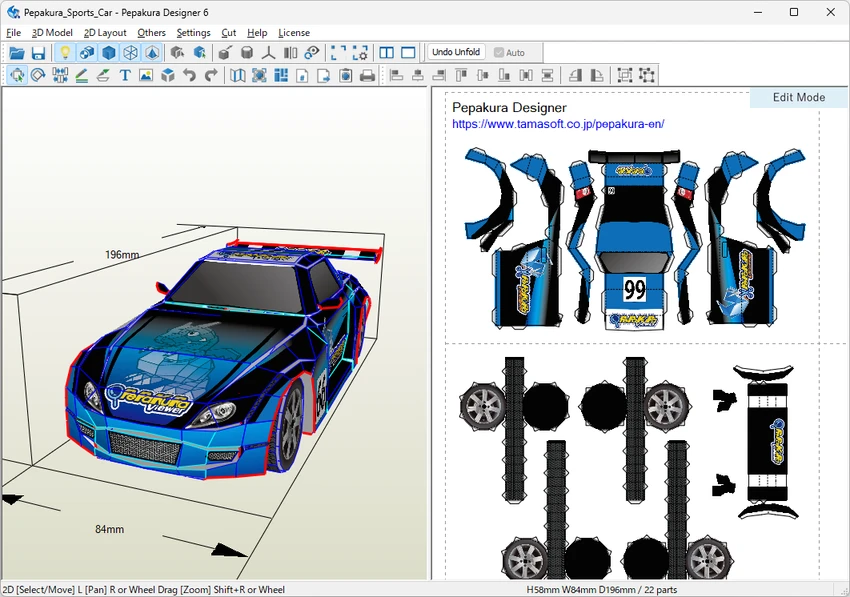

Pepakura Designer is a Windows application designed to convert 3D polygon mesh models into unfolded, printable patterns for papercraft creation. It is widely used by hobbyists, designers, and model makers who want to transform digital 3D objects into physical paper models. While it does not include tools for creating 3D models, it works seamlessly with existing 3D files and focuses entirely on unfolding, editing, and preparing models for printing.
Overview
Pepakura Designer is essentially a bridge between 3D digital modeling and real-world paper crafting. Users import supported 3D file formats, and the software automatically unfolds the model into flat parts that can be printed and assembled. The workflow is straightforward: load a model, generate an unfolded layout, adjust the design if needed, and export it for printing. It supports common file formats and integrates well with external 3D modeling tools, such as Metasequoia, which is recommended for creating the original 3D assets.
Features of Pepakura Designer
- Automatic unfolding of 3D polygon mesh models into 2D patterns
- Manual layout editing tools (move, rotate, join/disjoin parts)
- Support for adding flaps for papercraft assembly
- Edge ID labeling and assembly guidance arrows
- Texture control (enable/disable textures for colored or white models)
- Editable texture images for customization
- Export options including BMP, PNG, GIF, JPG, EPS, DXF, and PDF
- One-click unfolding process for quick pattern generation
- Compatibility with common 3DCG file formats
- Designed for use with external 3D modeling tools (no modeling features included)
User Experience
In practical use, Pepakura Designer feels focused and efficient rather than complex. The interface is built around a simple workflow: import a model and generate an unfolded pattern with a single action. This makes it accessible even for users who are not experienced with 3D design. The layout editing tools are basic but functional, allowing adjustments such as repositioning parts or refining how pieces are arranged on the page. Assembly support features, like numbered edges and directional arrows, are particularly helpful when building physical models, reducing confusion during the crafting process.
However, users should be aware that the software depends entirely on external 3D modeling tools, since it does not include any modeling capabilities itself.
Who Should Use Pepakura Designer?
- Papercraft hobbyists who build physical models from digital designs
- Designers working with 3D polygon models who want printable outputs
- Users already familiar with external 3D modeling tools
- Educators or creators making instructional paper models
Conclusion
Pepakura Designer is a specialized tool built for turning digital 3D models into physical papercraft designs. It performs this job efficiently, offering both automation and manual editing options for better control over the final print layout.


