Winhance logo

Winhance 26.06.12

  • User Rating:
    ★★★★★
    ★★★★★
    0.0 0Votes
  • Requirements:
    Windows
  • Version: 26.06.12
  • Latest updated: 2 days ago
  • License: Freeware  
  • Publisher: Marco du Plessis
  • Size: 61.5 MB
×

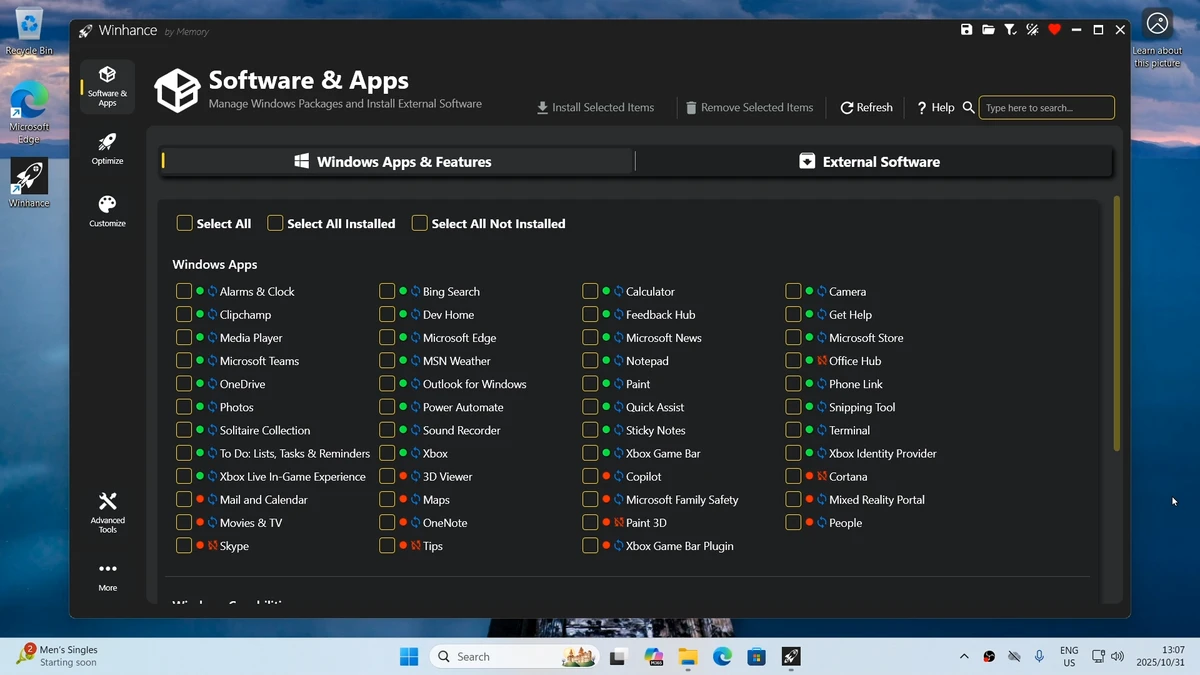
Winhance is a Windows system utility designed to simplify optimization, customization, and debloating tasks on Windows 10 and Windows 11. It helps users remove unwanted pre-installed apps, adjust system settings, and streamline their operating system for better performance, privacy, and usability.

Overview

Windows systems often come with many built-in applications and background features that not all users need. Managing or removing these components manually can involve complex scripts or advanced system tools. Winhance addresses this by providing a more accessible interface for performing common system optimization tasks. It focuses on simplifying Windows configuration, allowing users to manage apps, features, and settings without needing technical scripting knowledge. The tool is aimed at users who want more control over their Windows environment while avoiding manual PowerShell-based debloating methods.

Features of Winhance

  • Remove or add Windows 10 and Windows 11 components easily
  • Debloat unnecessary pre-installed apps and system features
  • Optimize system settings for performance, privacy, and gaming
  • Customize Windows appearance (taskbar, Start menu, Explorer, themes)
  • Automate Windows installation media and setup configurations
  • User-friendly interface designed to replace complex scripting methods
  • Streamlined management of Windows system components

User Experience

Winhance focuses heavily on usability. Instead of requiring command-line tools or scripts, it presents system optimization options in a structured interface. This makes it more approachable for users who want to clean up or customize Windows without deep technical knowledge. Tasks such as removing built-in apps or adjusting privacy settings are presented in a way that reduces complexity. The automation options also help users who frequently reinstall Windows or set up multiple systems. However, as with any system-level tool, users still need to be cautious when removing components to avoid disabling features they may later need.

Who Should Use Winhance?

Winhance is suitable for:

  • Windows users who want to remove pre-installed apps
  • Gamers looking to optimize system performance
  • Privacy-conscious users reducing background features
  • Power users who frequently configure or reinstall Windows
  • Users who prefer GUI tools over scripts and command-line methods

Conclusion

Winhance offers a practical and accessible way to manage Windows 10 and 11 system components. It simplifies debloating, optimization, and customization tasks that are typically handled through more complex tools or scripts.

Pros & Cons

Pros

    • Easy-to-use interface for system optimization
    • Supports debloating Windows apps and features
    • Includes customization and automation tools
    • Suitable for both Windows 10 and Windows 11

Cons

    • No detailed technical depth provided in the data
    • System changes may require careful use to avoid unwanted removals
    • Advanced control still depends on user understanding of Windows components

Frequently Asked Questions

What is Winhance used for?

Winhance is used to optimize and customize Windows by removing unnecessary apps and adjusting system settings.

Does Winhance work on Windows 10 and Windows 11?

Yes, it supports both Windows 10 and Windows 11.

Can Winhance improve performance?

Yes, it can improve performance by removing unused apps and optimizing system settings.

Do I need coding skills to use Winhance?

No, Winhance is designed with a user-friendly interface that avoids the need for scripting or PowerShell commands.

Is Winhance safe to use?

It depends on how it is used. Since it modifies system components, users should carefully review changes before applying them.

Recommended apps [Freeware]:
  • IObit Driver Booster 13.4.0.234 IObit Driver Booster logo updates outdated drivers automatically to boost system stability and gaming performance.
  • EarthView 7.16.4 EarthView logo dynamic wallpapers and screensavers with day, night, and weather effects
  • DirPrintOK 7.61 DirPrintOK logo fast and portable tool to print or export directory contents in XLS, HTML, CSV, or TXT formats.
  • StaxRip 2.52.4 StaxRip logo powerful Windows GUI for video/audio encoding using FFmpeg, x265, AviSynth+, VapourSynth, and more.
  • Stretchly 1.21.0 Stretchly logo reminds you to take breaks while working on your computer, promoting better health and productivity.
  • Android Studio 2026.1.1.9 Android Studio logo Google’s official IDE for Android, offering intelligent coding, fast emulators, and cloud integration.
Recommended apps [Shareware]:
  • Quick Heal AntiVirus Pro 26.1.0.2 Quick Heal AntiVirus Pro logo real-time malware protection, ransomware defense, and email security
  • Typing Instructor Platinum 21.1 Typing Instructor Platinum logo improve typing speed and accuracy through interactive lessons, games, and 10-finger typing practice.
  • Internet Download Manager (IDM) 6.42 Build 64 Internet Download Manager (IDM) logo boosts download speeds up to 5x, schedules downloads, and supports all major browsers and protocols
  • Wondershare AllMyTube 7.4.9.2 Wondershare AllMyTube logo download and convert videos from YouTube and 100+ sites into multiple formats for offline viewing.
  • WinRAR 7.22 WinRAR logo Windows tool for compressing, decompressing, and managing RAR, ZIP, and many other archive formats.
  • Topaz Photo 1.6.1 Topaz Photo logo advanced AI to sharpen photos, remove noise, and enhance image quality with ease